

Download Details
- Version
- 32.0.0.465 (latest)
- File size
- 20.6 MB
- License
- Free
- Security scan
- VirusTotal: 71 of 71 engines say OK (0 flagged)
- SHA-256 checksum
358e18ee59384ff0f9fb208e478b56a7a3b021e50103e9df535307821edc669f- Developer
- Adobe
- Supported OS
- Windows 11, Windows 10, Windows 7, Windows 8.1
- Installers
- 64-bit (x64), 32-bit (x86), Offline
- Downloads
- 16906
- Rating
- 3.6 out of 5 · 99 reviews
 Reviewed by Mohamed Zaki
Tested on Windows 11 and 10 · · How we review
Screenshots
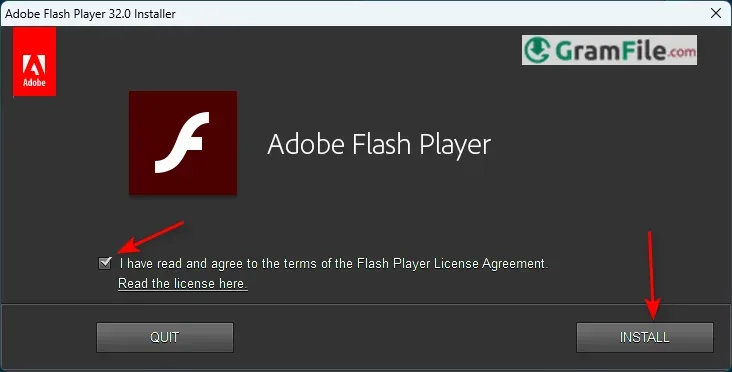
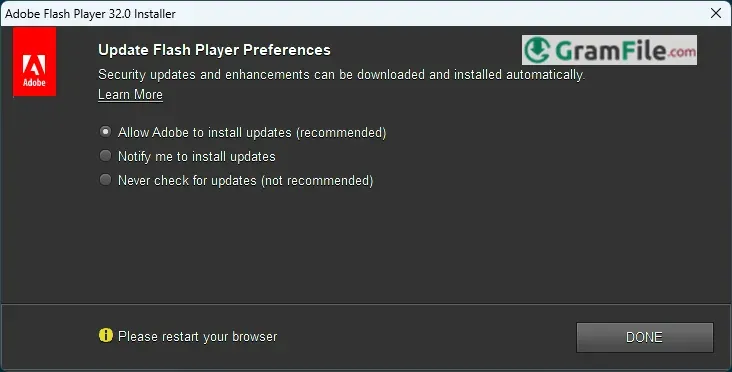
Adobe Flash Player was the browser plugin that ran web games, cartoons and video players for about two decades. It suits people who need to open old Flash content, and even for them it is a poor choice today.
Adobe ended support on 31 December 2020 and began blocking Flash content in January 2021. Major browsers have dropped the plugin as well.
Install it only out of curiosity or for archive work on an offline PC. For old SWF files, Ruffle or Flashpoint are the better route.
What is Adobe Flash Player?
Adobe Flash Player was a free browser plugin from Adobe that played Flash content: vector animations, games, video and interactive web apps.
It began at Macromedia in the 1990s and passed to Adobe in 2005. Support officially ended on 31 December 2020.
What the plugin ran: SWF games, cartoons and video players
Flash content lived in SWF files, built with ActionScript and vector graphics. Browser games, animated shorts, banner ads and early video sites all relied on it.
The plugin could also use a webcam and microphone, which made it popular for chat and conferencing pages.
Tip: if you are looking for a particular old game or cartoon, search the Flashpoint archive first. It may already hold a preserved copy.
Why the final build refuses to play anything after January 2021
Adobe did more than stop updating Flash. It blocked Flash content from running in the player after the end-of-life date.
That means a fresh install today will not bring old pages back to life. The runtime exists mostly as a historical file.
Browsers and Windows have already removed it
Chrome, Edge and Firefox all removed plugin support, and Microsoft pushed a Windows update that strips Flash components from the system.
Even a clean install on Windows 10 or 11 has no browser left that will load it. Older browsers that still accept plugins carry their own security problems.
Is Adobe Flash Player safe to install?
The installer on this page was checked with VirusTotal and came back clean, so the file itself is not a malware carrier.
The software is the risk. Flash had a long record of security flaws, and no patches arrive anymore.
Tip: if a website tells you to install or update Flash, close the tab. These prompts are almost always fake.
What replaced it: HTML5, WebGL and WebAssembly
Video, animation and games now run natively in the browser through HTML5, WebGL and WebAssembly. None of them needs a plugin.
These standards also work on phones, which Flash never did well.
Opening old SWF files today with Ruffle or Flashpoint
Ruffle is an open-source emulator that plays many SWF files, either as a desktop app or a browser extension. Flashpoint is a preserved archive of web games and animations with its own launcher.
Tip: if you only want to play a saved SWF on Windows, open it in the Ruffle desktop app instead of installing the original plugin.
Who should leave it uninstalled
Skip Adobe Flash Player if you only want to play an old browser game or watch a cartoon. Emulators and archives do that job without the security baggage.
It also makes no sense on a PC that goes online for banking, email or work.
How to Download & Install
Click the download button at the top of this page to get the EXE installer for Adobe Flash Player.
Adobe no longer supports this software, so treat the steps below as a reference for legacy or archive use only.
Step 1: Check that your PC runs Windows 11, 10, 8.1 or 7. Both 32-bit and 64-bit systems are covered.
Step 2: Click the download button at the top of this page and save the installer to your Downloads folder.
Step 3: Close your browsers, then double-click the installer. Accept the license agreement when asked.
Step 4: If the setup asks about automatic updates, decline them. Adobe no longer publishes updates, so there is nothing to receive.
Step 5: Wait for the setup to finish. Modern browsers no longer load the plugin, so do not expect Flash pages to start working in Chrome, Edge or Firefox.
Installer types
The main installer on this page is usually the 64-bit build. The listing also covers 32-bit and offline-capable setups.
There is no portable version.
System requirements
- Windows 11, Windows 10, Windows 8.1 or Windows 7
- 32-bit (x86) or 64-bit (x64) processor
- A browser that still supports plugins, which excludes current releases of Chrome, Edge and Firefox
How to update
You cannot. Adobe stopped shipping updates at the end of 2020, so the latest version is also the last one.
Ignore any website or pop-up that claims to offer a newer Flash update. Those are a common way to spread malware.
Fixes for common install problems
- Content shows a blocked message: the final build refuses to play Flash content because of Adobe’s end-of-life block. Use Ruffle or Flashpoint for old SWF files.
- The plugin never appears in the browser: current browsers have removed plugin support, and Windows updates can also remove Flash components.
- The installer will not start: close all browser windows, then right-click the installer and choose Run as administrator.
Pros & Cons
What we liked
- Free from Adobe
- Original runtime for legacy SWF content
- Installs on Windows 7 through 11
- Installer checked with VirusTotal, clean
What we didn't like
- No security updates since 2020
- Final build blocks Flash content
- Browsers have removed plugin support
Best Adobe Flash Player Alternatives
-
 Chrome Web Store
Extensions and themes that add features and style to Chrome.
FAQ
Can Adobe Flash Player still run in Chrome or Edge in 2026?
No. Chrome, Edge and Firefox have all removed plugin support, so the installer cannot make Flash work in them.
How do I open an SWF file on Windows 11?
Use the Ruffle desktop app, which plays many SWF files without any plugin. Flashpoint is another option for preserved games and animations.
Why does Flash say content is blocked after I install it?
Adobe built a block into the player that stops Flash content from running after its end-of-life date. Reinstalling will not remove it.
Should I uninstall Adobe Flash Player from my PC?
Yes, if it is installed and you do not need it. Adobe has advised removing it since support ended, because it no longer receives security fixes.
What replaced Flash for games and video?
HTML5, WebGL and WebAssembly. They run directly in the browser and work on phones, tablets and desktops.
Is the Flash Player installer safe from viruses?
The installer here was checked with VirusTotal and came back clean. The software is still unsupported and exposed to known flaws, so avoid it on a PC you use online.
Found a problem with this download? Report an outdated version, broken link, suspicious installer or incorrect information.
 Internet Download Manager
 Sumatra PDF
 IrfanView
 WinRAR
 PotPlayer
 Google Chrome