

Download Details
- Version
- R1.50 Ver.3.30 (latest)
- File size
- 10.9 MB
- License
- Free
- SHA-256 checksum
953571b89810ba5644a79e42b9cf9aa38e0ac12f7d183b64d588f6c281341096- Developer
- Canon Inc.
- Supported OS
- Windows 11, Windows 10, Windows 7, Windows 8.1
- Installers
- 64-bit (x64), 32-bit (x86), Offline
- Downloads
- 18034
- Rating
- 4.5 out of 5 · 71 reviews
 Reviewed by Ahmed Madbouli
Tested on Windows 11 and 10 · · How we review
Screenshots
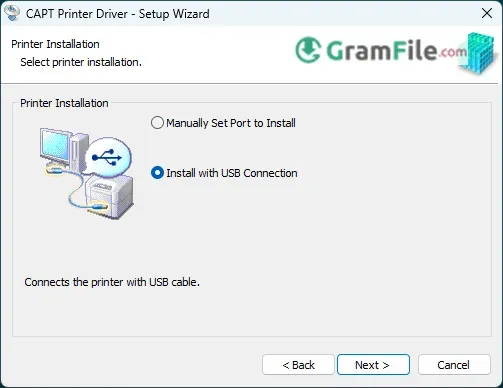
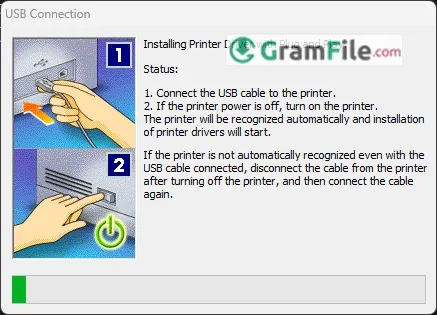
The Canon LBP2900B printer’s functionality relies on its dedicated Windows driver, a crucial software component that has supported this monochrome laser printer for over a decade.
Updated to maintain compatibility across Windows versions from XP to 11, this driver is essential for enabling the printer’s key features like speed and resolution, ensuring smooth communication between the PC and the dependable hardware.
Despite being older, the LBP2900B driver is valued for its stability, allowing the legacy printer to operate reliably even on modern systems.
While minor issues can sometimes arise, the driver’s continued relevance highlights its importance for the printer’s ongoing usability and demonstrates how consistent software support helps extend the life of hardware.
If you own a Canon LBP2900B laser printer, you already know it’s a dependable workhorse, fast, efficient, and built to last.
But without the right driver, even the best printer is just a paperweight. That’s where the Canon LBP2900B Driver comes in.
What Is the Canon LBP2900B Driver?
Think of the driver as your printer’s translator, it helps your Windows PC and LBP2900B communicate smoothly.
Without it, your computer wouldn’t know how to send print jobs, adjust settings, or even recognize the printer.
This driver isn’t flashy, but it gets the job done:
- Supports Windows XP through Windows 11 (64-bit only).
- Enables the printer’s full 12 pages per minute (ppm) speed and sharp 2400×600 dpi resolution.
- Uses Canon’s CAPT (Canon Advanced Printing Technology) system for stable performance.
While Canon hasn’t released major updates in years, the driver remains reliable, proving that good software doesn’t need constant tweaks.
Key Features
- Seamless Windows integration – Works from XP to Windows 11.
- Lightning-fast printing – Delivers 12 pages per minute.
- Crisp output quality – 2400×600 dpi resolution.
- Plug-and-play setup – Installs in minutes.
- Reliable performance – Rarely crashes or freezes.
- Compact driver size – Doesn’t hog system resources.
- Offline printing support – Works without internet.
- Basic yet effective – No unnecessary bloatware.
- USB connectivity – Simple wired connection.
- Long-term compatibility – Still runs on modern PCs.
How to Download & Install
The fastest way to download Canon LBP2900b Driver is through our download page.
- Click on the above Green Download Button for official and direct download.
- Specify the directory where you want to save the file.The download will start automatically.
- Downloaded file is saved in the specified folder in a self-extracting format (.exe format), LBP2900_R150_V330_W64_uk_EN_2.exe. It is about 10.9 MB in size.
- Double-click the files to decompress them. A new folder will be created in the same folder.The new folder will have the same name as the compressed file.
- Double-click the decompressed Setup.exe file to start installation.
- Follow the prompts, and reconnect the printer after setup.
Pros & Cons
What we liked
- Simple, lightweight, and stable.
- Works on almost every Windows version (even legacy ones).
- No bloatware, just the essentials.
What we didn't like
- No auto-updates.
- USB detection quirks.
- Only for LBP2900B.
Best Canon LBP2900b Driver Alternatives
-
 Bluetooth Driver
Enables fast wireless connection for your Bluetooth devices on Windows.
-
 Epson Printer Drivers
Software programs that let your Windows computer talk to your Epson printer.
-
 Samsung Android USB Driver
It's the key that lets your PC connect and work with your Samsung phone or tablet.
Conclusion
4.5out of 5 · 71 user ratings
If you need a no-nonsense driver that just works, the Canon LBP2900B driver is a solid pick. It’s not flashy, but it delivers exactly what it promises: reliable, hassle-free printing without bloatware or complicated setups.
Why Choose the Canon LBP2900B Driver?
- Proven Reliability – It’s been around for years and still performs flawlessly.
- Lightweight & Fast – Unlike bloated modern drivers, this one installs quickly and doesn’t slow down your PC.
- Perfect for Basic Printing – If you just need crisp black-and-white documents, this driver does the job without extra fuss.
Canon LBP2900B Driver vs. Others
✔ Better Than Generic Drivers – Windows Update might install a basic driver, but Canon’s official version ensures full printer functionality.
✔ Simpler Than Newer Drivers – Modern printer software often comes with unnecessary features; this one keeps it lean.
❌ Lacks Advanced Features – No cloud printing, mobile support, or fancy settings—just straightforward printing.
Bottom Line
The Canon LBP2900B driver is like a trusted old tool—it might not have the latest bells and whistles, but it never lets you down.
If you own this printer, stick with the official driver for the best experience. No upgrades needed—just reliable performance, year after year.
Best for: Home users, small offices, and anyone who values simplicity over flashy extras.
Found a problem with this download? Report an outdated version, broken link, suspicious installer or incorrect information.
 Zoom Workplace
 Nitro PDF Pro
 Sumatra PDF
 IrfanView
 K-Lite Codec Pack
 WinRAR