

Download Details
- Version
- 16.0.18025.20104 (latest)
- File size
- 7.2 MB
- License
- Free
- Security scan
- VirusTotal: 72 of 72 engines say OK (0 flagged)
- SHA-256 checksum
77904795dded38ea6788b7f3627e9dfdb163ddc22ef53fc9f172f2741258a0c3- Developer
- Microsoft Corporation
- Supported OS
- Windows 11, Windows 10
- Installers
- 64-bit (x64), 32-bit (x86), Offline
- Downloads
- 11496
- Rating
- 4.6 out of 5 · 36 reviews
 Reviewed by Mohamed Zaki
Tested on Windows 11 and 10 · · How we review
Screenshots
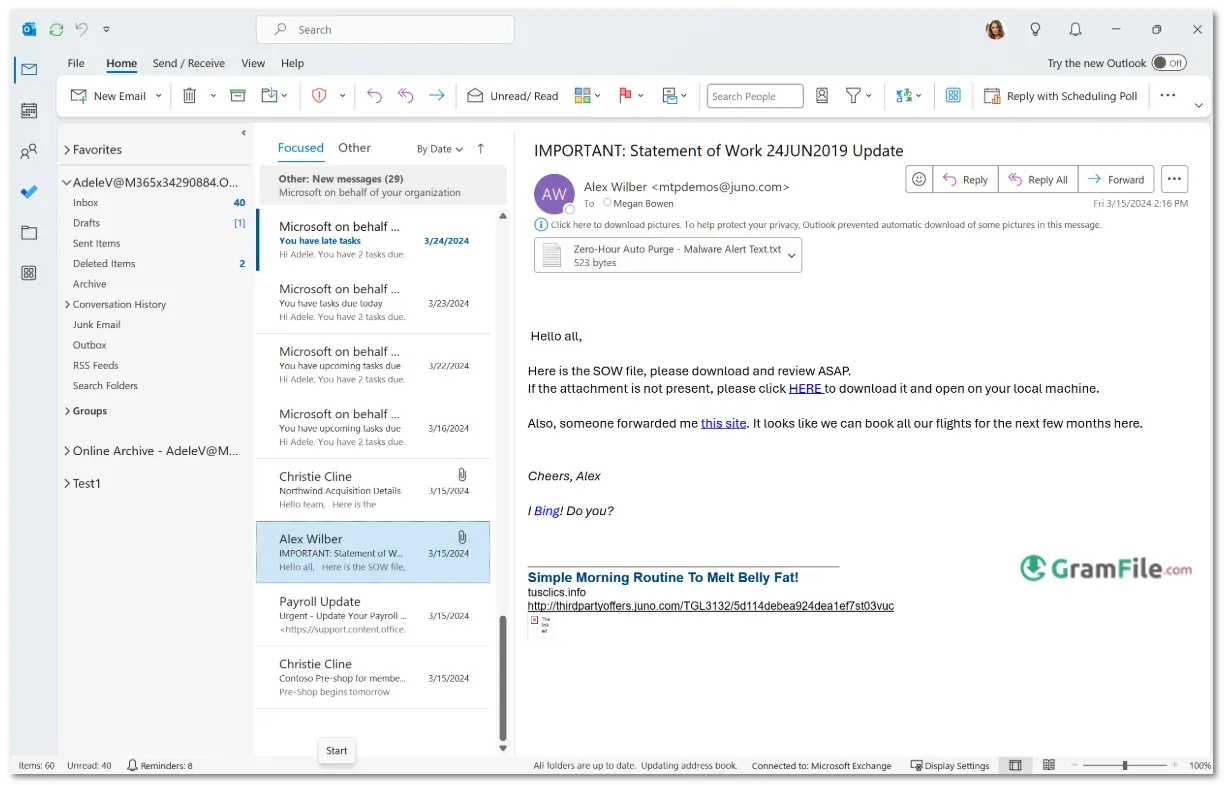
Microsoft Outlook has long been the cornerstone of professional email and productivity management, and its classic Windows version remains a favorite for users who value reliability and familiarity.
Originally launched in 1997 as part of Microsoft Office, Outlook quickly became the go-to solution for email, calendars, contacts, and tasks, seamlessly integrating with other Microsoft services.
Over the years, it has evolved with improved security, better organization tools, and enhanced performance, yet it retains the intuitive interface that has made it a trusted choice for businesses and individuals alike.
For decades, Microsoft Outlook has been the gold standard for email, calendars, and productivity management on Windows.
The Classic Outlook app – often referred to simply as “Outlook” – remains a favorite for professionals and everyday users who prefer a robust, feature-packed experience without unnecessary complexity.
Unlike the newer Outlook for Windows (the free, web-based version), Classic Outlook offers deep integration with Microsoft Office, advanced customization, and superior offline functionality.
What Is Classic Outlook?
Classic Outlook is the traditional desktop email client included with Microsoft 365 (formerly Office 365) or as a standalone purchase. It provides:
- Professional email management (multiple accounts, rules, focused inbox)
- Advanced calendar & scheduling (meeting invites, shared calendars)
- Task and contact organization (seamless sync with Microsoft services)
- Offline access (work without an internet connection)
- Strong security (phishing protection, encryption, and spam filters)
While Microsoft is pushing its newer Outlook (2024) app, many users still prefer Classic Outlook for its stability, customization, and full Office integration.
Key Features & Highlights
- Professional email management – Supports multiple accounts in one place.
- Advanced calendar system – Schedule meetings, set reminders, and share availability.
- Offline access – Work without an internet connection.
- Powerful search – Quickly find emails, contacts, or attachments.
- Customizable folders & rules – Automatically organize incoming messages.
- Focused Inbox – Separates important emails from clutter.
- Seamless Office integration – Works with Word, Excel, and Teams.
- Task & contact management – Track to-dos and store client details.
- Strong security – Built-in phishing and spam protection.
- Add-in support – Extend functionality with third-party plugins.
- Dark mode – Reduces eye strain during long work sessions.
- Quick Steps – Automate repetitive email actions.
- Shared mailboxes & calendars – Collaborate with teams effortlessly.
- Reliable performance – Handles large mailboxes smoothly.
- Familiar interface – Easy to use for longtime Windows users.
Classic Outlook remains a top choice for productivity, packed with essentials, no fluff.
How to Download & Install
Fortunately, the old Classic Outlook is still available at Microsoft Store, you can install the app by following these steps:
- Click on the above Green Download Button for official and direct download from Microsoft App Store.
- Click “Install”.
- Once installed, sign in with your Microsoft account.
- Outlook will be installed automatically: launch it from the Start menu.
Pros & Cons
What we liked
- Rock-solid reliability
- Best-in-class organization
- Works offline
- Enterprise-grade security
What we didn't like
- No Offline Installer
- Dated interface
Best Outlook Classic Alternatives
-
 Gmail App (Meru)
Gives you email on your desktop - clean, fast, and without the browser tabs chaos.
Found a problem with this download? Report an outdated version, broken link, suspicious installer or incorrect information.
 Zoom Workplace
 Nitro PDF Pro
 Sumatra PDF
 IrfanView
 K-Lite Codec Pack
 WinRAR