


Display Driver Uninstaller (DDU) is a specialized tool designed to completely remove graphics drivers from Windows systems, eliminating leftover files, registry entries, and settings that standard uninstallers often miss.
Originally created in 2013 by Wagnardsoft (a developer alias), DDU emerged as a solution to persistent driver conflicts, installation errors, and performance issues plaguing PC users, especially gamers and professionals dealing with frequent GPU updates.
Over the years, it has become the go-to utility for troubleshooting stubborn display problems, thanks to its no-nonsense approach and deep-cleaning capabilities.
Whether you’re switching GPUs, fixing driver corruption, or just chasing peak performance, DDU ensures your system starts fresh, without the digital baggage.
What is Display Driver Uninstaller (DDU)?
Display Driver Uninstaller (DDU) is a free, lightweight tool designed to completely remove graphics drivers from Windows PCs.
Unlike the standard uninstaller, DDU digs deep—wiping out leftover files, registry entries, and hidden settings that can cause conflicts, crashes, or performance issues.
Whether you’re switching GPUs, troubleshooting display problems, or just want a fresh start, DDU ensures no trace of old drivers remains.
DDU for NVIDIA & AMD
- DDU NVIDIA: If you’re upgrading an NVIDIA GPU or facing driver issues (like black screens or stuttering), DDU removes all traces of GeForce Experience and old drivers before a fresh install.
- DDU AMD: For Radeon users, DDU eliminates leftover Adrenalin software and driver files that can cause instability, especially after failed updates.
Key Features & Highlights
- Deep driver removal: Wipes every trace of old GPU drivers.
- Fixes installation errors: Solves stubborn driver setup failures.
- Prevents conflicts: Stops old and new drivers from clashing.
- Works on NVIDIA/AMD/Intel: Handles all major GPU brands.
- Safe Mode cleaning: Ensures no driver files are locked.
- Lightweight & portable: No install needed, runs from any folder.
- Prevents Windows auto-updates: Blocks driver reinstallations mid-cleanup.
- User-friendly interface: Simple dropdowns, one-click cleaning.
- Free & no ads: Zero bloatware, just pure utility.
- Gamer-approved: Trusted by pros for smooth GPU swaps.
How to Download & Install
Display Driver Uninstaller (DDU) is the go-to tool when your graphics drivers are acting up, or you’re switching between NVIDIA, AMD, or Intel GPUs. Here’s how to get it safely and use it properly—without any hiccups.
Download DDU
🚨 Avoid sketchy download sites! DDU is free, but fake versions can contain malware.
The fastest way to download Display Driver Uninstaller (DDU) is through our download page.
Click on the above Green Download Button for official and direct download. This ensures you get a legitimate copy and avoid any potential malware.
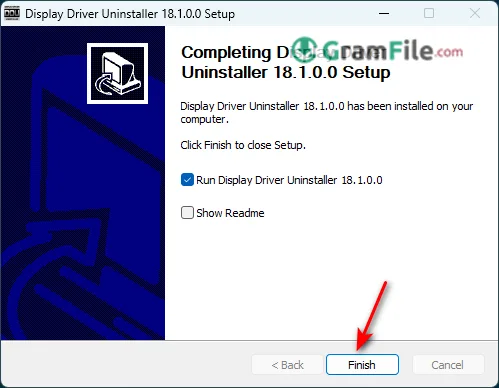
Install DDU
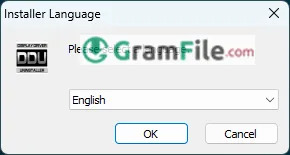
1. Double-click the downloaded file DDU vXXX_setup.exe. (XXX is the version number)
2. Click Ok
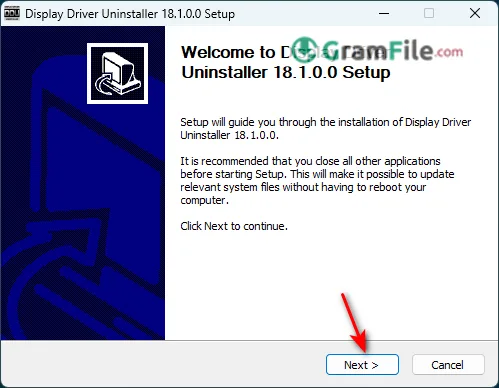
3. Click Next
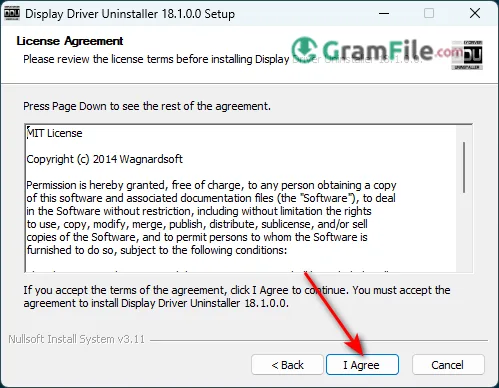
4. Click I Agree
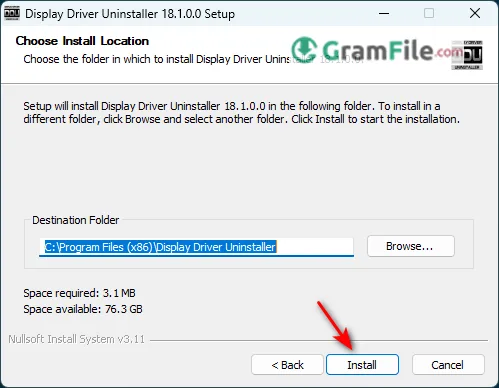
5. Click Install
6. Click Finish
Prepare Your PC Before Running DDU
⚠️ Safety first! Follow these steps to avoid issues.
- Download your new GPU drivers first (NVIDIA/AMD/Intel):
- Get them from the manufacturer’s website so you’re ready to reinstall after cleanup.
- Disable Windows automatic driver updates:
- Press
Win + Pause/Break→ “Advanced system settings.” - Go to Hardware → Device Installation Settings.
- Select “No” to prevent Windows from auto-installing old drivers.
- Press
- Disconnect from the internet (optional but recommended):
- This stops Windows from grabbing drivers before you do.
Run DDU in Safe Mode
🔧 This is crucial! Normal mode won’t clean everything properly.
- Restart in Safe Mode:
- Press
Win + R, typemsconfig, hit Enter. - Go to Boot → Safe Boot (Minimal) → Apply → OK → Restart.
- Press
- Open DDU after reboot:
- Navigate to the extracted DDU folder.
- Run “Display Driver Uninstaller.exe.”
- Select your GPU brand:
- Choose NVIDIA, AMD, or Intel from the dropdown menu.
- Click “Clean and restart”:
- DDU will wipe all traces of your old drivers and reboot your PC.
Install Fresh Drivers
🎯 Now for the clean install!
- After restart, install your new drivers:
- Run the GPU driver installer you downloaded earlier.
- Reboot one last time:
- This ensures everything loads correctly.
- Re-enable internet & Windows updates (if needed).




