

Download Details
- Version
- 2.2.0 (latest)
- File size
- 39.5 MB
- License
- Free
- Security scan
- VirusTotal: 41 of 42 engines say OK (1 flagged)
- SHA-256 checksum
b2e414dd9cf637d3ea9f5b783972bb36cbb801134b6df79d67c1c08f68f4e889- Developer
- Deluge
- Supported OS
- Windows 11, Windows 10, Windows 7, Windows 8.1
- Installers
- 64-bit (x64), 32-bit (x86), Offline
- Downloads
- 9384
- Rating
- 4.2 out of 5 · 68 reviews
- File name(s)
- deluge-2.2.0-win64-setup.exe, deluge-2.2.0-win32-setup.exe
 Reviewed by Ahmed Madbouli
Tested on Windows 11 and 10 · · How we review
Screenshots
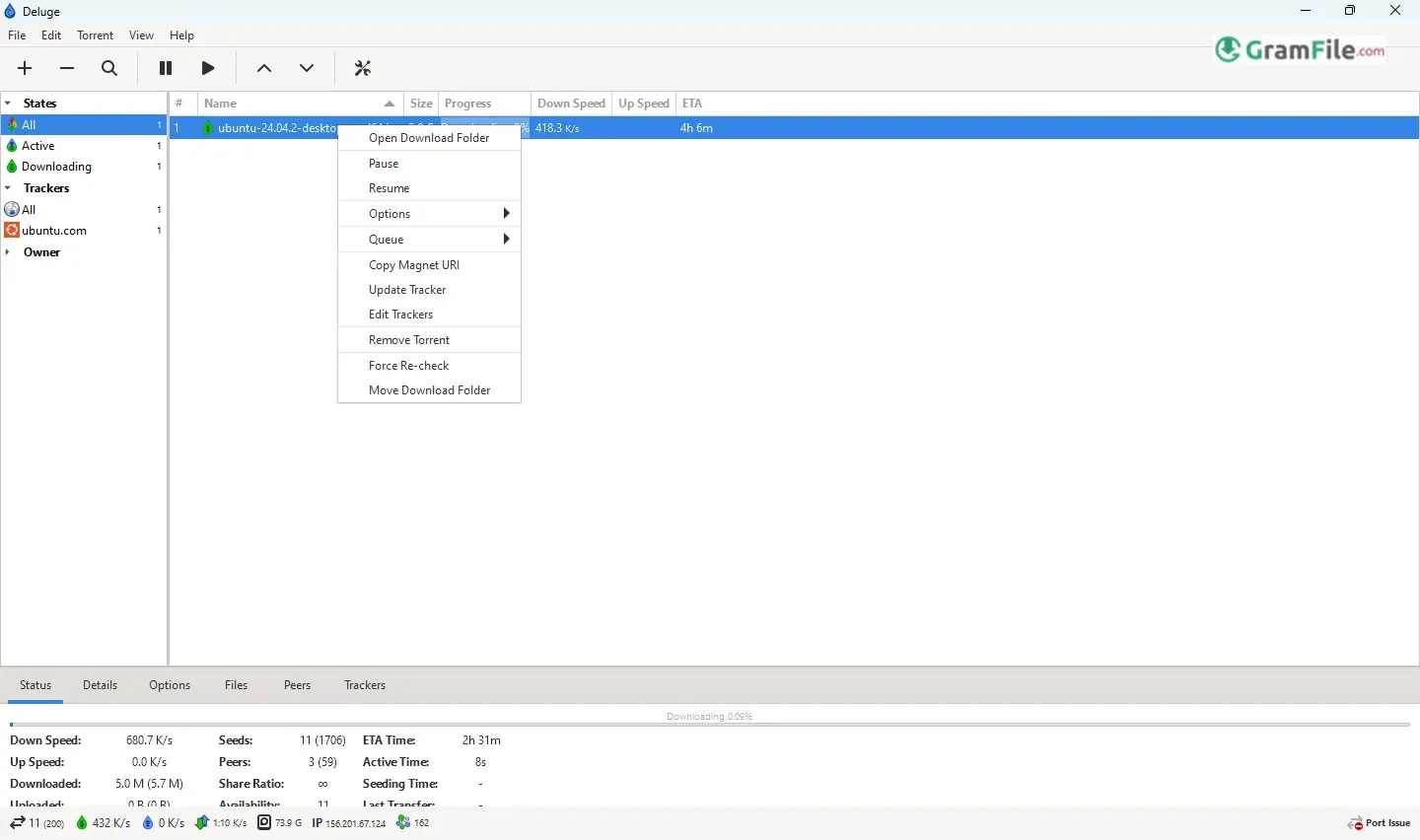
If you want a torrent client that stays out of your way but doesn’t skimp on features, Deluge is worth a look.
Unlike bloated alternatives packed with ads or overly simplistic tools that lack customization, Deluge strikes a smart balance, clean and lightweight by default, yet ready to expand with plugins when you need more control.
Originally created as a Linux-first client back in 2006, Deluge quickly gained fans for its modular design and efficient performance.
The Windows version brings that same flexibility to PC users, offering a no-frills core experience that stays fast and stable, even on older machines.
Over the years, it’s evolved into a favorite for users who want just enough, not too basic, not too complicated.
What is Deluge?
Deluge is a lightweight, open-source torrent client that does one thing extremely well: efficient downloads without the bloat.
Unlike ad-heavy alternatives, Deluge keeps things clean and fast, yet remains surprisingly powerful thanks to its plugin system.
Think of it as the “Swiss Army knife” of torrent clients: simple at first glance, but packed with hidden depth when you need it.
Key Features (Why It’s Worth Trying)
- Lightweight Core – Uses minimal RAM, ideal for older or slower PCs.
- Plugin Ecosystem – Add RSS, remote control, or bandwidth scheduling if needed.
- Zero Ads – No pop-ups, no “premium upgrade” nags.
- Web UI – Manage downloads remotely from any browser.
- Fine-Tuned Controls – Set per-torrent speed limits or prioritize files.
- Encryption & Proxy Support – Better privacy for cautious users.
- Cross-Platform Sync – Works seamlessly with Deluge on Linux/macOS.
How to Download & Install
- Get It: Click on the above Green Download Button for official and direct download. This ensures you get a legitimate copy and avoid any potential malware.
- Install: Run the .exe—no sneaky toolbars or extras.
- Launch: Open Deluge, and you’re ready to go. No logins, no clutter.
(Pro Tip: The “Portable” version lets you run it from a USB drive—handy for shared PCs.)
Pros & Cons
What we liked
- Lightweight & fast
- Totally ad-free
- Expandable with plugins
- Remote web control
What we didn't like
- Needs plugins for advanced features
- No torrent search
- Basic interface
Best Deluge Alternatives
-
 qBittorrent
A free BitTorrent client that's lightweight, fast, and feature-packed.
-
 Transmission
It is a simple, fast torrent app for Windows, no ads, no bloat.
-
 Tixati
A fast, ad-free torrent app with extra privacy controls.
-
 µTorrent
It is a small, fast tool for downloading files from the internet.
Conclusion
4.2out of 5 · 68 user ratings
Choose Deluge if:
- You want a no-nonsense torrent client that stays fast and light.
- You like customization but don’t want forced features.
- You hate ads and prefer open-source transparency.
Deluge vs. The Rest
- vs. qBittorrent – Deluge is leaner, but qBittorrent has more built-in tools.
- vs. Transmission – Deluge offers plugins; Transmission is simpler but less flexible.
- vs. uTorrent – Deluge wins easily – no ads, no bloat, no shady practices.
The Bottom Line
Deluge is for those who want a clean start with the option to grow. It won’t overwhelm you, but it won’t limit you either. If you’re tired of bloated clients or just want something that works, Deluge is a strong pick.
Try it when: You need a reliable, lightweight client that respects your system and your time. 🚀
Found a problem with this download? Report an outdated version, broken link, suspicious installer or incorrect information.
 Zoom Workplace
 Nitro PDF Pro
 Sumatra PDF
 IrfanView
 K-Lite Codec Pack
 WinRAR