


Most torrent software feels like walking through a mall, ads everywhere, someone always watching, and features you never wanted.
Tixati is different. Since 2009, this Windows-only client has been the quiet rebel of torrenting: no ads, no tracking, no nonsense. It won’t hold your hand, but it won’t sell you out either.
What is Tixati?
Tixati is a no-nonsense torrent client built for one type of person: those who want to download files without the drama. No ads. No spyware. No “premium” upgrade nonsense. Just clean, fast downloads with an unusual focus on privacy and control.
It’s not open-source (which some users care about), but it’s been around since 2009 with zero scandals, unlike certain other torrent clients we won’t name (cough uTorrent cough).
Key Features
1. Privacy That Means Something
- Doesn’t broadcast what you’re downloading to the world
- No hidden tracking like uTorrent’s “anonymous statistics”
- Doesn’t require an account or phone home
2. Real Control Over Your Downloads
- Fine-tune exactly how many connections you want
- See every single peer you’re connected to
- Prioritize specific files within torrents
3. Lightweight Performance
- Instantly launches (no slow startup)
- Uses about 15MB of RAM – less than a single Chrome tab
- Won’t slow down older computers
4. Bandwidth on Your Terms
- Set different speed limits for every single torrent
- Schedule when downloads run (auto-pause during work hours)
- Reserve bandwidth for gaming or video calls
5. No Nonsense Design
- Zero ads (not even “recommended” ones)
- No “upgrade to pro” begging
- All features available immediately
6. Portable Option
- Run it from a USB drive
- Leaves no traces on shared computers
- Settings stay with the portable folder
How to Use Tixati?
Using Tixati is refreshingly straightforward, no tutorials needed, just common sense.
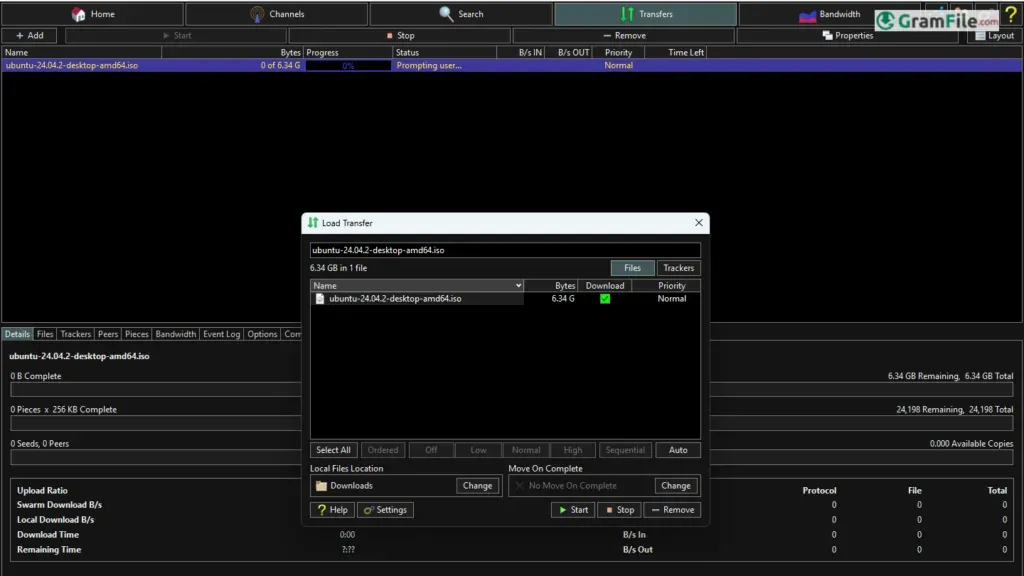
Download your .torrent file or copy a magnet link, then drag-and-drop it straight into the window (or use the “+” button if you’re feeling formal).
The interface shows exactly what’s happening: who you’re connected to, real transfer speeds, and how much data you’re sharing back.
Want to prioritize a download? Right-click it. Need to limit bandwidth? The speed controls are right there, not buried in menus. Everything works exactly how you’d expect, with zero “gotcha” moments.
The advanced controls are there if you need them, but they don’t get in your face – Tixati assumes you’re smart enough to find them when you’re ready.
After five minutes, you’ll wonder why other torrent clients make everything so complicated.
How to Download & Install
- Get It: Click on the above Green Download Button for official and direct download. This ensures you get a legitimate copy and avoid any potential malware.
- Install: The .exe is straightforward—no toolbars, no “offers.”
- Run: Opens instantly. No accounts, no logins, no BS.