

Download Details
- Version
- 2.0.0.5721 (latest)
- File size
- 330.42 MB
- License
- Free
- Security scan
- VirusTotal: 58 of 58 engines say OK (0 flagged)
- SHA-256 checksum
4ae9e6150d47a348a272df8e26c91ac59fdde3403fff82ec07746e26f20381bc- Developer
- Elgato
- Supported OS
- Windows 11, Windows 10
- Installers
- 64-bit (x64), Offline
- Downloads
- 3023
- Rating
- 4.7 out of 5 · 14 reviews
- File name(s)
- CameraHub_2.0.0.5721_x64.msi
Screenshots
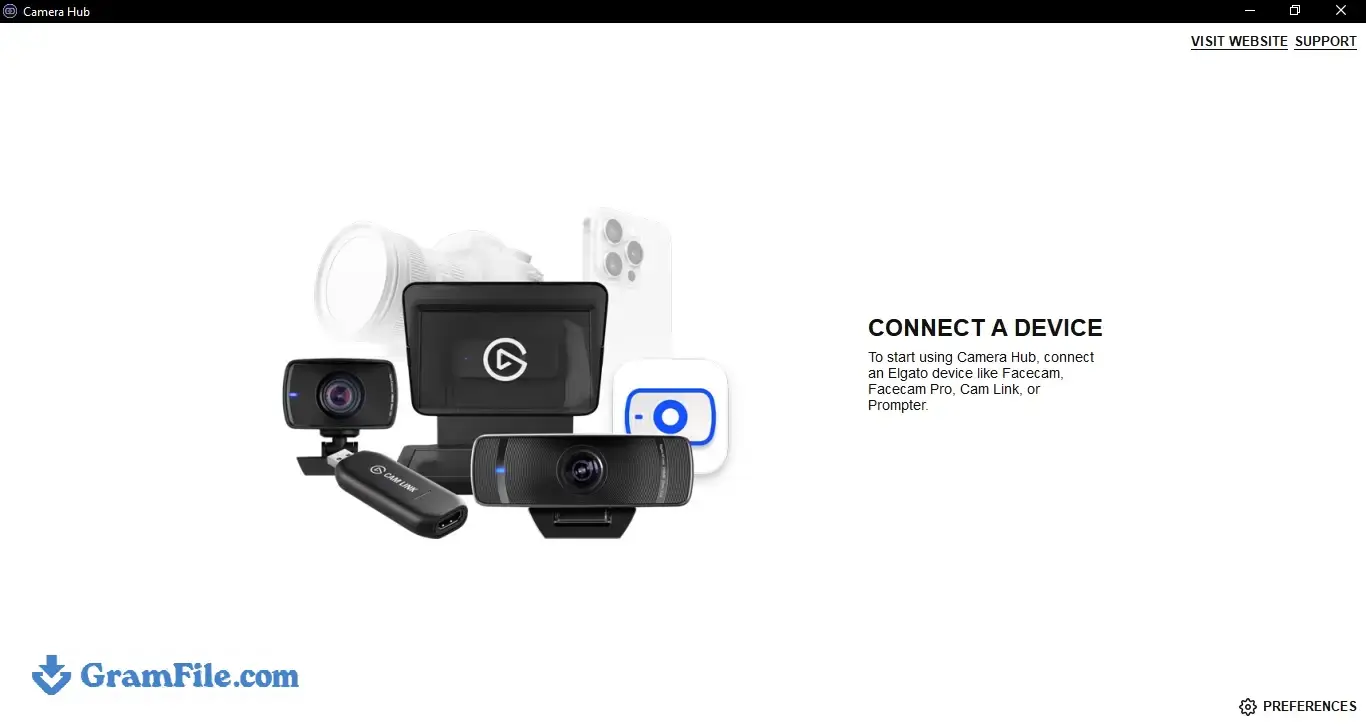
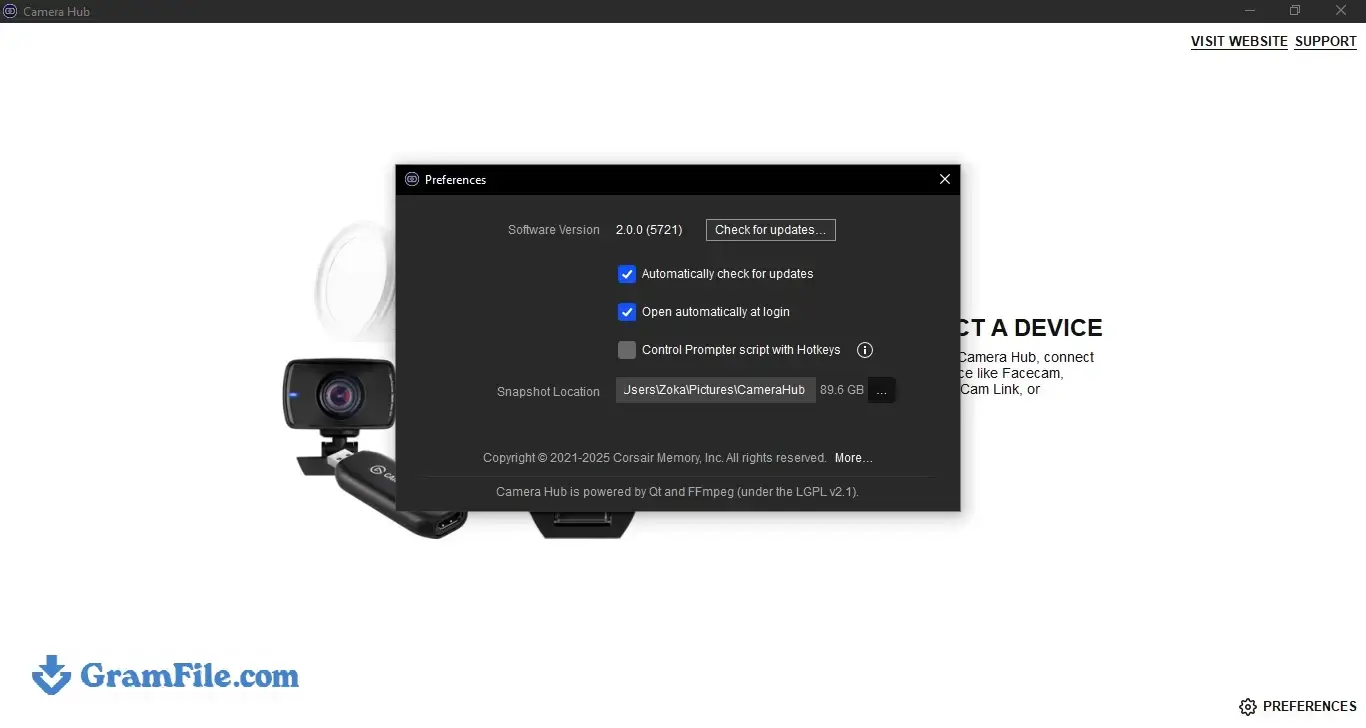
EpocCam turns an iPhone or iPad into a wireless or USB webcam for Windows 10 and 11. It suits anyone stuck with a weak laptop camera on Zoom, Teams, OBS or Discord.
The free tier stops at 640×480 with a watermark, and Pro (a one-time $7.99 unlock) removes both limits.
The catch: Elgato no longer sells or updates EpocCam, so it works the way it does today and will not change. If you already own an iPhone and want a quick webcam upgrade, it is still worth the install.
Is EpocCam Worth Downloading?
EpocCam turns an iPhone or iPad into a wireless or USB webcam for Windows, and the file on this page is Elgato Camera Hub 2.0, the Windows app that connects the two.
It suits anyone whose laptop camera makes calls on Zoom, Teams or OBS look worse than they should.
The free version is capped at 640×480 with a watermark, and Pro removes both limits.
Elgato has ended updates and sales, so EpocCam keeps working as it does today with no promise about tomorrow. If you already own an iPhone and want a quick camera upgrade, it is still worth the install.
Version note: this page hosts Camera Hub 2.0.0.5721, an older build. Elgato has released Camera Hub 2.1 and 2.2 since, and its own EpocCam troubleshooting advice is to use the latest Camera Hub from elgato.com/downloads. Choose this build if you specifically need version 2.0, for example to roll back after an update caused problems.
EpocCam Review: Quality, Features and Limits
What is EpocCam?
EpocCam is a phone-as-webcam tool with two parts: an app on your iPhone or iPad that sends the camera feed, and software on your PC that presents the feed to Windows as an ordinary webcam.
It began at Kinoni, which Corsair acquired in October 2020 and folded into Elgato, so older guides still mention Kinoni drivers.
Because Windows sees a normal camera, EpocCam works in video calls, recording tools and streaming software without plugins.
EpocCam video quality: free vs Pro
The free app is limited to 640×480 at 30 fps and adds a watermark. EpocCam Pro supports 1080p, 720p and 480p, all at up to 60 fps.
Even a mid-range phone sensor usually beats a laptop webcam, which is why most people end up wanting Pro.
EpocCam Pro features
Pro also adds manual focus and background replacement on iPhones with a TrueDepth camera. The phone microphone is a separate story: Camera Hub carries video only, and the audio section below explains the workaround.
Wi-Fi, USB and NDI connection modes
EpocCam connects over Wi-Fi, USB or NDI, and the supported resolutions are the same in every mode.
The video bitrate goes up to 13 Mbps over Wi-Fi and up to 84 Mbps over USB, so USB is the safer choice for long streams or a busy router. Wi-Fi saves you a cable, but its quality depends on your network.
Camera Hub 2.0 controls and what changed
Once Camera Hub detects your phone, you can choose the camera, bitrate, zoom and picture settings, and apply Snap Lenses.
Camera Hub 2.0 arrived on April 8, 2025 with LUT color grading, Voice Sync in more languages and one-click backgrounds from a Marketplace.
Those additions were built around Elgato’s own cameras, so test them before counting on them for an EpocCam feed.
The release also fixed the virtual camera freezing when you switch tabs, trimmed memory use and raised the minimum Windows version to Windows 11.
EpocCam microphone and audio on Windows
The Camera Hub integration does not carry audio. Elgato says that to use your phone as a microphone you need the older standalone EpocCam driver, with Camera Hub closed while you use it.
Installing or updating Camera Hub afterward can remove that driver, so expect to reinstall it. If you only need video, ignore this and use Camera Hub on its own.
Does EpocCam work with Android?
Elgato’s documentation covers iPhone and iPad only. An EpocCam app for Android does exist on Google Play (version 2.0.8, last updated in 2020), but it was built for the old standalone Kinoni driver, and nothing in Elgato’s current guides says it pairs with Camera Hub 2.0.
Android users who want a supported route are better served by a maintained alternative such as iVCam or Iriun Webcam, which list Android as a supported platform.
EpocCam not working on Windows: fixes
Most problems come from a short list of causes.
- If EpocCam does not show up as a camera, confirm Camera Hub is installed, restart your video apps, then restart the PC.
- If Wi-Fi will not connect, open Services in Windows and check that Bonjour Service is running with a startup type of Automatic or Automatic (Delayed Start), then restart Camera Hub.
- If USB will not connect, install Apple Devices from the Microsoft Store, restart the PC and try a different USB port.
- If the video flickers or freezes, remove older EpocCam or Kinoni drivers, since Elgato ties flickering to older driver versions.
Is EpocCam still worth using in 2026?
It depends on how you arrive. If you already own Pro, EpocCam remains a simple setup that does one job.
If you are starting fresh, the end of updates and new sales makes an actively developed alternative easier to recommend. Elgato itself warns that functionality may diminish over time.
How to Download & Install
Click the download button at the top of this page to get CameraHub_2.0.0.5721_x64.msi (330.42 MB). Since EpocCam 2022.2, Elgato Camera Hub is the Windows side of EpocCam, so you no longer need the old standalone driver for video. The whole setup takes about five minutes.
EpocCam installer type
There is one installer: a 64-bit (x64) offline MSI. No portable build exists, and there is no separate online installer.
EpocCam system requirements for Windows
- Windows 11, 64-bit. Camera Hub 2.0 raised the minimum to Windows 11, and Elgato says it should still run on Windows 10 without guaranteeing full functionality.
- An iPhone or iPad with the EpocCam app installed. Elgato lists iOS or iPadOS 13 or later as the minimum.
- Your phone and PC on the same Wi-Fi network, or a USB cable.
- For USB mode, the Apple Devices app from the Microsoft Store.
License and activation
Camera Hub is free to download and use. The EpocCam phone app has a free version (640×480, watermark) and EpocCam Pro, a one-time App Store purchase that was priced at $7.99. Elgato no longer sells EpocCam to new buyers. If you bought Pro earlier, sign in to the App Store with the same Apple ID and download the app again from your purchase history. There is no license key to enter, because Pro is tied to your Apple ID.
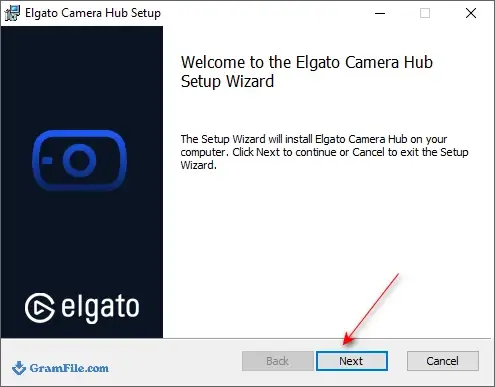
Step 1: Open the installer and click Next
Double-click the downloaded .msi file. If an old standalone EpocCam or Kinoni driver is installed, remove it first, because Elgato’s release notes flag conflicts with older Kinoni drivers.
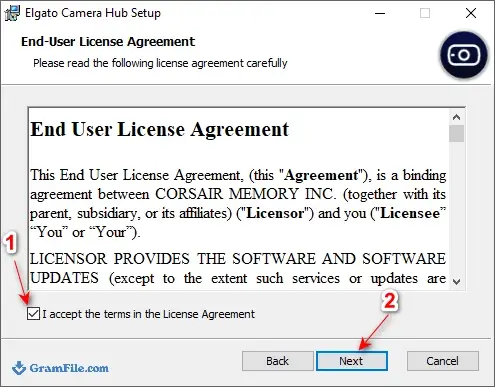
Step 2: Accept the license agreement
Accept the license agreement and click Next.
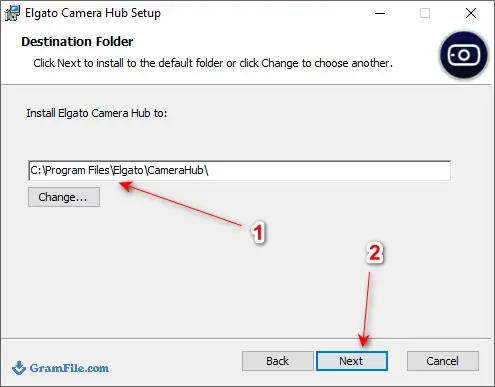
Step 3: Choose the destination folder
Keep the default folder unless you have a reason to change it, then click Next.
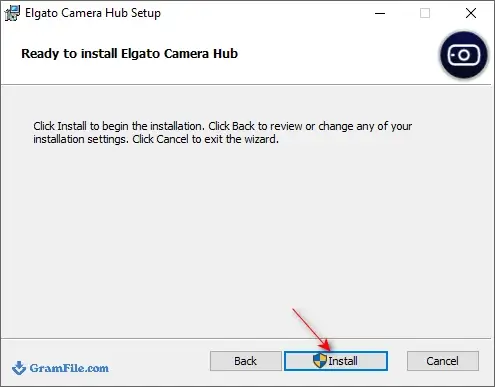
Step 4: Click Install
Approve the Windows permission prompt if it appears, then wait for the installation to finish.
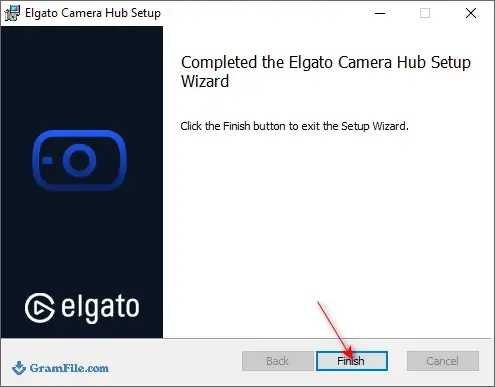
Step 5: Click Finish
Close the setup wizard. Restart Zoom, Teams or OBS so they can see the new camera, and restart Windows if EpocCam still does not show up.
Connect your phone to Windows over Wi-Fi
- Install EpocCam on your iPhone or iPad and open it.
- Open Camera Hub on your PC.
- Keep both devices on the same Wi-Fi network.
- When Camera Hub detects EpocCam, choose the camera, bitrate, zoom and picture settings.
- In your video app, pick EpocCam as the camera.
Connect your phone to Windows over USB
- Install Apple Devices from the Microsoft Store and restart the PC.
- Plug in your iPhone or iPad and tap Trust if the phone asks.
- Open EpocCam on the phone, then open Camera Hub on the PC.
- If the connection fails, try a different USB port.
How to update EpocCam
EpocCam itself will not get new releases. Camera Hub updates separately: right-click its icon in the Windows system tray and use the check for updates option, or download the newest installer from Elgato. The phone app updates through the App Store.
Pros & Cons
What we liked
- Free tier covers basic calls
- Wi-Fi, USB and NDI connections
- Pro reaches 1080p at 60 fps
- Zoom and picture controls in Camera Hub
- Shows up as a normal webcam
What we didn't like
- No longer sold or updated
- Free tier: 480p with watermark
- No phone microphone through Camera Hub
Conclusion
4.7out of 5 · 14 user ratings
EpocCam is a finished tool that still does its job: pair an iPhone, install Camera Hub, pick EpocCam as the camera and the picture is better than most laptop webcams give you.
The free tier is closer to a trial, and the lack of future updates is the real cost. Pick it if you already own Pro or need a quick fix today.
Choose a maintained alternative if you want new features, Android support or long-term peace of mind. More options are in our virtual webcam apps category.
| App | Best For | Price | Platform | Standout Feature |
|---|---|---|---|---|
| EpocCam | Existing Pro owners and quick iPhone setups | Free; Pro was $7.99 one-time (no longer sold) | Windows, macOS; iPhone, iPad | Wi-Fi, USB and NDI modes |
| Camo | People who want an actively developed app | Free tier; paid Pro | Windows, macOS; iPhone, Android | Free iPhone app, Pro raises the resolution cap to 1080p |
| iVCam | Windows users who want free Full HD | Free with watermark; paid upgrade removes it | Windows; iPhone, Android | Full HD at 60 fps in the free version |
| Iriun Webcam | A free, low-fuss option on any desktop | Free; optional paid upgrade | Windows, macOS, Linux; iPhone, Android | Works on the most desktop systems |
FAQ
Is EpocCam free for Windows?
Yes, Elgato Camera Hub 2.0 and the basic EpocCam phone app are free. The free app is limited to 640×480 at 30 fps and adds a watermark. Removing the watermark and getting 1080p needs EpocCam Pro, which Elgato no longer sells to new buyers.
Does EpocCam work on Windows 11?
Yes, Windows 11 is the minimum for Camera Hub 2.0, the version on this page. Elgato says Camera Hub 2.0 should still run on Windows 10 but does not guarantee full functionality. Your phone also needs the EpocCam app on an iPhone or iPad.
Is EpocCam discontinued?
Yes. Elgato says EpocCam gets no more updates or development and is no longer available for new purchase. Existing users can keep using it, but Elgato warns that functionality may diminish over time. If you already bought it, you can download it again from your App Store purchase history.
Does EpocCam work with Android phones?
Elgato’s current EpocCam guides cover iPhone and iPad only. An older EpocCam app for Android (version 2.0.8, last updated in 2020) exists on Google Play, but Elgato does not document it working with Camera Hub 2.0. For Android, a maintained app such as iVCam or Iriun Webcam is the safer choice.
How do I use my phone as a webcam on Windows with EpocCam?
Install Camera Hub on your PC and the EpocCam app on your iPhone or iPad, then open both. Put the devices on the same Wi-Fi network, or connect a USB cable after installing Apple Devices from the Microsoft Store. When Camera Hub detects the phone, choose EpocCam as the camera in Zoom, Teams or OBS.
Why is EpocCam not detected as a camera on my PC?
Camera Hub must be installed for Windows apps to see EpocCam as a webcam. Restart your video apps after installing, and restart the PC if EpocCam still does not appear. On Wi-Fi, check that the Bonjour service is running; on USB, install Apple Devices and try a different port.
Does EpocCam work as a microphone on Windows?
Not through Camera Hub, which carries video only. Elgato says you need the older standalone EpocCam driver, with Camera Hub closed, to use the phone microphone. Installing or updating Camera Hub afterward can remove that driver, so you may have to reinstall it.
Is EpocCam safe to download?
The Camera Hub 2.0.0.5721 file on this page scanned clean, with 58 of 58 VirusTotal engines reporting no threat. You can also compare the SHA-256 checksum in the download details with the hash Windows calculates for your copy. The software is made by Elgato, a Corsair brand.
Found a problem with this download? Report an outdated version, broken link, suspicious installer or incorrect information.
 Zoom Workplace
 Nitro PDF Pro
 Sumatra PDF
 IrfanView
 K-Lite Codec Pack
 WinRAR