

Download Details
- Version
- 8.8.0 (latest)
- File size
- 229.4 MB
- License
- Free
- Security scan
- VirusTotal: 60 of 61 engines say OK (1 flagged)
- SHA-256 checksum
e4490c1ef9d2d33088ddd9ee9f8707398b812de5910288b4fb85f52f79f2d8c4- Developer
- leokhoa
- Supported OS
- Windows 11, Windows 10
- Installers
- 64-bit (x64), 32-bit (x86), Offline
- Downloads
- 18335
- Rating
- 4.9 out of 5 · 37 reviews
- File name(s)
- laragon-wamp.exe
 Reviewed by Ali Mohamed
Tested on Windows 11 and 10 · · How we review
Screenshots
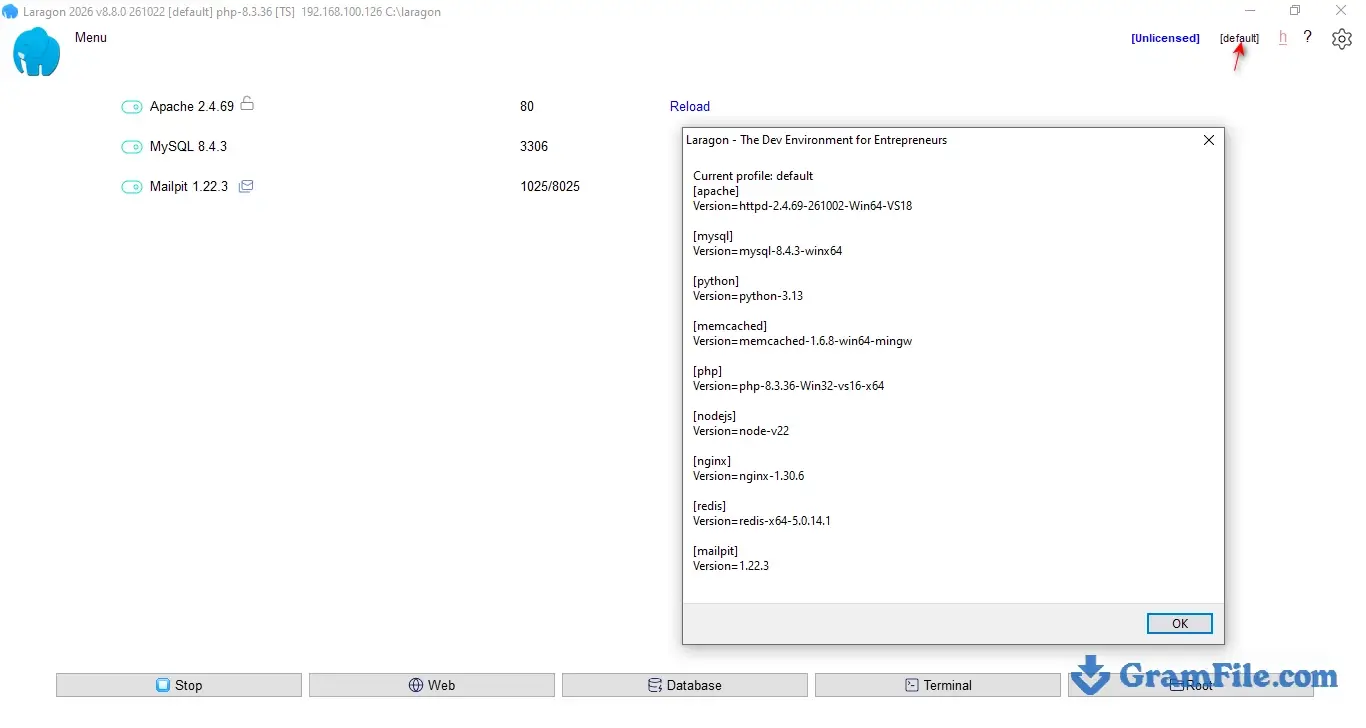
Laragon is a Windows-only local development environment that puts Apache, Nginx, MySQL, PostgreSQL, PHP, Node.js and Python in one portable folder.
It suits PHP and Laravel developers, WordPress builders and anyone tired of editing hosts files by hand.
The current release is 8.8.0, and it is worth downloading if you work on Windows, with one condition: since version 7 it is free only for non-commercial use.
What sets it apart is the automation. Every folder you drop into www gets its own .test address, and local HTTPS is one click away.
Laragon is a local server stack for Windows. It installs a web server, a database, several PHP versions, Node.js, Python, Composer and a terminal into one folder, then wires them together so a new project works without manual configuration.
It suits PHP and Laravel developers, WordPress builders and anyone tired of editing the hosts file by hand.
It is worth downloading if you work on Windows, with one condition: since version 7 it is free only for non-commercial use.
Its automation is what keeps people on it. Every folder you drop into www gets its own .test address, and local HTTPS is one click away.
What is Laragon?
Its binaries stay inside the install folder instead of spreading across Windows, which makes moving or removing it painless. If you have used XAMPP or WampServer, Laragon does the same job with far less setup.
Auto virtual hosts and .test domains
Put a folder in www and it maps to an address like my-app.test. Laragon edits the hosts file and the Apache or Nginx configuration for you.
A .test address behaves much closer to a real domain than localhost/my-app, which matters for cookies, redirects and WordPress installs that store their own URL.
Local SSL with one click
Click the lock icon in the main window and your project answers on https://my-app.test.
New projects are detected and get HTTPS automatically, and the certificate also covers localhost, 127.0.0.1 and your local network IP.
That helps when you test service workers, secure cookies or webhooks. If a browser still complains, go to Menu, Apache, SSL, then Add laragon.crt to Trust Store.
Switching PHP, MySQL and Node.js versions
You can keep several versions side by side and pick one from the menu, which helps when one client site runs PHP 8.1 and another runs 8.4.
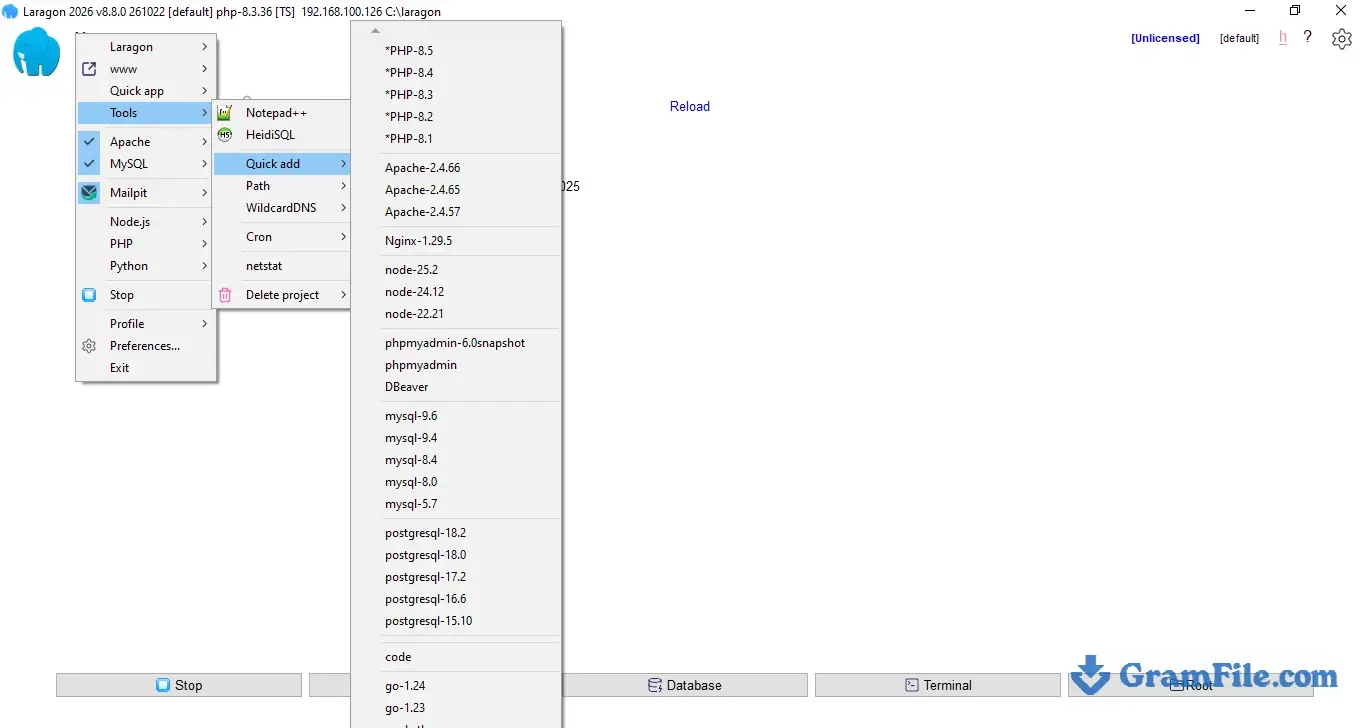
Extra versions arrive through Tools, then Quick add, or by extracting a build into the bin folder. New PHP releases are added automatically on licensed installs.
The bundled PHP list starts at 8.1, so a legacy PHP 7 project needs a manual add.
Recent releases moved the default PHP FastCGI port to 10987 to avoid clashing with Xdebug. Nginx users can raise the PHP process count with PHP_FCGI_CHILDREN in laragon.ini (the default is 10).
Quick app: Laravel, WordPress and Symfony
Quick app creates a fresh project from a template in one click. Laravel, Symfony, WordPress and Node.js templates are included, and you can edit them or write your own.
For WordPress this removes the usual download, database and config routine. For Laravel, Composer is already installed and a database is ready for your .env file.
Database tools and automatic backups
MySQL 9.6, 9.4 and 8.4 and PostgreSQL 15 to 18 are bundled. phpMyAdmin comes in two versions: phpMyAdmin 5 under the MySQL menu, and phpMyAdmin 6, which needs PHP 8.4 or newer. Laragon can also back up your MySQL databases on a schedule.
In a default install the MySQL root user has no password. That is fine on a personal machine, but change it if you expose the port.
Terminal and PATH
The built-in terminal has Git, Composer and npm ready to use. To get the same tools in Windows Terminal, VS Code or PhpStorm, run Tools, then Path, then Add Laragon to Path once.
Skipping that step is the most common reason people see “php is not recognized” after installing.
Sharing a local site
Quick share publishes a local project at a public URL through ngrok, which is handy for client previews or testing a webhook. Ngrok handles the tunnel, so its own account rules and limits apply.
Laragon vs XAMPP
XAMPP bundles Apache, MariaDB and PHP, runs on Windows, macOS and Linux, and is free for commercial work. You set up virtual hosts and certificates yourself.
Laragon does those chores automatically and adds Node.js, Python and version switching, but it runs only on Windows and charges for commercial use.
On a Windows machine, Laragon saves time on every new project. On a mixed team, XAMPP covers more platforms. Our XAMPP for Windows page has the download and details.
Laragon vs Docker
Docker gives you containers that match production and behave the same on every operating system, which is the safer route for teams that deploy to Linux. The cost is heavier resource use and more configuration on Windows.
Laragon runs native Windows binaries, so it starts fast and stays simple. Differences such as file name case sensitivity can hide bugs that only appear on a Linux server.
The developer says Laragon can replace Docker for many local web projects, and for solo PHP and WordPress work that holds up.
Who should skip Laragon
Skip it if you use macOS or Linux, if your team needs exact production parity through containers, or if you work commercially and do not want to buy a license.
Projects that still depend on PHP 7 or older will also need some manual work.
Common Laragon problems and fixes
“php is not recognized” in the terminal
The bundled PHP folder is not on your Windows PATH. Click Tools, then Path, then Add Laragon to Path, and open a new terminal window.
Apache will not start
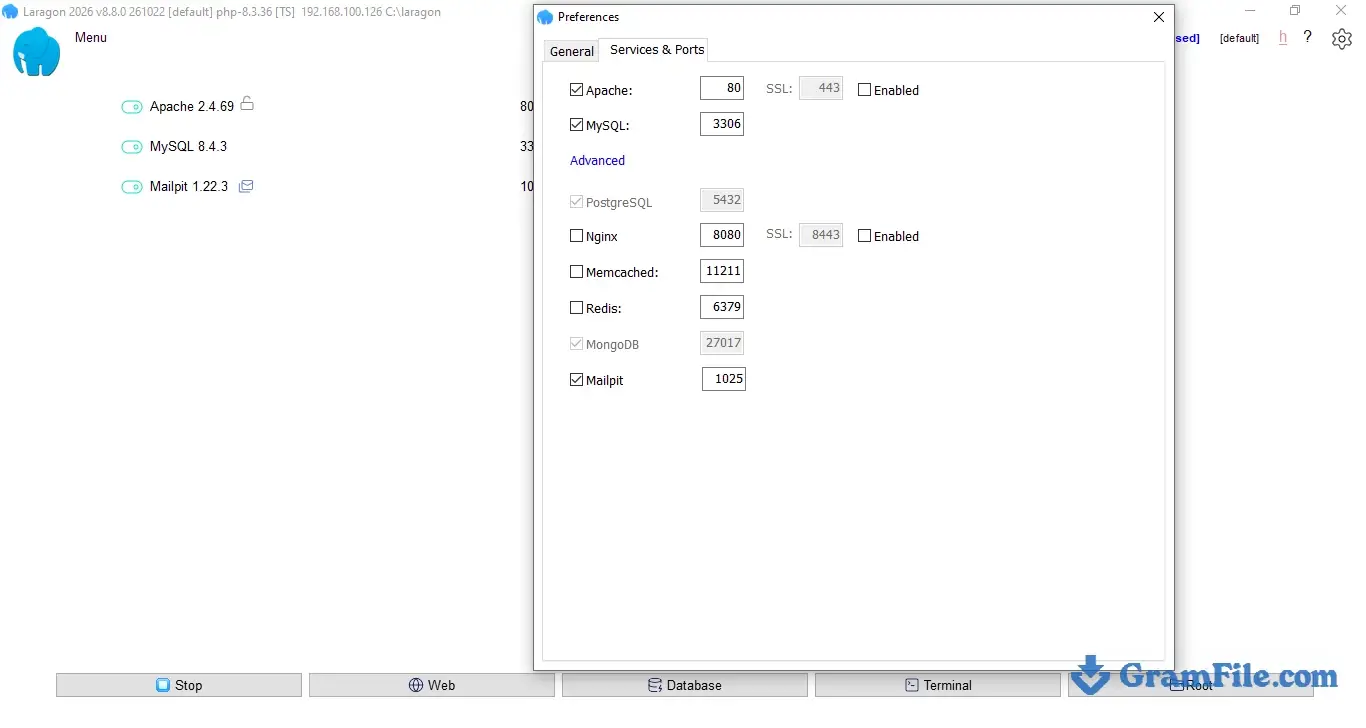
Another program is probably using port 80 or 443. Close it, or change the Apache port under Menu, Preferences, Services and Ports, then restart the services.
The .test address does not load
Check that Auto create virtual hosts is enabled in Preferences and that the services are running. Windows needs administrator permission to edit the hosts file, so accept the prompt when it appears.
The browser warns about the certificate
Go to Menu, Apache, SSL, then Add laragon.crt to Trust Store, and restart the browser.
phpMyAdmin 6 will not open
phpMyAdmin 6 needs PHP 8.4 or newer. Switch the PHP version first, or use phpMyAdmin 5 from the same MySQL menu.
A legacy project needs PHP 7
The bundled list starts at PHP 8.1. Add an older build through Tools, then Quick add, or extract one into the bin folder manually.
How to Download & Install
The whole process takes about ten minutes on a normal connection. Part 1 covers the download, part 2 the setup wizard, and part 3 your first project.
Part 1: download Laragon
Use the download button on this page. The installer is a single file named laragon-wamp.exe, about 229 MB. Before you run it, check that its SHA-256 matches the checksum in the download details above. In PowerShell:
Get-FileHash .\laragon-wamp.exe -Algorithm SHA256Installer type and system requirements
There is one current installer, Laragon Full (64-bit). The old Lite and Mint editions only survive on a legacy 2.2 page for 32-bit systems, and there is no separate portable download. The installed folder is portable anyway: move it to another drive, another PC or a USB stick and it keeps working.
The Full build ships with Apache 2.4.69, Nginx, MySQL 9.6, 9.4 and 8.4, PHP 8.5 to 8.1, Node.js 26 to 22, Python 3.13, Redis, Memcached, PostgreSQL 18 to 15, npm and Git.
- Windows 10 or 11, 64-bit
- Roughly 1 GB of free disk space after installation, plus room for your projects and databases
- Administrator permission, which Windows may request when Laragon edits the hosts file or trusts its SSL certificate
- The Microsoft Visual C++ 2015-2022 x64 runtime, which most up-to-date Windows machines already have
Part 2: install Laragon
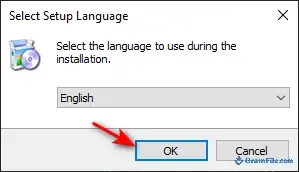
- Double-click laragon-wamp.exe and accept the Windows prompt. Pick your language in the first window and click OK.
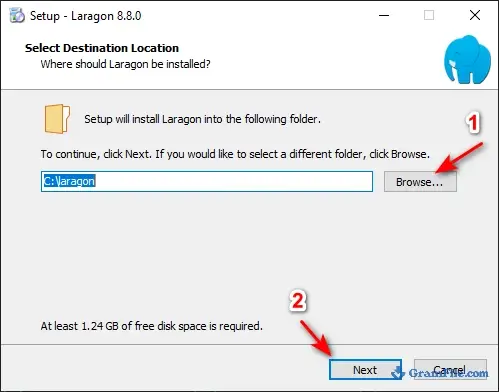
- Choose the install folder. The default is C:\laragon, and it is the best choice unless you have a reason to move it, because every path in this guide assumes it. Click Next.
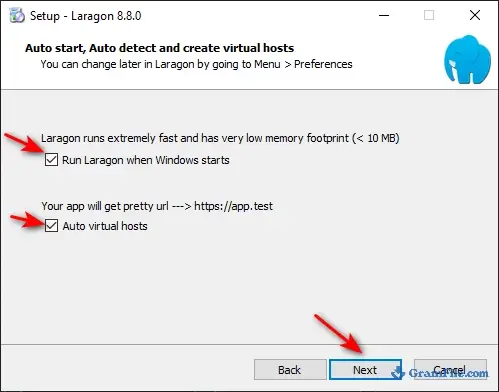
- On the options screen, leave Auto start, Auto detect and Auto create virtual hosts enabled. The last two are what give you .test domains without touching the hosts file.
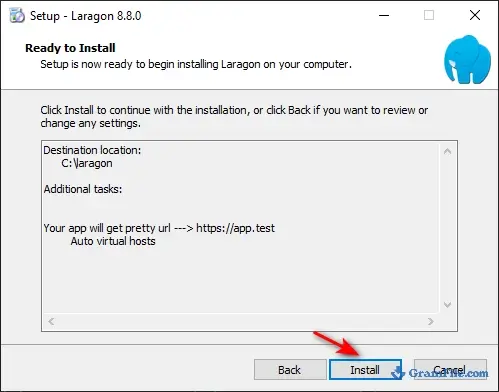
- Click Install when the summary appears.
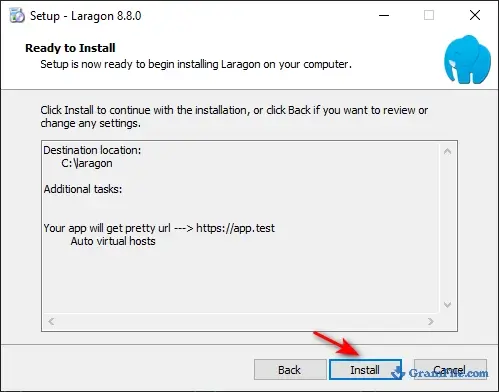
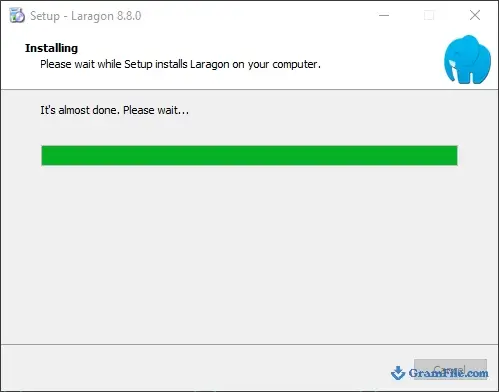
- Wait while the files are extracted. This is the longest step because the bundle holds several runtimes.
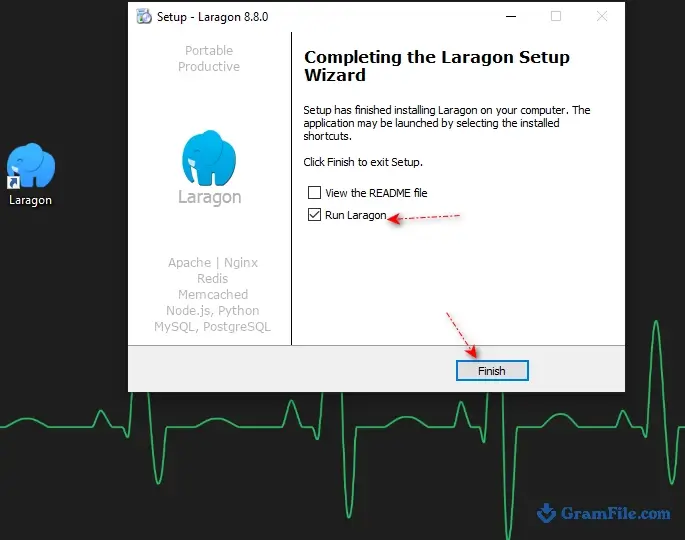
- Finish the wizard and tick the option to run Laragon.
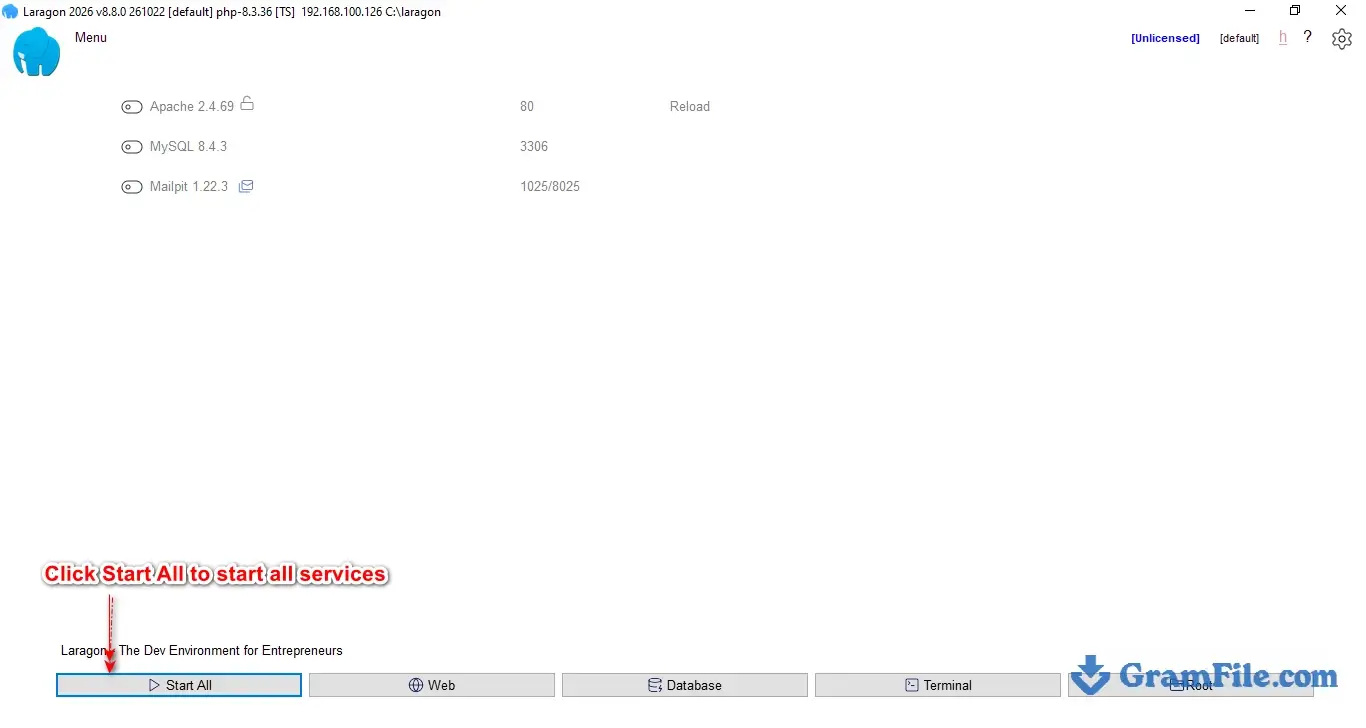
- In the Laragon window, click Start All. Apache and MySQL should both turn on. Without a license, a license popup appears at every startup. You can close it for non-commercial use.

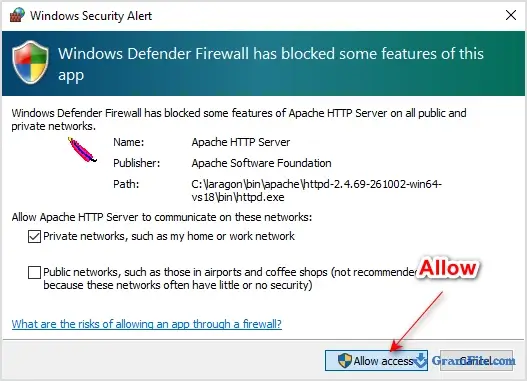
- When Windows Firewall asks about Apache and the other services, click Allow access. If you decline, local sites may still load on your own PC but other devices on your network cannot reach them.
- Optional: open the Laragon menu to add other services such as Redis, Memcached or PostgreSQL, and pick which ones start with the rest.

Part 3: create your first project
- Right-click anywhere in the Laragon window, choose Quick app, then pick WordPress, Laravel, Symfony or Node.js. Enter a project name such as my-app. Laragon creates the folder in www, and for WordPress and Laravel it also sets up the database.
- If you would rather start by hand, open the www folder (C:\laragon\www by default) and create a folder named my-app with an index.php file inside. Laragon detects the new folder and builds the virtual host automatically.
- Open
http://my-app.testin your browser. The folder name becomes the address, so a folder called shop-demo loads at shop-demo.test. - Click the lock icon in the main window to switch the project to
https://my-app.test. If the browser shows a certificate warning, use Menu, Apache, SSL, then Add laragon.crt to Trust Store. - For the database, open Menu, MySQL, phpMyAdmin (version 5) or phpMyAdmin6 (needs PHP 8.4 or newer). Log in as root with an empty password, then create a database for the project.
- To change PHP for a project, open Menu, PHP, Version and choose another release, then restart the services. Missing versions come from Tools, then Quick add.
- Run Tools, then Path, then Add Laragon to Path one time. After that, php, composer, node and npm work in Windows Terminal, VS Code and PhpStorm. Open a new terminal window so the change takes effect.
Laragon license and activation
The license is tiered. Unlicensed use is allowed for non-commercial work, but the app shows a license popup when it starts and the free tier gets no auto-update. Paid options as listed on laragon.org/pricing at the time of writing:
- Non-commercial Standard: $10 for one device ($20 for two), perpetual, one year of updates
- Non-commercial Extended: $30 for one device ($40 for two), perpetual, five years of updates
- Commercial annual: $49 for one device ($69 for two)
- Commercial lifetime: $149 for one device ($199 for two), five years of updates
- Team annual: $149 for five devices, $399 for 15 devices
To activate a purchased key, right-click the license label in the top-right corner of the Laragon window and paste the key into the window that opens.
This shortcut arrived around version 8.5. The pricing FAQ on the developer’s site covers reactivation after a Windows reinstall or a device change. Check that page before buying, since prices can change.
How to update Laragon
Individual components update through Tools, then Quick add. To update the app itself, download and run LaragonUpdater.exe, as the release notes say.
The free tier skips auto-update, so check this page for new builds now and then. Export your databases before a major upgrade, just in case.
Pros & Cons
What we liked
- Automatic .test domains for every project
- One-click local HTTPS
- Easy switching between PHP, MySQL and Node.js versions
- Self-contained, portable folder
- Composer, Git, npm and phpMyAdmin included
- Scheduled MySQL backups
- Lightweight and reliable
What we didn't like
- Windows only
- Commercial use requires a paid license
- The free tier shows a startup popup and has no auto-update
Best Laragon Alternatives
-
 XAMPP
XAMPPLaunchpad for testing websites on your own computer.
Conclusion
4.9out of 5 · 37 user ratings
If you build PHP, Laravel or WordPress projects on Windows, yes. The time saved on domains, certificates and version juggling shows up from the first project.
Read the license before you commit. Hobby and learning use is free, while freelancers and companies need a paid key, starting at $49 a year or $149 for a lifetime commercial license. If you are on another operating system or need container-level parity with production, choose one of the alternatives below.
| App | Best for | Price | Platform | Standout feature |
|---|---|---|---|---|
| Laragon | PHP, Laravel and WordPress work on Windows | Free for non-commercial use; commercial from $49 per year | Windows | Automatic .test domains and one-click SSL |
| XAMPP | Simple cross-platform Apache, MariaDB and PHP stack | Free | Windows, macOS, Linux | Familiar control panel, no license limits |
| Docker Desktop | Teams that need production parity | Free for personal and small business use; paid for larger companies | Windows, macOS, Linux | Identical containers across machines |
| Local (by WP Engine) | WordPress-only development | Free | Windows, macOS, Linux | One-click WordPress sites |
FAQ
Is Laragon free?
Laragon is free for non-commercial use in an unlicensed mode that shows a license popup at startup and skips auto-updates. Since version 7, commercial use needs a paid license, starting at $49 per year.
Is Laragon safe to download?
The installer scanned clean on 60 of 61 VirusTotal engines, with one engine flagging it. Compare the SHA-256 checksum on this page with the file you downloaded before you run it.
Is Laragon better than XAMPP?
For Windows web development, Laragon is easier day to day because it creates .test domains and local HTTPS automatically. XAMPP is the better pick if you need Linux or macOS support or want a tool that is free for commercial work.
Does Laragon work on Windows 11?
Yes. Laragon runs on Windows 10 and Windows 11. The current Full installer is 64-bit.
How do I change the PHP version in Laragon?
Open the Laragon menu, go to PHP, then Version, and choose another installed release. If the version you need is missing, add it through Tools, then Quick add, and restart the services.
Where is the Laragon www folder?
The www folder is C:\laragon\www if you kept the default install location. Each project folder inside it becomes a .test address automatically.
How do I enable SSL in Laragon?
Click the lock icon in the Laragon main window and the project loads over HTTPS. If the browser still shows a warning, use Menu, Apache, SSL, then Add laragon.crt to Trust Store.
Can Laragon replace Docker?
For many local web projects, yes. It runs native Windows binaries, so it is lighter and quicker to set up than Docker. Docker remains the better choice when you need the same environment as a Linux production server.
Why is PHP not recognized in the terminal after installing Laragon?
The bundled PHP folder is not on your Windows PATH yet. Click Tools, then Path, then Add Laragon to Path, and open a new terminal window.
What do I do if Apache will not start because port 80 is in use?
Another program is using port 80. Close it, or change the Apache port in Laragon under Menu, Preferences, Services and Ports, then restart the services.
How do I update Laragon?
Update individual components through Tools, then Quick add. To update the app itself, download and run LaragonUpdater.exe.
Found a problem with this download? Report an outdated version, broken link, suspicious installer or incorrect information.
Changelog - What's new in version 8.8.0
Fixed and improvements:- Update Apache to the latest version 2.4.69-261002-Win64-VS18
- Update PHP 8.3 to the latest version, 8.3.36 (Critical Security Fixes)
- Update Nginx to the latest version 1.30.6
- Update Node.js 22 LTS to the latest version 22.23.4
- Update Composer to the latest version 2.10.3
Notes:
* To use Laragon's bundled **PHP, Node.js, and Python** in any Terminal, code editor, or IDE, simply click **Tools > PATH > Add Laragon to PATH**.
- Smoothly upgrade from older version of Laragon to Laragon 8:
Please follow this guide: https://github.com/leokhoa/laragon/discussions/1059
- Smoothly update to the latest version of Laragon: Just download and run **`LaragonUpdater.exe`**
Laragon supports both versions of phpMyAdmin:
1. **Menu > MySQL > phpMyAdmin**: phpMyAdmin 5
7. **Menu > MySQL > phpMyAdmin6**: phpMyAdmin 6 - This version works with PHP 8.4+

 Zoom Workplace
 Nitro PDF Pro
 Sumatra PDF
 IrfanView
 K-Lite Codec Pack
 WinRAR