

Download Details
- Version
- 4.0.0.0 (latest)
- File size
- 104.59 MB
- License
- Free
- SHA-256 checksum
e4232ba9dd2d8f2eee0a5f2b43400a0e44ec24e698c8866b2b27d0fca80c5f38- Developer
- DioLenza Studio
- Supported OS
- Windows 11, Windows 10
- Installers
- 64-bit (x64)
- Downloads
- 9218
- Rating
- 4.3 out of 5 · 19 reviews
 Reviewed by Ahmed Madbouli
Tested on Windows 11 and 10 · · How we review
Screenshots
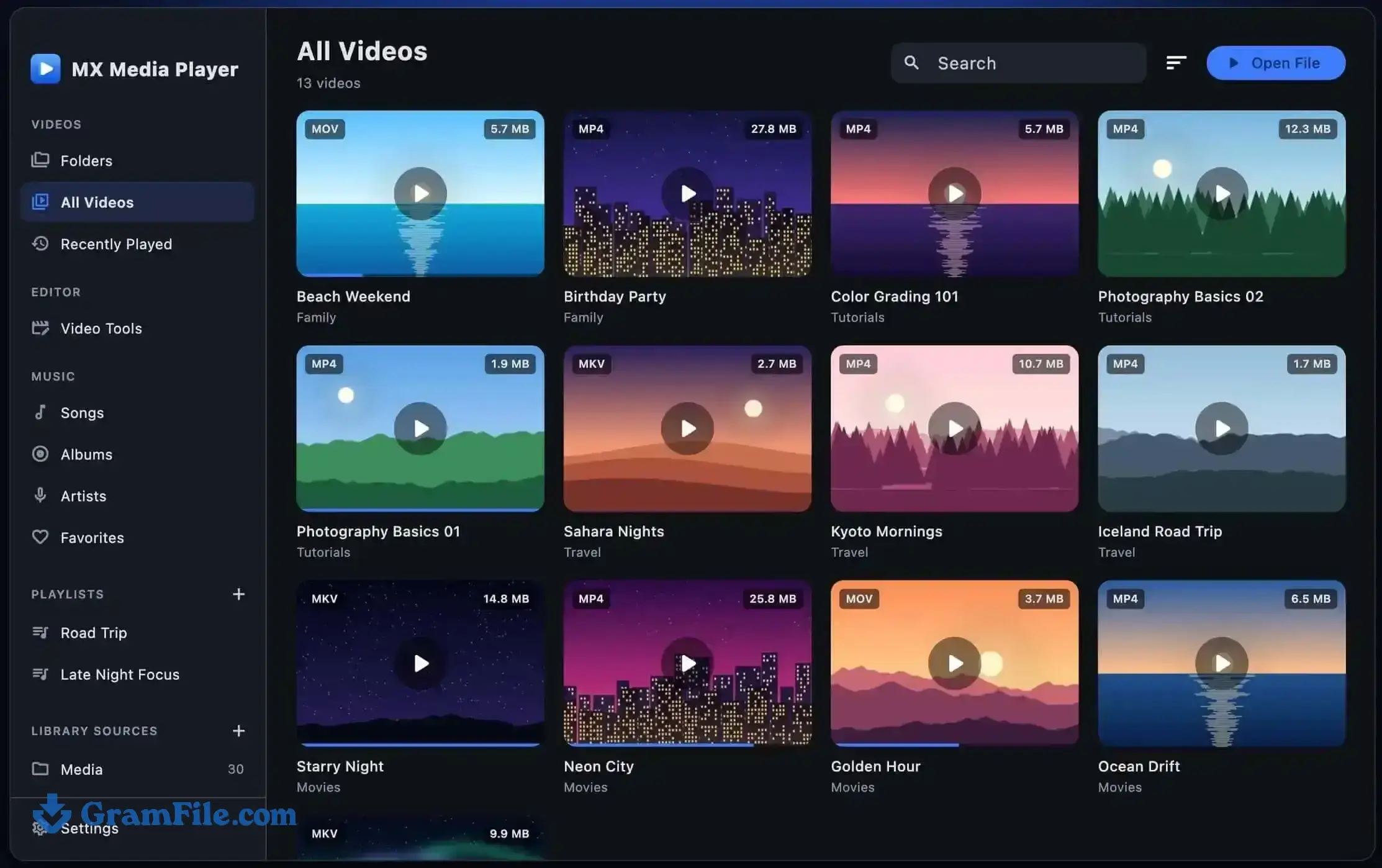
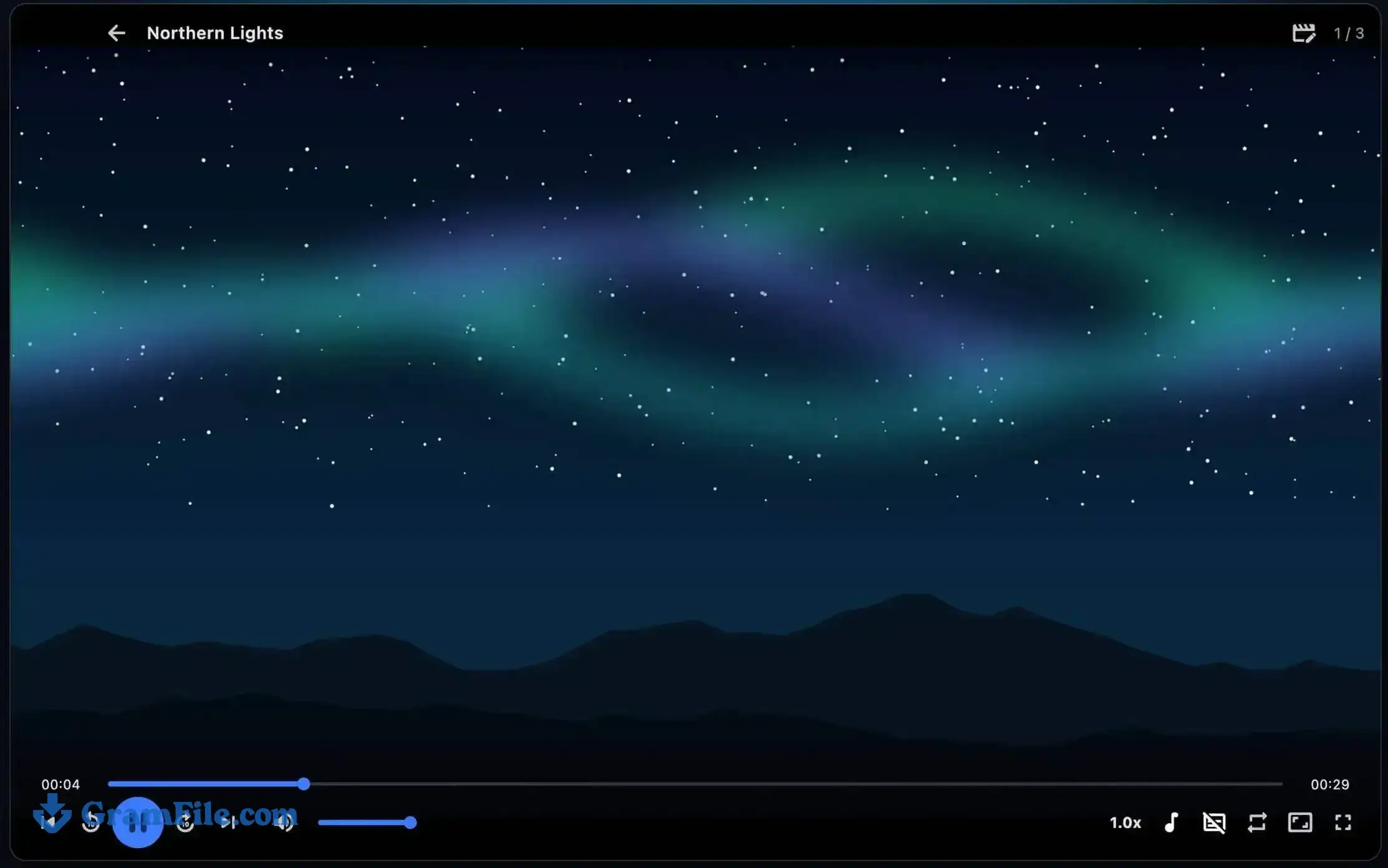
MX Player for Windows is a free video player that also includes a video editor and an offline caption generator.
It suits people who watch local MKV, MP4 and HEVC files, use subtitles often, and would rather not install a separate editor for quick cuts.
At 100+ MB it is worth the download if that sounds like you. One thing to know first: this is DioLenza Studio’s Windows build, a different product from the Android app most people mean when they say MX Player.
What is MX Player?
MX Player is a free Windows media player that plays HEVC and 4K video without extra codecs, loads SRT, ASS and VTT subtitles, and includes a built-in video editor and offline caption generator.
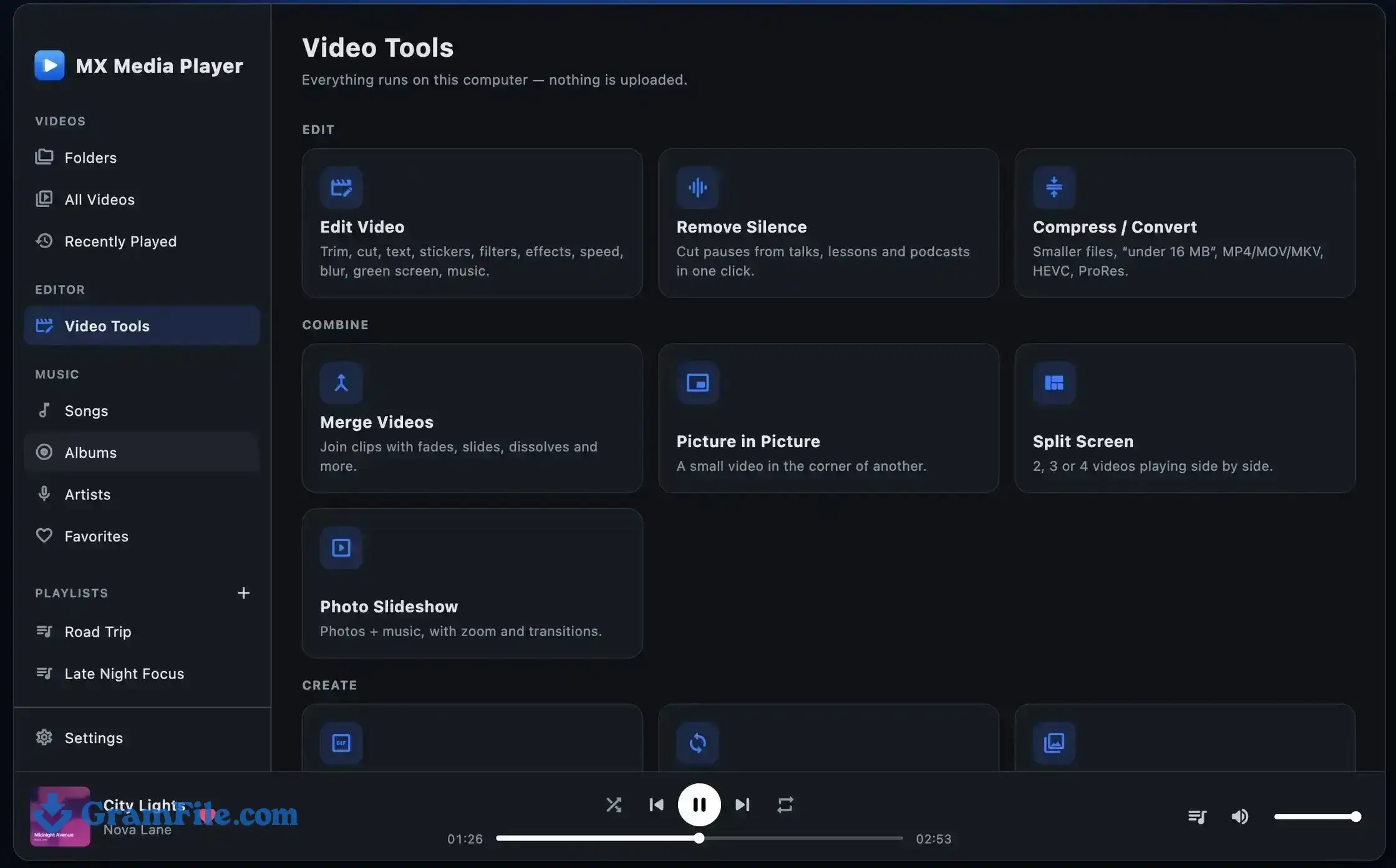
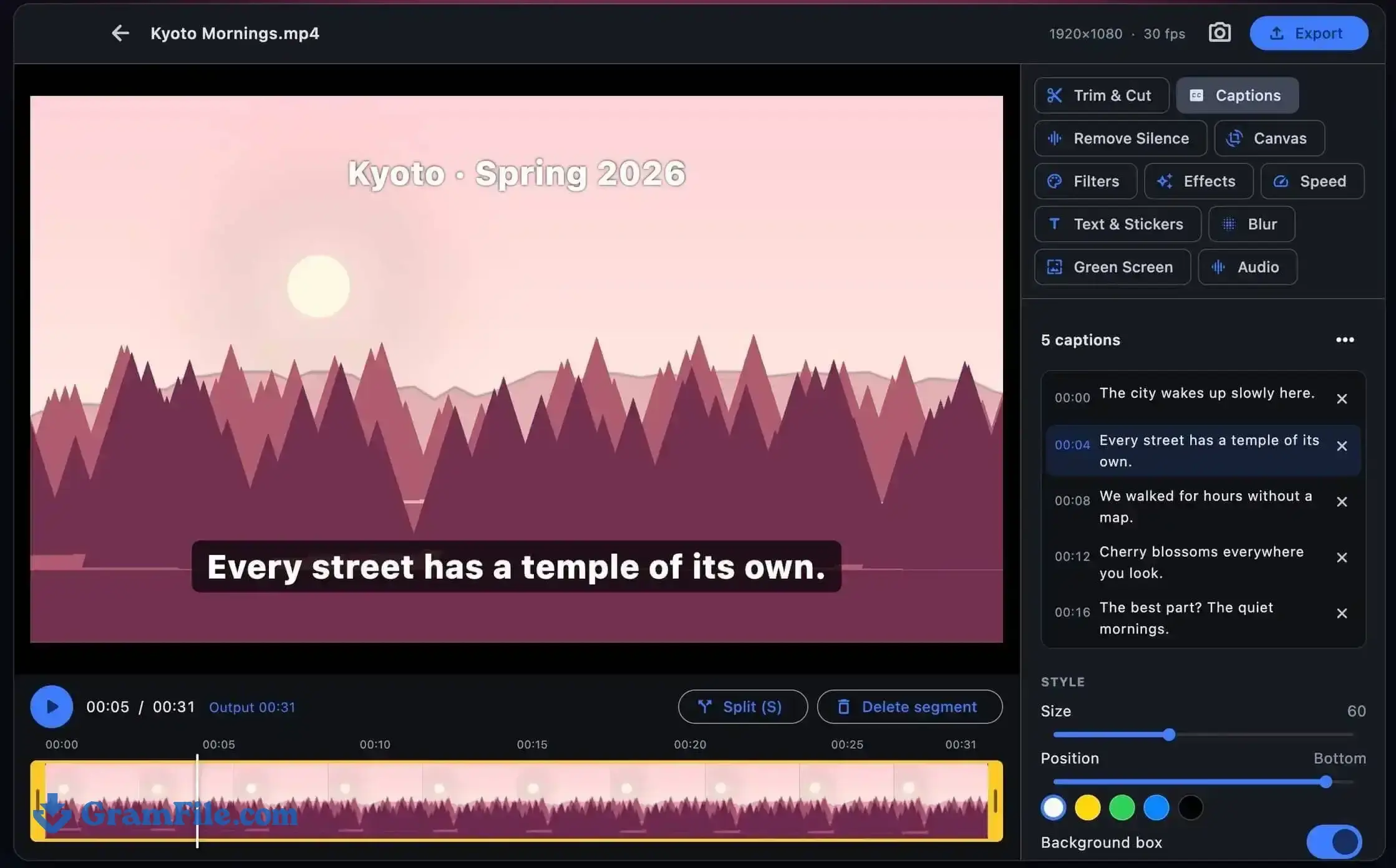
The screenshots above show a video editor and converter next to normal playback, plus an auto caption tool.
Is this the same MX Player as the Android app?
Not as far as we can tell, and it is worth knowing before you install. The Android app has passed a billion installs on Google Play, and it is the reason so many people search for MX Player on PC.
In August 2026, iTechGuides noted that the Android app’s official download page offers no Windows installer. The build on this page is published by DioLenza Studio, and we have not found any statement tying it to the Android team.
Judge it as a standalone Windows app that shares the name, and expect a different interface from the one on your phone.
If you specifically want the Android app, an Android emulator is the route most guides describe, though it is a heavier setup than a native install.
MX Player playback and format support
The player opens MKV, MP4, AVI, MOV, WMV, FLV, WebM and TS files, along with HEVC (H.265) and 4K video, without a codec pack.
Decoding is hardware accelerated, so a supported graphics card takes load off the processor.
Videos are grouped by folder with thumbnails and a NEW badge on files you haven’t watched, and playback resumes where you stopped. A music library covers audio files, so you don’t need a second app for those.
Speed runs from 0.25x to 3x, which suits lectures at 1.5x as well as a slow look at a tricky scene. Aspect ratio modes, repeat, full screen and full keyboard control are all there.
MX Player subtitles and audio tracks
Subtitle support covers SRT, ASS and VTT, with adjustable size and automatic loading of matching subtitle files.
Files with several audio tracks are easy to handle: switch tracks during playback, or set a preferred audio and subtitle language once.
MX Player auto captions and silence remover
Auto Captions turns speech into subtitles in 90+ languages, including Urdu, English and Hindi, and the processing runs offline on your PC, so the video never leaves your machine.
As with any speech to text tool, clean voice recordings give better results than noisy clips, so proofread the captions before you publish anything.
The Silence Remover cuts pauses out of lectures, tutorials and podcasts in one click, which saves a lot of manual trimming on long recordings.
MX Player video editor
The editor handles the basics of a cut: trim, split, freeze frames, plus text, emoji stickers and logos with drag-and-drop placement.
Crop presets include 16:9, 9:16 and 1:1, and a blurred-background mode keeps vertical clips from showing black bars.
For the look of a video, there are filters, LUTs, vignette, sharpen, film grain, stabilization and noise reduction, plus green screen replacement with any image or video. Faces and number plates can be blurred or pixelated, which matters if you post street footage.
Audio tools include background music, a voice changer, an equalizer, echo, noise removal and loudness normalization. Speed control adds slow motion, reverse, fade in and fade out.
Merge, convert and compress videos with MX Player
One-click tools merge clips with transitions, build picture in picture and split screen layouts with up to four videos, and turn photos into slideshows with music.
You can also compress and convert files to MP4, MOV or MKV in H.264 or HEVC, which helps when a screen recording is too big to send.
Does MX Player work offline?
Yes. Playback, editing and captioning all run on your PC, and the app’s description says nothing is uploaded. That makes it a reasonable pick for private footage.
Who should download MX Player for Windows?
Download it if you watch a lot of local video with subtitles, trim clips for social posts, or want captions without sending files to a cloud service.
Skip it if you want a long-established open-source player that also handles discs and network streams, in which case VLC media player is the better fit, or if you run a 32-bit version of Windows.
Pros & Cons
What we liked
- Plays HEVC and 4K without codec packs
- Offline auto captions in 90+ languages
- Built-in editor and video converter
- Resumes playback where you stopped
- Speed control from 0.25x to 3x
- Free download, no bundleware
What we didn't like
- Not the Android MX Player
- 64-bit only, no portable build
- Only 19 ratings so far
Best MX Player Alternatives
-
 PotPlayer
Free media player with built-in codecs and deep controls.
-
 VLC media player
A reliable, ad-free media player that plays almost any file format with ease.
-
 Media Player Classic – BE
A free, lightweight Windows media player with advanced playback features.
-
 PowerDVD
Turns your PC into a high-end media hub for movies, music, and more.
Conclusion
4.3out of 5 · 19 user ratings
MX Player for Windows is a solid pick if you want playback, subtitles and light editing in one install. Its strongest points are offline auto captions and HEVC and 4K playback without a codec pack.
Its weak spot is trust: the name belongs to a famous Android app, the Windows build comes from a different developer, and the rating count is small.
If that doesn’t bother you, install it, check the SHA-256 hash first, and run a few of your own files through it. If you want the most proven player, VLC is the safe alternative.
MX Player vs VLC, PotPlayer and MPC-BE
| App | Best for | Price | Platform | Standout feature |
|---|---|---|---|---|
| MX Player | Playing, captioning and trimming clips in one app | Free | Windows 11, 10 (64-bit) | Offline auto captions and built-in editor |
| VLC media player | Playing nearly anything, including discs and streams | Free, open source | Windows, macOS, Linux, Android, iOS | Broad format and streaming support |
| PotPlayer | Tweaking every playback setting | Free | Windows | Deep customization and built-in codecs |
| MPC-BE | Lightweight, low-resource playback | Free, open source | Windows | Small footprint with advanced playback options |
FAQ
Is MX Player available for Windows 11?
Yes, MX Player runs on Windows 11 and Windows 10 (64-bit), and you can download it from this page. It is a Windows app from DioLenza Studio, separate from the Android app, whose official download page lists no Windows installer.
Is MX Player free for PC?
Yes, GramFile lists this Windows build as free to download and use. No serial key or activation step is listed for it.
Can I use MX Player on PC without an emulator?
Yes, the native Windows build on this page installs like any desktop program, so you don’t need BlueStacks or another emulator. An emulator is only necessary if you want the Android MX Player itself.
Is MX Player safe to download for PC?
GramFile reviews each listing by hand and publishes a SHA-256 checksum for the file, so you can confirm your download is unaltered. In PowerShell, run Get-FileHash -Algorithm SHA256 on the file and compare the result with the checksum on this page. A match proves the file is the one we published, and it is still sensible to scan it with Windows Security like any new download.
Does MX Player play HEVC (H.265) and 4K videos on Windows?
Yes, it plays HEVC (H.265) and 4K files without a separate codec pack, and it uses hardware-accelerated decoding where your graphics card supports it. For smooth 4K, keep your graphics driver up to date.
Does MX Player support SRT subtitles on PC?
Yes, it loads SRT, ASS and VTT subtitles. It can load matching subtitle files automatically, resize the text, and switch between audio tracks during playback.
Can MX Player generate subtitles automatically?
Yes, its Auto Captions tool turns speech into subtitles in 90+ languages, and the processing happens offline on your PC. Accuracy depends on audio quality, so review the text before you use it.
Is MX Player better than VLC on Windows?
VLC is the better all-rounder, while MX Player suits you if you also want a built-in video editor and offline auto captions. VLC is open source and also plays discs and network streams. Pick MX Player when editing and captioning matter more than that range.
Found a problem with this download? Report an outdated version, broken link, suspicious installer or incorrect information.
 Zoom Workplace
 Nitro PDF Pro
 Sumatra PDF
 IrfanView
 K-Lite Codec Pack
 WinRAR