

Download Details
- Version
- 2 (latest)
- File size
- 19.5 GB
- License
- Paid
- Developer
- Electronic Arts
- Supported OS
- Windows 11, Windows 10
- Installers
- 64-bit (x64), 32-bit (x86)
- Downloads
- 16559
- Rating
- 4.5 out of 5 · 68 reviews
 Reviewed by Eman Sakr
Tested on Windows 11 and 10 · · How we review
Screenshots
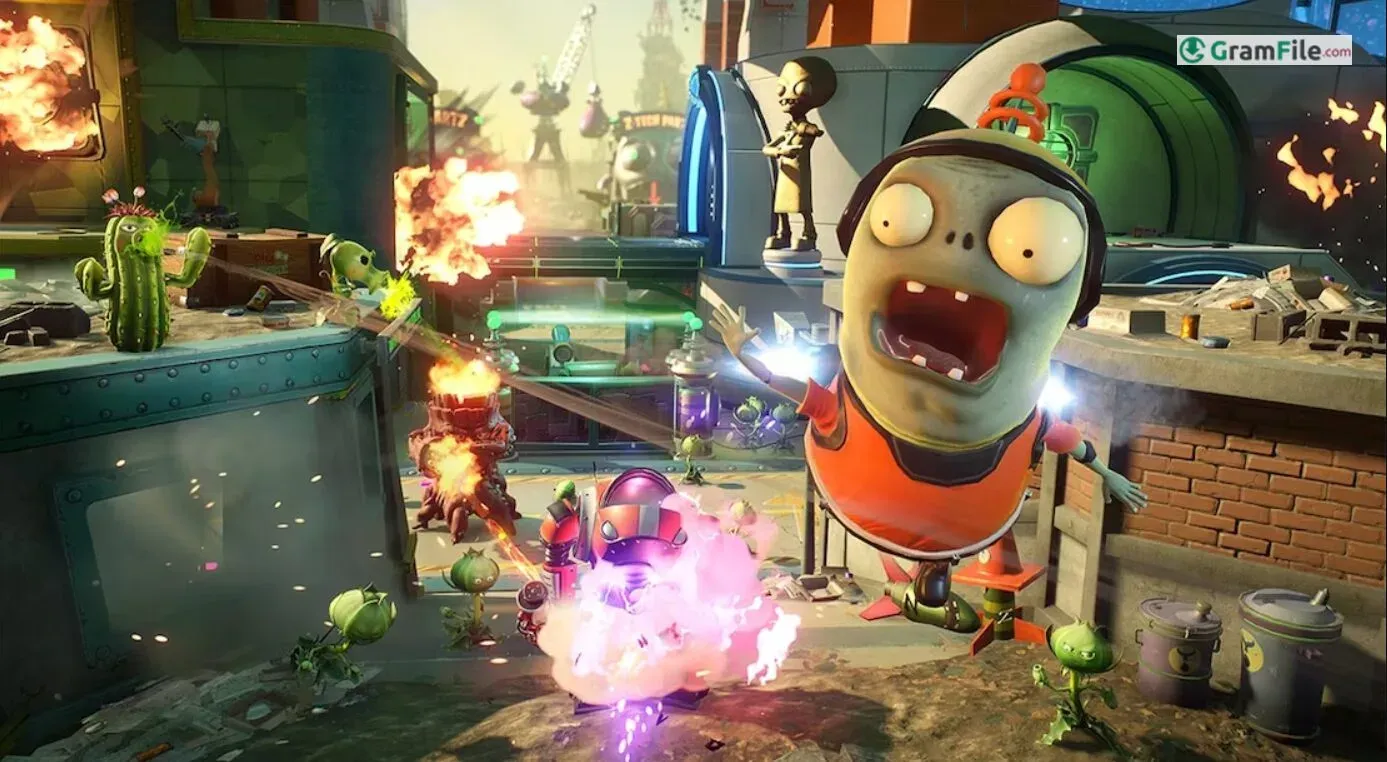
This one suits players who want a loud, cartoon-style team shooter with no grim tone and a low barrier to entry.
It runs on 64-bit Windows PCs and comes from EA as a paid game, so there is no free tier to try first.
The standout is the Backyard Battleground, an open hub where you and up to three friends pick up daily quests before heading into a match.
Skip it if you want a game that works without a connection or a free download.
What is Plants vs. Zombies Garden Warfare 2?
It is the second shooter spin-off of the Plants vs. Zombies series, made by PopCap and published by Electronic Arts. You play as a plant or a zombie in a cartoon suburb, using class-based weapons and special abilities.
The game is a paid license sold through the EA store.
Backyard Battleground: the hub between matches
Instead of dropping you straight into a menu, the game gives you an interactive hub. You and up to three friends can take on daily quests and challenges there and interact with familiar characters.
It works as a lobby with things to do while the group gathers.
Tip: if you play with friends, group up in the hub first and then queue together.
Classes with their own tricks: Rose, Imp and the rest
The roster covers plants and zombies, and each class has its own weapon and set of abilities. The Rose leans on magic, while the Imp can summon a mech.
The downside is a learning curve: with this many abilities, new players need a few matches to work out which class fits their style.
Turf Takeover, Team Vanquish and Herbal Assault
Matches range from the large objective-based Turf Takeover to the smaller deathmatch-style Team Vanquish. Herbal Assault flips the usual roles, with plants attacking and zombies defending.
The variety keeps sessions from feeling repetitive, though all the multiplayer content depends on an online connection.
Solo play and co-op without a full squad
You are not forced into competitive lobbies. EA promotes solo play as part of the game, so you can progress without a team.
Expect to be online anyway, since the listed requirements include an internet connection.
Stickers, new variants and optional purchases
Progression runs through collectible stickers that award new characters, variants and cosmetic items. That keeps a reason to log in after the first few hours.
EA also lists optional in-game purchases of virtual currency, so check the store page if that matters to you.
What your PC needs to run it smoothly
The game needs a 64-bit system and a dedicated graphics card. A card in the GeForce GT 640 or Radeon HD 7730 class is listed as a minimum by a requirements database.
Laptops that default to integrated graphics are the usual source of trouble, so check which GPU the game is using.
Free-only, offline-only or newer-game players: pass on this one
Skip it if you want a free game, a title that works fully offline, or a more modern entry in the series.
It is also a poor fit for players who dislike online matches, because most of the content assumes a connection.
How to Download & Install
Use the download button at the top of this page to grab the installer. The game itself is a paid license from EA, so you need it on your EA account to play.
- Press the download button at the top of this page and store the installer somewhere easy to find.
- Run the installer and follow the on-screen prompts.
- Sign in with your EA account when asked.
- Make sure the game is in your library. If it is not, buy it through the EA store first.
- Start the installation from your library and wait for the game files to finish downloading.
- Launch the game and choose a plant or zombie class to begin.
Installer type
This page offers a single installer, which normally targets 64-bit systems. There is no separate offline installer or portable version.
System requirements
- OS: the EA store page lists Windows 10 64-bit as the minimum. Our database additionally marks Windows 7, 8.1 and 11 as supported.
- CPU: 64-bit (x64) processor.
- Graphics: a dedicated video card is required. Integrated graphics alone are not enough, according to EA support.
- Internet: a connection of 512 kbps or faster is listed.
- Input: keyboard and mouse, or a controller.
License and activation
This is a paid game. The license is tied to your EA account, so sign in with the account that owns it before you launch.
How to update
Updates come through the EA app. Open the game’s entry in your library to check whether a newer build is waiting.
Fixes for common install problems
- The game will not start on a laptop: it may be using integrated graphics. Set the game to run on the dedicated graphics card in your graphics control panel or Windows graphics settings.
- The download stalls or the files look broken: update your graphics drivers, then use the repair option for this game in the EA app.
- Matches will not load: check that your connection meets the listed speed and that no firewall is blocking the game.
Pros & Cons
What we liked
- Fun, humorous class-based shooter
- Backyard Battleground hub with quests
- Solo and co-op content included
- Wide roster with class variants
- Cosmetic sticker rewards
What we didn't like
- Paid, no free version
- Needs a dedicated graphics card
- Online connection expected
Best Plants vs. Zombies Garden Warfare 2 Alternatives
-
 PUBG
Free battle royale shooter with 100-player matches, loot and squads.
-
 Fortnite
Free battle royale shooter with building, creative mode and live events.
-
 Plants vs. Zombies
Tower defense game where plants stop zombie waves across your lawn.
Conclusion
4.5out of 5 · 68 user ratings
Garden Warfare 2 is a good pick if you want a cheerful class-based shooter and can play online with a friend or two. It is a poor choice if you want something free or fully offline.
If you prefer a newer game from the same series, look at Plants vs. Zombies: Battle for Neighborville, which is also a paid EA title.
If cost is the main concern, Fortnite is free, and the original Garden Warfare is a simpler paid alternative with the same humor.
FAQ
How much does Garden Warfare 2 cost on PC?
It is a paid game, and the price is set on the EA store page, so check there for the current amount. There is no free version here.
What PC do I need to run Garden Warfare 2?
You need a 64-bit system and a dedicated graphics card. The EA store page lists Windows 10 64-bit as the minimum.
Why does Garden Warfare 2 not start on my laptop?
The game may be running on integrated graphics, which EA support says is not enough. Set it to use the dedicated graphics card, then update your drivers.
Can I play Garden Warfare 2 with friends on PC?
Yes. The Backyard Battleground hub lets you and up to three friends take on quests together before joining matches.
Does Garden Warfare 2 have a single-player mode?
Yes, EA promotes solo play as part of the game. Expect to be online anyway, because the listed requirements include an internet connection.
What is the difference between Garden Warfare 2 and Battle for Neighborville?
Battle for Neighborville is the later game in the series and is a separate paid title. Garden Warfare 2 is the earlier one, with its own hub, classes and modes.
Found a problem with this download? Report an outdated version, broken link, suspicious installer or incorrect information.
 Internet Download Manager
 Sumatra PDF
 IrfanView
 WinRAR
 PotPlayer
 Google Chrome