


Unreal Engine for Windows is a powerful tool for making games and 3D experiences on your PC.
Originally created by Epic Games in the late ’90s for their own games, it’s now used by developers everywhere – from small teams to big studios – to build stunning, interactive worlds.
If you’ve ever played a visually stunning game or explored a breathtaking virtual world, chances are it was built with Unreal Engine.
Developed by Epic Games, this industry-leading software lets creators design high-end games, and even film-quality animations, all in real time. And the best part? It’s free to download and use for most projects.
What Is Unreal Engine?
Unreal Engine is a 3D creation tool used by game developers, filmmakers, architects, and more. It’s known for its photorealistic graphics, easy-to-use tools, and powerful physics simulation.
Whether you’re making a game, an architectural walkthrough, or a short film, it provides everything you need, without requiring deep coding knowledge.
Key Features & Highlights
- Real-time 3D rendering powers instant visual feedback.
- Nanite virtualized geometry handles massive, film-quality assets.
- Lumen global illumination creates realistic, dynamic lighting.
- Blueprint visual scripting builds logic without coding.
- Robust physics simulation enables lifelike collisions and movement.
- Cross-platform deployment exports to PC, console, mobile, VR.
- Quixel Megascans integration offers free photorealistic assets.
- Virtual production tools blend real-time CGI with live action.
- Extensive marketplace supplies ready-made models, tools, and plugins.
- Free to use until $1M revenue per product.
How to Download & Install
Getting started is simple:
1. Download the Epic Games Launcher
- Go to the official Epic Games website.
- Download and install the Epic Games Launcher (it’s like Steam but for Unreal Engine).
2. Install Unreal Engine

- Open the launcher and sign in (or create an account).
- Navigate to the “Unreal Engine” tab.
- Click “Install Engine” and choose the latest version.
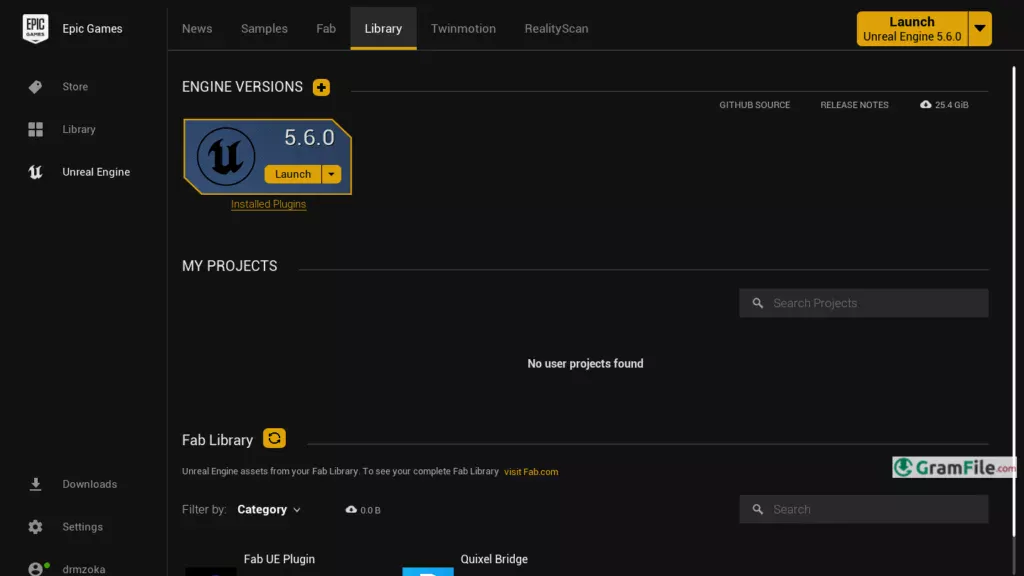
3. Set Up Your Project

- Once installed, launch Unreal Engine.
- Select a template (like First-Person Shooter or Open World) or start from scratch.
- You’re ready to create!
Unreal Engine 5 System Requirements
To run Unreal Engine smoothly, your PC needs these minimum specs (for basic projects) or recommended specs (for serious development):
| Component | Minimum | Recommended |
|---|---|---|
| OS | Windows 10 64-bit | Windows 10/11 64-bit (latest) |
| CPU | Quad-core Intel/AMD, 2.5 GHz | 8-core Intel/AMD, 3.0 GHz+ |
| RAM | 8 GB | 32 GB+ (64 GB for complex scenes) |
| GPU | DX12-compatible, 4 GB VRAM | RTX 2080 / RX 5700 XT (8 GB VRAM+) |
| Storage | 256 GB SSD | 1 TB NVMe SSD (faster load times) |
| Other | Internet connection | High-speed internet for assets |





