

Download Details
- Version
- 32.0.0.465 (latest)
- File size
- 20.6 MB
- License
- Free
- SHA-256 checksum
358e18ee59384ff0f9fb208e478b56a7a3b021e50103e9df535307821edc669f- Developer
- Adobe
- Supported OS
- Windows 11, Windows 10, Windows 7
- Installers
- 64-bit (x64), 32-bit (x86), Offline
- Downloads
- 16856+
 Reviewed by Mohamed Zaki
Tested on Windows 11 and 10 · · How we review
Screenshots
Adobe Flash Player for Windows was once a groundbreaking tool that revolutionized how we experienced the internet, enabling rich multimedia content like animations, videos, and interactive applications to come alive in web browsers.
Launched in the late 1990s by Macromedia (later acquired by Adobe), it quickly became a cornerstone of the digital world, powering everything from games to educational tools and video streaming.
However, after decades of dominance, Flash faced growing criticism over security vulnerabilities and performance issues, leading to its eventual decline.
By the end of 2020, Adobe officially discontinued support, marking the end of an era for this once-indispensable software. This review explores its legacy, impact, and why it’s no longer a part of our digital lives.
Adobe Flash Player was a software that brought the internet to life. It allowed users to view animations, play games, watch videos, and interact with dynamic content on websites.
For years, it was the go-to tool for creating engaging online experiences, making it a staple for developers and users alike.
What is Adobe Flash Player?
Adobe Flash Player was a browser plugin that enabled websites to display multimedia content.
It supported vector graphics, animations, and audio/video playback, making it essential for everything from YouTube videos to interactive learning tools and online games.
Key Features and Highlights
- Played animations, videos, and games directly in web browsers.
- Supported interactive multimedia content for websites.
- Enabled rich vector graphics for smooth, scalable visuals.
- Allowed streaming of audio and video seamlessly.
- Powered online games and educational tools.
- Supported ActionScript for creating dynamic applications.
- Worked across multiple browsers like Chrome, Firefox, and Edge.
- Offered offline capabilities for standalone applications.
- Integrated with web cameras and microphones for interactive features.
- Became a global standard for web content in the 2000s.
- Discontinued in 2020 due to security and performance concerns.
- Replaced by modern technologies like HTML5 and WebGL.
The Latest Update
The final version of Adobe Flash Player was 32.0.0.465, released in December 2020. This update marked the end of an era, as Adobe officially discontinued support for Flash Player due to the rise of more secure and efficient technologies like HTML5.
Offline Version
While Adobe Flash Player was primarily used as a browser plugin, offline versions were available for specific needs, such as running standalone Flash applications or games.
However, these offline versions are no longer recommended due to security risks and lack of updates.
Why Did Adobe Flash Player Fade Away?
Flash Player faced criticism over the years for its frequent security vulnerabilities, high resource usage, and compatibility issues with mobile devices.
As modern web standards like HTML5 emerged, offering better performance and security, Flash became obsolete. Major browsers like Chrome, Firefox, and Edge eventually stopped supporting it.
Is Adobe Flash Player Still Safe to Use?
No. Adobe strongly advises against using Flash Player today. Since it’s no longer supported, it poses significant security risks, leaving systems vulnerable to malware and cyberattacks.
Alternatives to Adobe Flash Player
With Flash gone, modern web technologies like HTML5, WebGL, and WebAssembly have taken its place. These tools are faster, more secure, and work seamlessly across devices, ensuring a smoother and safer online experience.
How to Download & Install
Note: Adobe Flash Player is no longer supported or recommended due to security risks.
This guide is for educational purposes only. Proceed with caution, as using Flash Player may expose your system to vulnerabilities.
Step 1: Check System Requirements
- Ensure your Windows PC meets the minimum requirements:
- Windows 7, 8, or 10 (32-bit or 64-bit).
- A compatible web browser (e.g., Chrome, Firefox, or Edge).
Step 2: Download Adobe Flash Player
- Click on the above Download Button -at the top of this page- to download the latest version of Adobe Flash Player.
- Caution: Only download from trusted sources to avoid malware.
- Save the installer file (flash-player.exe) to your computer.
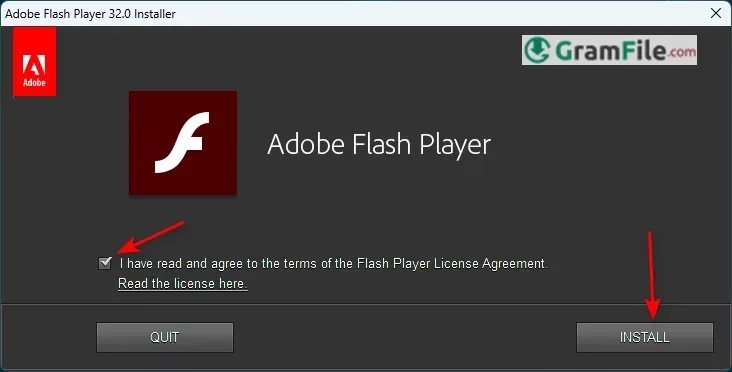
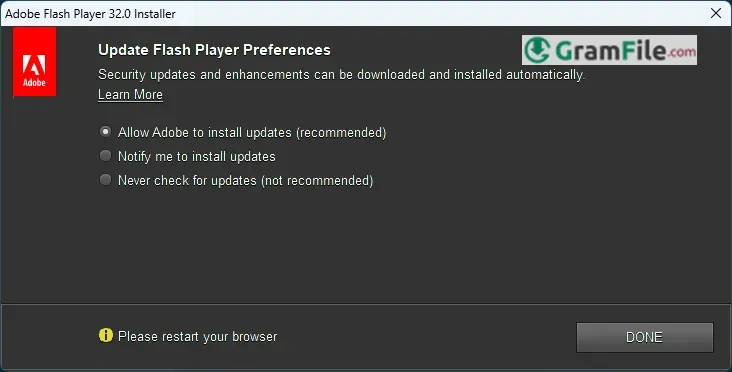
Step 3: Install Adobe Flash Player
- Locate the downloaded installer file (usually in your “Downloads” folder).
- Double-click the file to start the installation process.
- Follow the on-screen instructions:
- Accept the license agreement if prompted.
- Choose whether to allow updates (not recommended due to lack of support).
- Wait for the installation to complete.
Step 4: Enable Flash Player in Your Browser
- Open your browser and go to its settings or extensions menu.
- Look for Adobe Flash Player and ensure it’s enabled.
- Some browsers may require you to manually allow Flash for specific websites.
Step 5: Test Adobe Flash Player
- Visit a website that uses Flash content (if still available).
- If prompted, allow Flash Player to run on the site.
- Verify that animations, videos, or games load correctly.
Important Reminder
Adobe Flash Player is outdated and unsupported. Using it can put your computer at risk. Consider switching to modern alternatives like HTML5 for a safer and more efficient experience.
Pros & Cons
What we liked
- Made websites interactive and engaging.
- Supported videos, games, and animations.
- Worked on most browsers.
- Easy for developers to create content.
- Widely used in the 2000s.
What we didn't like
- Frequent security issues.
- Slowed down computers.
- Not mobile-friendly.
- Discontinued in 2020.
- Modern browsers no longer support it.
- Unsafe to use today.
Best Adobe Flash Player Alternatives
-
 Chrome Web Store
It lets you add helpful extras and fresh styles to your browser.
Conclusion
3.6out of 5 · 99 user ratings
Adobe Flash Player for Windows was a game-changer in its time, transforming the way we experienced the internet.
It brought animations, videos, and interactive content to life, making it a must-have tool for developers and users alike. However, its journey came to an end in 2020, as modern technologies like HTML5 took over.
Why Choose Adobe Flash Player?
If you’re working on legacy projects or need to access old Flash-based content, Adobe Flash Player might still seem like a solution.
It was once the gold standard for multimedia on the web, offering unmatched compatibility and ease of use.
However, choosing Flash Player today is not recommended due to its lack of support, security vulnerabilities, and incompatibility with modern browsers.
Adobe Flash Player vs. Others
- Flash Player vs. HTML5: HTML5 is faster, more secure, and works seamlessly across all devices, unlike Flash, which struggled on mobile platforms and required constant updates.
- Flash Player vs. WebGL: WebGL offers advanced graphics capabilities without the need for plugins, making it a more efficient choice for modern web development.
- Flash Player vs. WebAssembly: WebAssembly provides better performance for complex applications, leaving Flash’s outdated technology behind.
Final Thoughts
Adobe Flash Player was a pioneer that shaped the early internet, but its time has passed. While it holds nostalgic value, using it today is risky and unnecessary.
Modern alternatives like HTML5, WebGL, and WebAssembly have not only replaced Flash but also improved upon it, offering safer, faster, and more versatile solutions.
Flash’s legacy lives on in the vibrant, interactive web we enjoy today, but it’s best left in the past. Embrace the future of web technologies for a better and more secure online experience.
Found a problem with this download? Report an outdated version, broken link, suspicious installer or incorrect information.
 Zoom Workplace
 Nitro PDF Pro
 Sumatra PDF
 IrfanView
 K-Lite Codec Pack
 WinRAR