

Download Details
- Version
- 2025.1218.1800.0 (latest)
- File size
- 99.1 MB
- License
- Free
- Security scan
- VirusTotal: 66 of 66 engines say OK (0 flagged)
- SHA-256 checksum
3dbaa258d071fd4a24986a38a0f69ce23b6b6fd688322b1e2f07afc98798fc1e- Developer
- Supported OS
- Windows 11, Windows 10
- Installers
- 64-bit (x64), ARM (Arm64)
- Downloads
- 12578+
 Reviewed by Eman Sakr
Tested on Windows 11 and 10 · · How we review
Screenshots
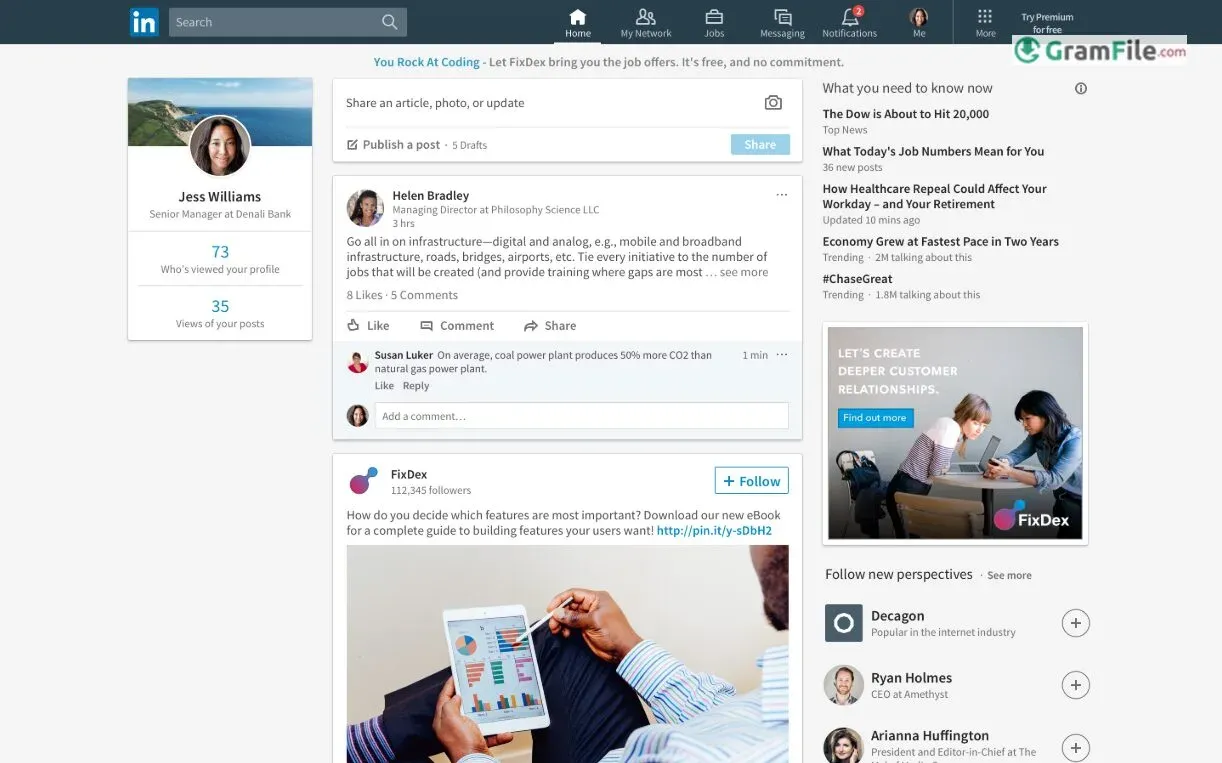
LinkedIn for Windows is the desktop version of the world’s leading professional networking platform, offering seamless access to career opportunities, industry insights, and valuable connections.
Launched in 2003, LinkedIn revolutionized how professionals network online, and its Windows app brings the same robust features – job searching, skill-building, and business networking – right to your PC.
Over the years, it has evolved with a cleaner interface, smarter recommendations, and enhanced productivity tools, making it essential for career growth. This review explores its key features, usability, and overall value for professionals.
While LinkedIn is widely used via web browsers and mobile apps, the Windows version offers a streamlined desktop experience.
It provides quick access to your feed, messages, notifications, and career tools without needing a browser.
The app is especially useful for professionals who spend long hours on their PCs and want efficient networking at their fingertips.
What is LinkedIn?
LinkedIn is the world’s largest professional networking platform, connecting millions of professionals across industries.
It allows users to build their professional profiles, network with colleagues, discover job opportunities, share industry insights, and enhance their skills through learning resources.
Whether you’re job hunting, recruiting talent, or expanding your professional influence, LinkedIn provides the tools to succeed.
Compatibility and Installation
LinkedIn’s Windows app is designed for modern systems but remains accessible across older versions:
- Supports 64-bit systems: Runs natively on 64-bit Windows for better performance.
- Windows 7, 10, and 11 compatible: Works across all three, though Windows 7 users may experience slower updates.
How to Download & Install
- Simply, Click on the above Green Download Button for official and direct download.
- Via Microsoft Store (Recommended) – Open the Store, search LinkedIn, and click Install.
- Manual Install (Alternative) – If the Store isn’t an option, download the installer from LinkedIn’s official site (ensure you select the Windows version).
- Sign In & Sync: Launch the app, log in, and your profile/data will sync automatically.
Performance & Usability
- Lightweight: Uses minimal system resources, even on older machines.
- Seamless Notifications: Desktop alerts keep you updated without checking a browser.
- Limitations: Lacks advanced features like recruiter tools or detailed analytics found on the web version.
Who Should Use It?
- Professionals managing their network from a PC.
- Job seekers who want quick access to new postings.
- Windows 7/10/11 users needing a dedicated, no-frills LinkedIn experience.
Core Features That Power Your Career
1. Streamlined Networking
- Instant Connection Management – Quickly view, accept, or send invitations without browser tabs.
- Smart Suggestions – The app intelligently recommends relevant contacts based on your industry and activity.
2. Real-Time Career Opportunities
- Job Alerts – Get notified about new openings matching your profile directly on your desktop.
- One-Click Applications – Apply for roles using your LinkedIn profile in seconds.
3. Effortless Content Engagement
- Feed Customization – Prioritize updates from key connections and industry leaders.
- Seamless Sharing – Post articles, updates, or media without switching to a browser.
4. Professional Messaging Hub
- Dedicated Inbox – Manage all LinkedIn messages in a clean, email-like interface.
- Read Receipts – Know when your messages are viewed for better follow-ups.
5. Profile Optimization Tools
- Edit-On-The-Fly – Update your experience, skills, or headline without leaving the app.
- Visibility Controls – Adjust who sees your profile changes in real-time.
6. Learning Integration
- LinkedIn Learning Access – Launch courses directly from the app (subscription required).
- Skill Tracking – Add completed courses to your profile with one click.
7. System-Wide Integration
- Desktop Notifications – Stay updated even when the app is minimized.
- Windows Search – Find contacts or content through your Start Menu.
Pros & Cons
What we liked
- Faster than browser
- Easy profile updates
- Get job alerts first
- Saves time
What we didn't like
- Missing features
- Weak search
- Slow on old PCs
Best LinkedIn Alternatives
-
 Facebook
Your social media on the desktop, minus the browser tab.
-
 X (Twitter)
Follow breaking news, join global conversations, and share thoughts instantly from your desktop.

Conclusion
4.4out of 5 · 54 user ratings
Why Choose LinkedIn?
LinkedIn remains the gold standard for professional networking, no other platform offers its level of industry reach, credible job opportunities, and executive engagement.
Whether you’re job hunting, recruiting, or building your brand, LinkedIn delivers real results.
LinkedIn vs. Competitors
- Compared to Indeed/Glassdoor: LinkedIn focuses on networking first, jobs second, making it better for career growth.
- Versus Slack/Discord: Designed for professional conversations, not casual chats.
- Against Xing/Jobcase: Far larger global reach with more Fortune 500 connections.
The Windows App Advantage
While the web version is more powerful, LinkedIn for Windows is perfect for:
- Professionals who want distraction-free networking
- Quick profile checks and messaging
- Job seekers who need instant alerts
Bottom Line: If you’re serious about your career, LinkedIn is non-negotiable, and the Windows app makes it effortlessly accessible. It’s not perfect, but it’s the best at what it does.
Found a problem with this download? Report an outdated version, broken link, suspicious installer or incorrect information.
Must-Have Windows Apps
-
 Zoom Workplace
 Zoom Workplace
 Nitro PDF Pro
 Sumatra PDF
 IrfanView
 K-Lite Codec Pack
 WinRAR