

Download Details
- Version
- 7.0.1.0 (latest)
- File size
- 0.4 MB
- License
- Free
- Developer
- X Corp
- Supported OS
- Windows 11, Windows 10
- Installers
- 64-bit (x64)
- Downloads
- 8806+
 Reviewed by Eman Sakr
Tested on Windows 11 and 10 · · How we review
Screenshots
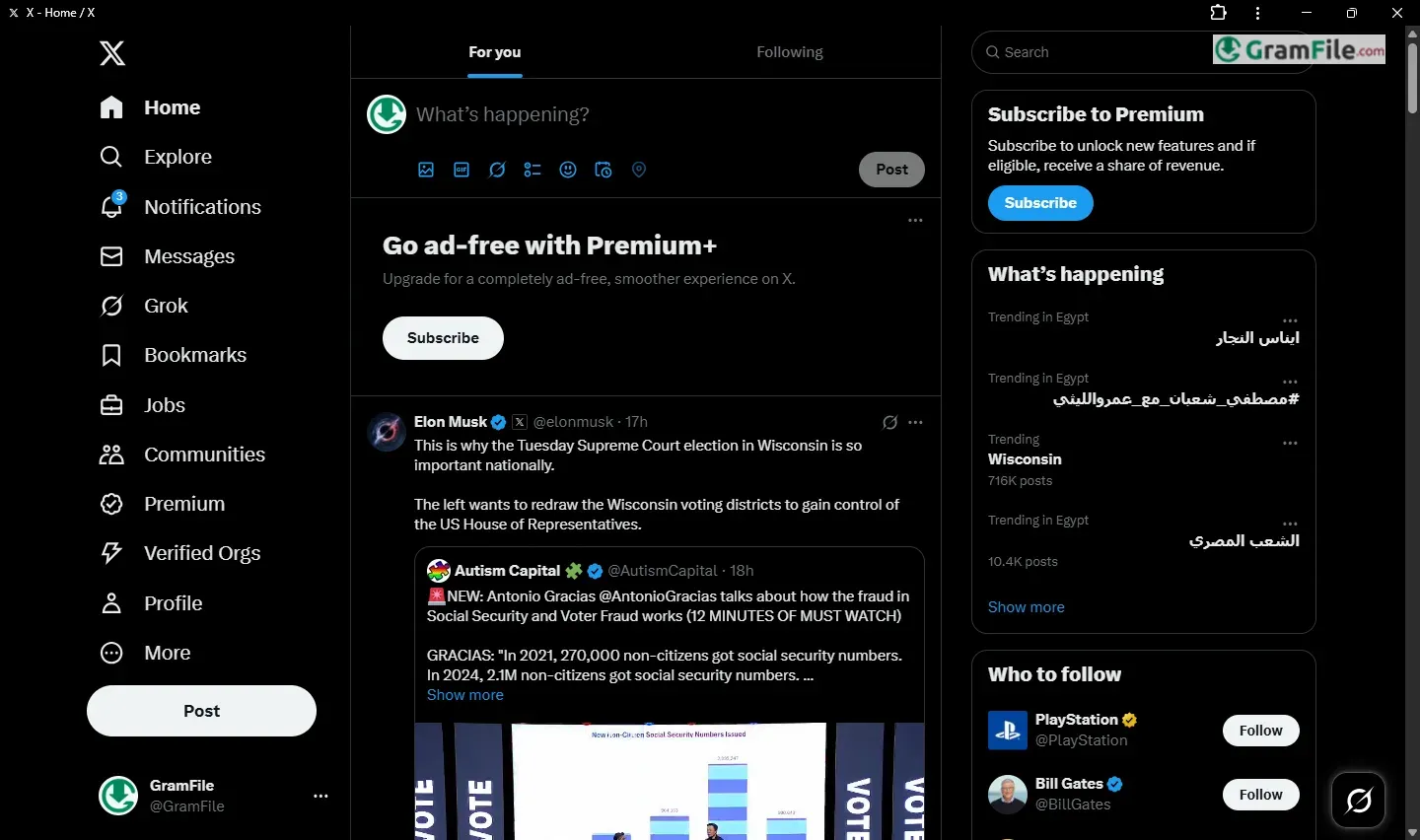
X (Twitter) for Windows brings the world’s fastest-breaking news and global discussions to your desktop.
Originally launched in 2006 as a microblogging platform, Twitter revolutionized digital communication with its 280-character tweets before rebranding as X in 2023.
The Windows app maintains all the core functionality that made Twitter essential for journalists, professionals, and public figures, while optimizing it for desktop productivity.
In this review, we’ll examine how the Windows version stands up for real-time information sharing in today’s fast-moving digital landscape.
Key Features
X (Twitter) for Windows delivers a streamlined desktop experience for professionals who need instant access to breaking news, industry trends, and global conversations.
The Windows app retains the platform’s signature immediacy while adding desktop-specific functionality that enhances productivity. Here’s what sets it apart:
Optimized Desktop Interface
The Windows version features a clean, three-column layout that maximizes screen space. The left sidebar provides quick access to Home, Explore, Notifications, and Messages, while the central feed displays real-time updates.
The right column suggests trending topics and accounts to follow, keeping you informed without excessive clicking.
Enhanced Thread Management
For professionals sharing complex ideas, the Windows app makes thread creation effortless.
The compose box expands for longer drafts, and a visual thread builder lets you structure connected tweets before posting—ideal for detailed commentary or breaking down industry developments.
Advanced Search & Filters
X’s powerful search functionality shines on desktop. Boolean operators, date filters, and verified-account sorting help cut through noise when researching trends or tracking brand mentions.
Saved searches with email alerts ensure you never miss critical updates in your field.
Keyboard Shortcuts & Productivity
Power users benefit from time-saving shortcuts:
- J/K to navigate posts
- L to like
- R to reply
- Cmd/Ctrl + Enter to tweet
These make engagement significantly faster than mobile.
Integrated Media Tools
The Windows app supports:
- Drag-and-drop image/video uploads
- Live streaming with Studio mode
- GIF/keyword integration
- Podcast/Spaces discovery tab
Professional-Grade DMs
Direct Messages function as a full-featured chat system with:
- File sharing (up to 2GB)
- Group conversations
- Read receipts
- Encryption indicators
Lists & Curated Feeds
Create and monitor specialized lists (competitors, clients, industry leaders) in separate tabs.
The mute/filter options let you customize feeds to show only relevant content, critical for avoiding distraction.
Analytics Dashboard
Business profiles access real-time metrics on:
- Impression trends
- Engagement rates
- Follower demographics
- All exportable as CSV for reporting.
Pros & Cons
What we liked
- Faster navigation with keyboard shortcuts
- Better for long threads and research
- Cleaner interface than mobile
- Handy for work with multiple windows
What we didn't like
- Missing some new mobile features
- Looks outdated compared to web
- No tweet scheduling built-in
- Can be slow during big events
Best X (Twitter) Alternatives


Found a problem with this download? Report an outdated version, broken link, suspicious installer or incorrect information.
Must-Have Windows Apps
-
 Zoom Workplace
 Zoom Workplace
 Nitro PDF Pro
 Sumatra PDF
 IrfanView
 K-Lite Codec Pack
 WinRAR