

Download Details
- Version
- 4.15 (latest)
- File size
- 1.9 MB
- License
- Free
- Security scan
- VirusTotal: 71 of 71 engines say OK (0 flagged)
- SHA-256 checksum
84c8a437f8af89257524478489e5c85f1edf25f761d299e2bcde46ac0afbe106- Developer
- Pete Batard
- Supported OS
- Windows 11, Windows 10, Windows 7, Windows 8.1
- Installers
- 64-bit (x64), 32-bit (x86), ARM (Arm64), Portable, Offline
- Downloads
- 36928
- Rating
- 4.7 out of 5 · 111 reviews
- File name(s)
- rufus-4.15.exe, rufus-4.15_x86.exe, rufus-4.15_arm64.exe, rufus-4.7p.exe
 Reviewed by Ahmed Madbouli
Tested on Windows 11 and 10 · · How we review
Screenshots
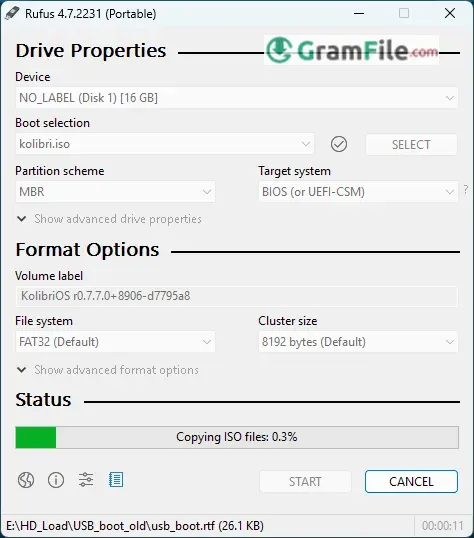
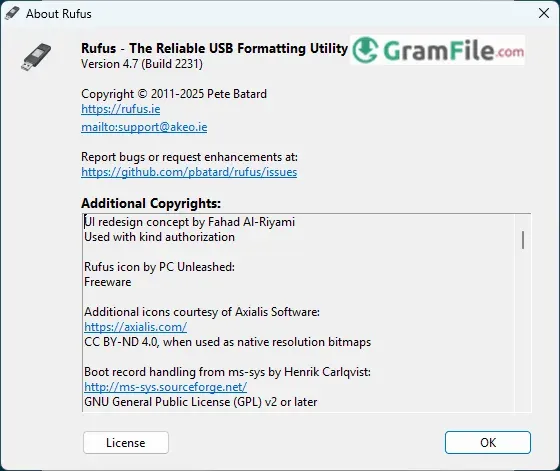
Since 2011, Rufus has set the standard for fast, reliable bootable USB creation. This compact Windows tool converts ISOs to bootable drives in seconds with military precision.
Developer Pete Batard created Rufus to solve two problems: slow USB writing and overly complex alternatives. The result? A 1MB powerhouse that outperforms tools ten times its size.
What makes IT pros choose Rufus decade after decade? Raw speed. While competitors crawl, Rufus completes most writes in half the time. Its secret? Optimized low-level operations that bypass Windows bottlenecks.
From Windows installs to Linux live USBs, Rufus handles every format while offering advanced controls competitors hide behind menus. No bloat. No nonsense. Just the fastest way to make bootable media.
This review explains why Rufus remains unbeaten for USB creation, and when you might need something simpler.
What is Rufus?
At its heart, Rufus (The Reliable USB Formatting Utility, as its name playfully suggests) is a remarkably compact and powerful open-source utility specifically designed for Microsoft Windows.
Its primary and most celebrated function is the streamlined creation of bootable USB flash drives from a wide array of bootable ISO images (.iso files).
Think of it as the bridge between a downloaded operating system or utility image and a physical USB stick ready to boot a computer.
While this might sound simple, Rufus handles the complex nuances of formatting, partitioning, and writing data correctly. This ensures the resulting drive is universally recognized and bootable on different systems, including those using traditional BIOS or modern UEFI interfaces.
It’s the go-to solution when you need to quickly and effectively turn an ISO file into a functional bootable USB drive.
Key Features & Highlights
- Blazing fast – Writes ISOs quicker than competitors.
- No install needed – Runs portable from a single .exe.
- Deep format control – Choose MBR/GPT, FAT32/NTFS.
- Windows 11 ready – Bypasses TPM/Secure Boot checks.
- Failsafe checks – Detects bad USB sectors.
- UEFI/BIOS support – Works on any PC.
- Tiny footprint – Under 2MB, zero bloat.
- Offline friendly – No internet required.
- Persistent storage – Saves settings between uses.
- Multilingual – Supports 40+ languages.
Pros & Cons
What we liked
- Fastest ISO-to-USB tool
- Portable (no install needed)
- Bypasses Windows 11 restrictions
- Advanced formatting options
What we didn't like
- Not beginner-friendly
- Windows only
- No automatic updates
Best Rufus Alternatives
-
 balenaEtcher
A free tool that lets you easily write OS images to USB drives or SD cards.
-
 Ventoy
It is the ultimate multi-boot solution, turning any USB into a portable library of bootable operating systems.
Conclusion
4.7out of 5 · 111 user ratings
Rufus isn’t just another USB tool, it’s the precision instrument professionals reach for when every second and every setting matters.
While alternatives exist, none match its perfect balance of raw speed and surgical control.
Why Choose Rufus?
- Unmatched speed – Writes ISOs while competitors are still loading
- Military-grade control – From partition schemes to cluster sizes
- No-nonsense reliability – Works when other tools fail
- Portable power – Fits on a floppy disk (remember those?) yet outperforms bloated suites
Rufus vs. The Competition
- vs. BalenaEtcher – Rufus is the sports car to Etcher’s bicycle
- vs. Win32 Disk Imager – Like comparing a scalpel to a butter knife
- vs. Ventoy – Ventoy’s great for multi-boot, Rufus for precision jobs
The Bottom Line
Choose Rufus when:
- You need it done fast
- You want it done right
- “Good enough” isn’t good enough
For everyone else? There’s always Etcher.
Found a problem with this download? Report an outdated version, broken link, suspicious installer or incorrect information.
Changelog - What's new in version 4.15
- Add RISC-V 64 support to UEFI:NTFS- Improve the guards for using the "silent" Windows installation option
- Improve the ability to cancel during write retries
- Improve progress reporting for compressed image extraction
- Fix unrestricted XML entity expansion and integer overflow in ezxml parser (courtesy of @esadowski4) [GHSA-55r2-34wg-8mv9]
- Fix "silent" Windows installation failing at 75% in most cases [#2960]
- Fix a crash during boot when using UEFI:NTFS on Snapdragon X based ARM64 platforms [#2934]
- Fix first WUE option always being checked by default [#2965]
- Fix an infinite loop when using Windows ISOs that contain multiple WIMs
- Fix "Enable runtime UEFI media validation" checkbox not always being properly enabled
- Other WUE improvements/fixes for OneDrive removal and username validation (with thanks to @christian8641) [#2984, #2991]
 Zoom Workplace
 Nitro PDF Pro
 Sumatra PDF
 IrfanView
 K-Lite Codec Pack
 WinRAR