

Download Details
- Version
- 1.1.17 (latest)
- File size
- 15.9 MB
- License
- Free
- Security scan
- VirusTotal: 67 of 68 engines say OK (1 flagged)
- SHA-256 checksum
d250e97a7595fdac4f97debc630d7a8da942319274a76cb32384596b659dbaeb- Developer
- Ventoy
- Supported OS
- Windows 11, Windows 10, Windows 7, Windows 8.1
- Installers
- 64-bit (x64), 32-bit (x86), Offline
- Downloads
- 15305
- Rating
- 4.4 out of 5 · 61 reviews
- File name(s)
- ventoy-1.1.17-windows.zip
 Reviewed by Ahmed Madbouli
Tested on Windows 11 and 10 · · How we review
Screenshots
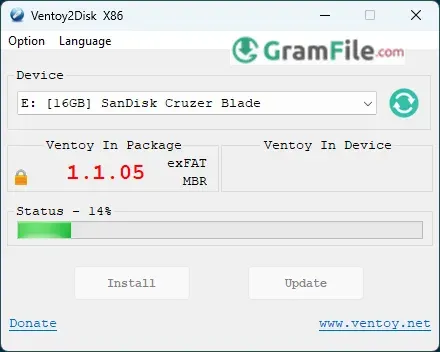
Ventoy redefines bootable USB creation by eliminating the need for repetitive formatting. This innovative tool lets you simply copy multiple ISO files to a USB drive and boot any of them on demand, a breakthrough that makes traditional single-ISO tools obsolete.
Developed by Chinese programmer Longpanda in 2020, Ventoy began as an open-source solution to a universal frustration: the wasteful process of recreating bootable USBs for different operating systems. Its unique approach leverages a novel boot loader that dynamically presents all available ISOs at startup.
Unlike Rufus or Etcher which overwrite the entire drive, Ventoy creates a persistent partition that preserves your files while adding boot capability.
The project has gained rapid adoption among IT professionals, with over 10 million downloads and support for 1,000+ ISO variants – from Windows to obscure Linux distros.
What is Ventoy?
Ventoy is a revolutionary open-source tool that transforms how we use bootable USB drives. Forget the old “one ISO per USB” approach, Ventoy lets you drag and drop multiple OS images onto a single drive and boot any of them on demand.
No more constant reformatting or carrying multiple flash drives.
Key Features That Change Everything
✔ Multi-ISO Boot – Store Windows, Linux, recovery tools, and more on one USB
✔ Plug-and-Play – Just copy ISO files like normal documents (no extraction)
✔ Persistent Storage – Keep personal files alongside bootable ISOs
✔ UEFI & Legacy BIOS – Works on any PC, old or new
✔ ISO Compatibility – Supports 1,000+ OS variants (even obscure ones)
✔ Write Protection – Safeguard your USB from accidental corruption
✔ Auto Installation – Streamlines OS setups with unattended scripts
Why It Stands Out
While tools like Rufus and BalenaEtcher force you to wipe your USB for each new ISO, Ventoy treats your drive like a digital Swiss Army knife.
IT teams love it for deploying systems, while hobbyists use it to test Linux distros without burning through flash drives.
Pros & Cons
What we liked
- Runs multiple OS from one USB
- No repetitive formatting
- Works on old/new PCs
What we didn't like
- First setup takes time
- Can’t edit ISOs
Best Ventoy Alternatives
-
 Rufus
RufusIt creates bootable USBs fast with advanced options.
-
 balenaEtcher
A free tool that lets you easily write OS images to USB drives or SD cards.
Conclusion
4.4out of 5 · 61 user ratings
Ventoy isn’t just another USB tool, it’s a complete paradigm shift. By solving the “one ISO per drive” problem, it has made traditional tools feel outdated overnight.
Why Choose Ventoy?
- Game-changing convenience – Your USB becomes a multi-OS toolbox
- No more reformatting – Add/remove ISOs like regular files
- Future-proof design – Works with 99% of operating systems
- IT department’s dream – Maintain all your tools on one drive
Ventoy vs. The Competition
- vs. Rufus – Rufus is a scalpel (precise but single-use), Ventoy is a Swiss Army knife
- vs. BalenaEtcher – Etcher is like a disposable camera, Ventoy is a smartphone
- vs. MultiBootUSB – Ventoy actually delivers what others only promise
The Bottom Line
Choose Ventoy if you:
- Work with multiple operating systems
- Hate constantly reformatting drives
- Want to future-proof your toolkit
For single Windows installs? Rufus might be faster. But for everyone else – especially IT pros, sysadmins, and Linux enthusiasts – Ventoy is nothing short of revolutionary.
Found a problem with this download? Report an outdated version, broken link, suspicious installer or incorrect information.
Changelog - What's new in version 1.1.17
Changelog1. Optimization for Secure Boot process.
2. Fix the boot issue for some UOS release.
3. Add support for some EulerOS release.
4. Fix the disk_write logic error (#3693)
5. Add log for live injection process.
6. Add support for Athena OS (#3689)
7. Fix the boot issue for latest GhostBSD (#3664)
8. Fix the PATH broken in Ventoy2Disk.sh (#3615)
9. Fix fdisk detection on BusyBox systems (#3614)
10. Fix the issue that proxmox-ve can not boot after install in grub2 mode.
11. Languages update.
================================================================
Wana boot and install OS through network (PXE)? Welcome to my new project iVentoy.
About iVentoy https://www.iventoy.com/
iVentoy is an enhanced version of the PXE server.
Extremely easy to use
Many advanced features
x86 Legacy BIOS, IA32 UEFI, x86_64 UEFI and ARM64 UEFI mode supported
110+ common types of OS supported (Windows/WinPE/Linux/VMware)
Turn any PC, laptop, server, NAS, or Raspberry Pi into a PXE server instantly!
......
 Zoom Workplace
 Nitro PDF Pro
 Sumatra PDF
 IrfanView
 K-Lite Codec Pack
 WinRAR