

Download Details
- License
- Free
- Developer
- Total Security
- Supported OS
- Windows 11, Windows 10
- Installers
- 64-bit (x64), 32-bit (x86)
- Downloads
- 2902
- Rating
- 4 out of 5 · 22 reviews
 Reviewed by Eman Sakr
Tested on Windows 11 and 10 · · How we review
Screenshots
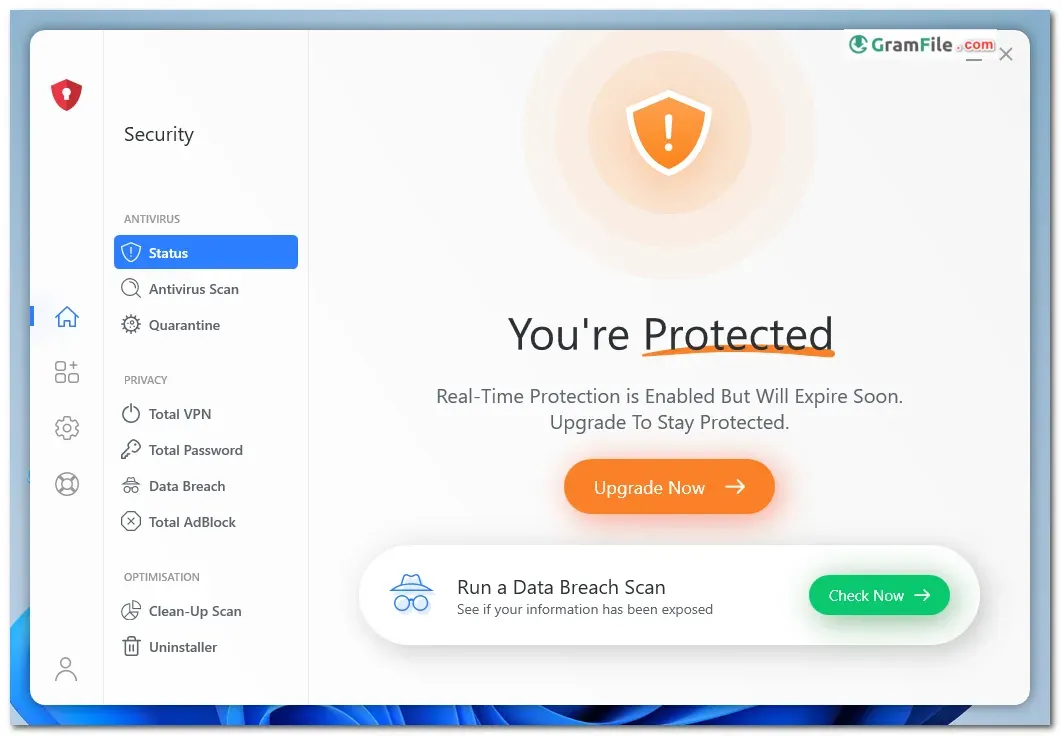
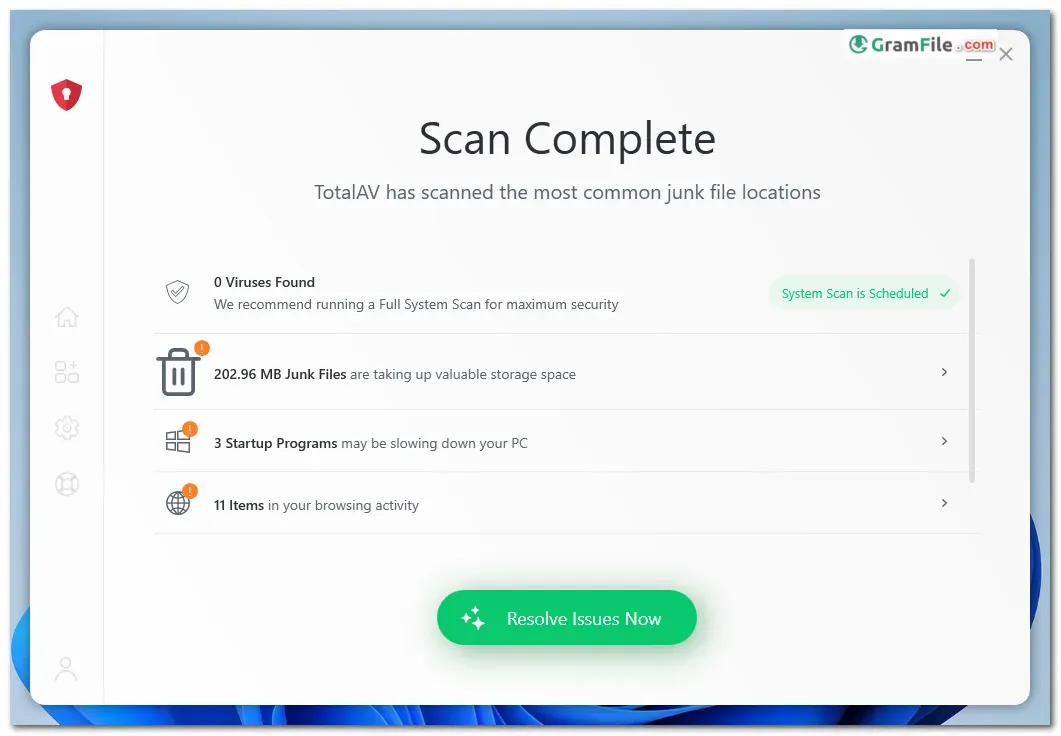
TotalAV is a security suite for Windows PCs. It combines an antivirus engine, a web filter and PC cleanup tools in one simple app.
It suits people who want protection without fiddling with settings. Independent labs have rated its malware detection highly, and the interface is easy to follow.
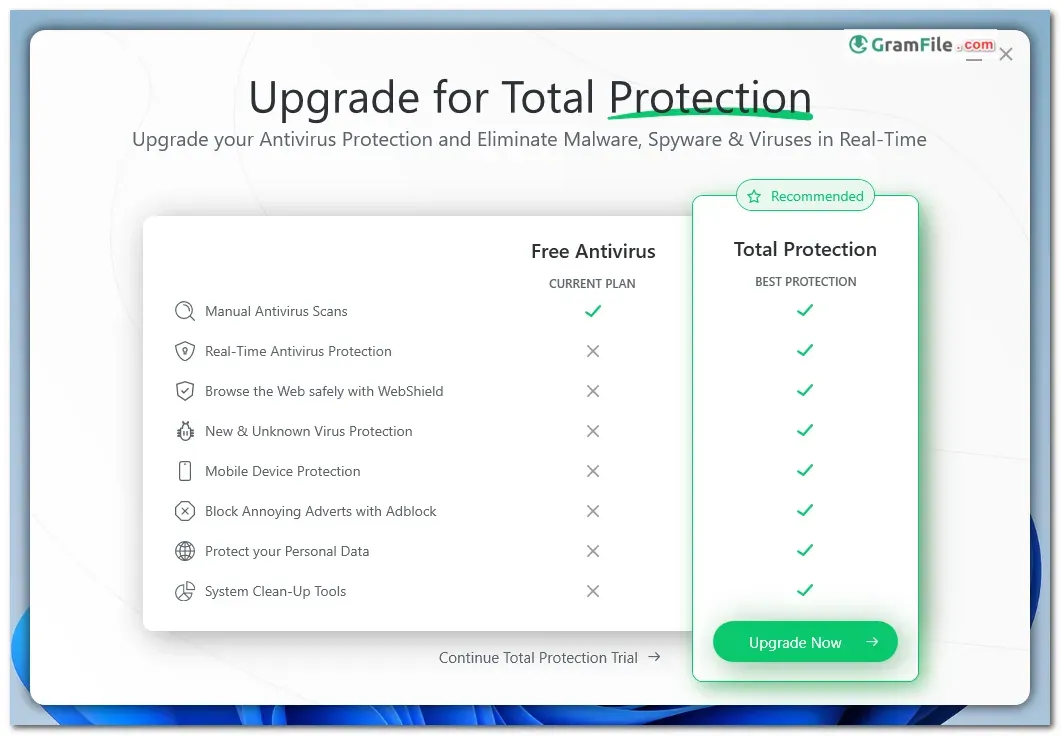
The free version is a basic scanner. Real-time protection, the VPN and the password manager sit behind paid plans, so decide early whether you need them.
What is TotalAV?
TotalAV is a consumer antivirus suite for Windows with real-time scanning, ransomware and phishing defense, a web filter and PC tune-up tools.
The aim is simple: install it, run a scan and let it handle the rest. That makes it a fit for home users who do not want to learn security jargon.
Malware protection
Malware protection is the main strength. Independent testing labs have given TotalAV top marks for protection, performance and usability.
The WebShield browser extension blocks known malicious and phishing pages before they load.
The interface is clean. Scans, cleanup and protection settings are all a click or two from the dashboard.
Tip: if you shop or bank online often, switch on WebShield in your main browser so risky pages are blocked before you enter any details.
Extra tools on paid plans
Paid plans add a VPN, a password manager and an ad blocker on top of the antivirus engine.
The tune-up tools clear junk files and manage startup items, which can make an older PC feel less sluggish.
Tip: if you need only antivirus, pick the cheapest paid tier. Buy a higher one only if you will use the VPN or password manager.
Free vs Pro
| Feature | Free | Paid plans |
|---|---|---|
| Manual malware scan | Yes | Yes |
| Real-time protection | Limited or trial only | Yes |
| Ransomware protection | No | Yes |
| WebShield and ad blocking | No | Yes |
| VPN and password manager | No | Yes (depends on tier) |
| System tune-up tools | Limited | Yes |
| Live customer support | No | Yes |
Is TotalAV safe to install?
Yes, as long as you get the real installer. Independent labs such as AV-TEST and AV-Comparatives have certified TotalAV for Windows.
Fake “TotalAV” pages and cracked copies do exist. Use the download button at the top of this page and avoid unofficial mirrors.
Who should skip it
If you only want a free scanner and no upsells, Microsoft Defender or a free Bitdefender or Avast edition may suit you better.
Power users who want deep manual control over firewall rules and scan engines will find TotalAV too simple.
How to Download & Install
Click the download button at the top of this page to get the TotalAV installer, a standard EXE file for Windows.
Run it, follow the setup prompts, then start the app and run a first scan.
Step 1: Click the download button at the top of this page and save the installer.
Step 2: Open the installer and approve the Windows permission prompt.
Step 3: Follow the setup wizard and wait for the installation to finish.
Step 4: Launch TotalAV and let it update its protection data.
Step 5: Run a first scan, then review the cleanup suggestions it offers.
Installer types
There is one main installer, usually 64-bit. No separate offline or portable build is listed.
System requirements
- Windows 11 or Windows 10
- Processor: 1 GHz or faster (Intel or AMD)
- RAM: 2 GB minimum
- Free disk space: about 500 MB
- Administrator rights and an internet connection for setup and updates
License and activation
The free version works without a subscription. Paid plans unlock more features after you sign in with your TotalAV account or enter your activation details in the app.
How to update TotalAV
TotalAV updates its protection data on its own while you are online. The app itself also updates automatically.
If you want the latest build manually, use the download button at the top of this page and install it over the old one.
Fixing common install problems
- Setup stops or fails: right-click the installer, choose Run as administrator, and check that your internet connection is active.
- Conflicts with another antivirus: two real-time scanners can clash. Uninstall the other one, restart the PC, then install TotalAV again.
- Scans feel slow at first: the first full scan checks everything. Later scans are faster, and you can schedule them for times you are away.
Pros & Cons
What we liked
- Strong malware detection in lab tests
- Clean, beginner-friendly interface
- WebShield blocks phishing pages
- VPN and password manager included
- Built-in PC cleanup tools
What we didn't like
- Free version is very limited
- Renewal prices can jump
- Frequent upgrade prompts
Best TotalAV Alternatives
-
 Microsoft Defender
Free real-time antivirus with cloud protection, ransomware defense and offline scanning.
-
 Bitdefender Antivirus Free
Free antivirus with real-time malware, ransomware and phishing protection, light on resources.
-
 Avira Free Security
Free antivirus with real-time protection, a limited VPN and PC cleanup tools.
-
 Kaspersky Free
Cloud-assisted real-time malware scanning and anti-phishing protection at zero cost.
Conclusion
4out of 5 · 22 user ratings
TotalAV is easy to use, but it is not the only option for a Windows PC.
The table shows how it compares with three well-known alternatives, so you can match one to your budget and needs.
| App | Best For | Price | Platform | Standout Feature |
|---|---|---|---|---|
| TotalAV | Beginners who want an all-in-one suite | Free scanner, paid plans | Windows, macOS, Android, iOS | Simple dashboard with WebShield and tune-up tools |
| Bitdefender Antivirus Free | Light, set-and-forget protection | Free | Windows | Very low system impact |
| Avast Free Antivirus | A free suite with extra checks | Free (paid upgrades) | Windows, macOS, Android | Network and Wi-Fi security scan |
| Microsoft Defender | Built-in protection with no install | Free | Windows | Integrated into Windows Security |
Final verdict
TotalAV is a solid pick if you want protection that is quick to set up and easy to read. The paid plans are where it delivers the most.
If you only need basic free scanning, try the free version first, then upgrade only if the extras matter to you.
FAQ
Is TotalAV free for Windows?
TotalAV has a free version with basic scanning. Real-time protection, the VPN and most extras need a paid plan or a trial.
Is TotalAV safe to download and install?
Yes, if you use the genuine installer. Independent labs have certified it, but avoid cracked copies and unofficial mirrors.
Does TotalAV work on Windows 11 and Windows 10?
Yes, it supports both. A 64-bit PC with at least 2 GB of RAM and about 500 MB of free disk space is enough.
Does TotalAV slow down my PC?
Not noticeably during normal use, and labs have scored its performance well. The first full scan takes longer than later ones.
Can I run TotalAV with another antivirus?
It is best not to. Two real-time scanners can conflict, so remove the old one before installing TotalAV.
Is TotalAV worth paying for?
It is worth it if you will use the VPN, password manager or ad blocker. For antivirus alone, a free option may be enough.
Found a problem with this download? Report an outdated version, broken link, suspicious installer or incorrect information.
 Internet Download Manager
 Sumatra PDF
 IrfanView
 WinRAR
 PotPlayer
 Google Chrome