

Download Details
- Version
- 27.0.64.366 (latest)
- File size
- 21.5 MB
- License
- Free
- Security scan
- VirusTotal: 59 of 60 engines say OK (1 flagged)
- SHA-256 checksum
840398d70bffeb58325dbf9bdab576c6df9a02552a6b3c56040edf08dc97d1f9- Developer
- Bitdefender
- Supported OS
- Windows 11, Windows 10
- Installers
- 64-bit (x64), 32-bit (x86)
- Downloads
- 7417
- Rating
- 4.3 out of 5 · 51 reviews
- File name(s)
- bitdefender_avfree.exe
 Reviewed by Eman Sakr
Tested on Windows 11 and 10 · · How we review
Screenshots


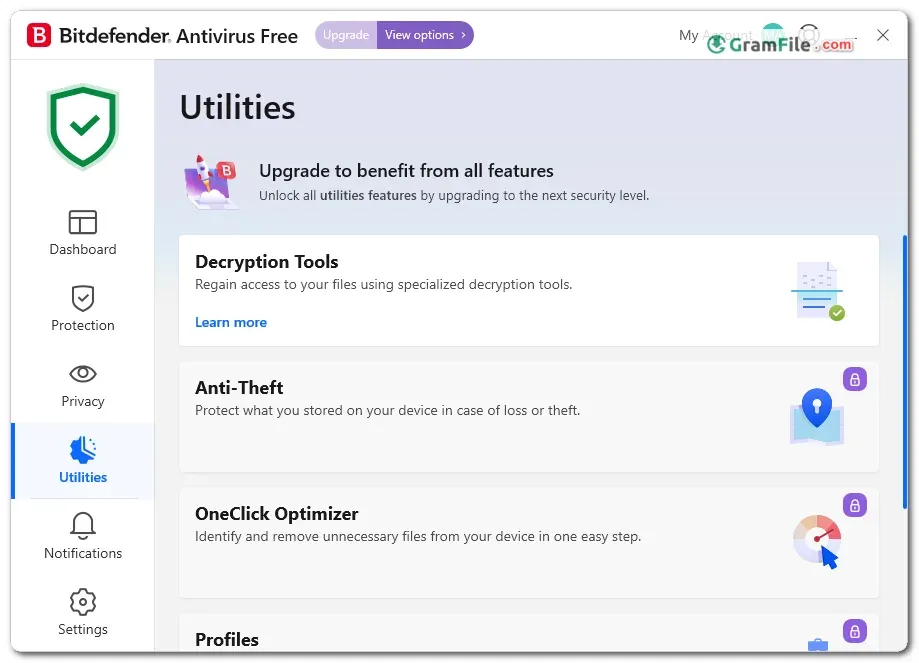

Bitdefender Antivirus Free is a Windows antivirus that runs quietly in the background. It handles malware, ransomware and phishing on its own, so there is little to configure. Reviewers rate its malware blocking as excellent.
It suits anyone who wants dependable protection without a subscription. Background impact is light, so games and editing apps keep running normally, and the interface stays simple.
Expect a minimal feature set: no VPN, no parental controls and the odd nudge to upgrade. If you want a set-and-forget shield that stays light on your PC, it is worth installing.
What is Bitdefender Antivirus Free?
Bitdefender Antivirus Free is the no-cost Windows edition of Bitdefender’s security software. It watches your PC in real time and blocks malware before it does damage.
The interface is deliberately minimal. You install it, sign in, and it gets on with the job.
What it does well
Real-time protection covers viruses, ransomware and phishing pages. Reviewers rate its malware blocking as excellent, close to the best free tools available.
It also scans encrypted web traffic, and you can switch off the web scan or phishing protection or add exceptions for sites you trust.
Background impact is light, so games, video editing and other heavy apps keep running normally. Full scans are heavier, so start them when you step away.
Tip: if you want a second opinion on a suspect file, add a manual scanner from another vendor next to Bitdefender.
Where it annoys
The free edition is stripped down. There is no email scanning, no file shredder and no game mode.
You will also see occasional prompts to buy a paid plan, and customization is limited to a few protection toggles.
Tip: treat the upgrade prompts as banners. Closing them does not reduce your protection.
Free vs paid Bitdefender plans
| Feature | Antivirus Free | Paid plans |
|---|---|---|
| Price | Free | Yearly subscription |
| Real-time malware protection | Yes | Yes |
| Ransomware and phishing protection | Yes | Yes |
| Safepay banking browser | No | Yes |
| Extras such as VPN and parental controls | No | Depends on the plan |
| Platforms | Windows only | Windows, macOS, Android, iOS |
Is Bitdefender Antivirus Free safe to install?
Yes. The installer from this page is checked with VirusTotal, and the result came back essentially clean, with only an isolated flag of the kind security tools often attract.
Bitdefender is a long-established security company, and the program is distributed without bundled extras.
Bitdefender Free vs Microsoft Defender
Microsoft Defender is already built into Windows and scores very well in independent tests.
Bitdefender Free adds phishing and ransomware protection in a lightweight package, so the gain over Defender is modest.
Tip: if you want zero installs and zero accounts, Defender is a legitimate choice. Pick Bitdefender if you prefer a separate vendor.
Bitdefender Free vs Malwarebytes Free
Malwarebytes Free is mostly used for manual scans as a second opinion.
Bitdefender Free is the better fit when you want constant protection running in the background.
Is there a free version for Mac?
No. Bitdefender Antivirus Free is Windows only. Mac users need a paid Bitdefender plan or a different free tool.
Who should skip it
Skip it if you need a VPN, parental controls, a password manager or a secure banking browser.
Also skip it if you cannot tolerate upgrade prompts, or if you want one free antivirus across Windows, Mac and phones.
How to Download & Install
Click the download button at the top of this page to get the EXE installer for Bitdefender Antivirus Free.
It is a small online installer that fetches the remaining files during setup, so keep your internet connection on.
- Click the download button at the top of this page and save the installer.
- Uninstall any other antivirus first, so the two do not clash.
- Run the installer and approve the Windows permission prompt.
- Sign in to (or create) a Bitdefender Central account when the setup asks for it.
- Wait while the setup downloads and installs its components.
- Restart your PC if prompted, then open the app from the system tray or Start menu.
Installer types
Only one main installer is offered, usually 64-bit, and the page lists support for both 64-bit and 32-bit systems.
There is no portable version, which is normal for a real-time antivirus.
System requirements
- Operating system: Windows 11 or Windows 10
- RAM: 2 GB
- Free disk space: 2.5 GB
- Internet connection for installation and updates
- A Bitdefender Central account
- Browser: Chrome, Firefox or Microsoft Edge
Older CPUs may feel slower, since Bitdefender warns that performance can drop on aging hardware.
License and activation
The license is free. Signing in to your Bitdefender Central account during setup is what activates the protection.
How to update
Protection updates arrive automatically in the background, so there is nothing to maintain by hand.
To move to a newer build of the program itself, run the latest installer from this page.
Fixing common install problems
- “Installer initialization failed” or “Cannot copy installer”: uninstall both Bitdefender Antivirus Free and Bitdefender Agent from Settings > Apps, delete any leftover Bitdefender folders in Program Files, restart, then run the installer again.
- Download or certificate error during setup: check your internet connection, delete the old installer, grab a fresh copy from this page and run it as administrator.
- Setup says another Bitdefender product is detected: remove every trace of the old antivirus (Bitdefender or another brand) with its own uninstall tool, restart, and try again.
Pros & Cons
What we liked
- Free with real-time protection
- Excellent malware detection in reviews
- Light on system resources
- Simple, minimal interface
- Phishing and ransomware protection included
What we didn't like
- No VPN or parental controls
- Windows only, no free Mac version
- Occasional prompts to upgrade to paid
Best Bitdefender Antivirus Free Alternatives
-
 Microsoft Defender
Free real-time antivirus with cloud protection, ransomware defense and offline scanning.
-
 Avira Free Security
Free antivirus with real-time protection, a limited VPN and PC cleanup tools.
-
 Kaspersky Free
Cloud-assisted real-time malware scanning and anti-phishing protection at zero cost.
-
 Malwarebytes
Free malware scanner that removes ransomware, spyware and adware without slowdown.
Conclusion
4.3out of 5 · 51 user ratings
Free antivirus tools differ mainly in extras, not core protection. Comparing a few helps you decide whether you need anything beyond the basics.
Check each option for price, platform support and the one feature that sets it apart.
| App | Best For | Price | Platform | Standout Feature |
|---|---|---|---|---|
| Bitdefender Antivirus Free | Set-and-forget Windows protection | Free | Windows | Strong malware blocking with a light footprint |
| Microsoft Defender | Users who want nothing extra to install | Free | Windows | Built into the operating system |
| Avast Free Antivirus | People who want extra tools | Free | Windows, macOS, Android, iOS | Extras like a password manager and secure browser |
| Malwarebytes Free | Manual second-opinion scans | Free | Windows, macOS, Android | Easy on-demand cleanup scans |
Final verdict
Bitdefender Antivirus Free is a sound pick if you want light, automatic protection on Windows 10 or 11 and do not care about extras.
If you need a VPN, parental controls or cross-platform coverage, look at a paid Bitdefender plan or one of the alternatives above.
FAQ
Is Bitdefender Antivirus Free really free?
Yes, the Windows edition costs nothing and has no time limit.
You need a free Bitdefender Central account to activate it, and it occasionally promotes paid plans.
Is Bitdefender Antivirus Free good enough for Windows 11?
Yes, it provides real-time protection against malware, ransomware and phishing on Windows 11 and Windows 10.
It lacks extras like a VPN, so add those separately if you need them.
Can I use Bitdefender Free together with Windows Defender?
Not at the same time. Installing a third-party antivirus normally switches Defender’s real-time protection off.
You can turn Defender back on by uninstalling Bitdefender.
Does Bitdefender Antivirus Free include a VPN?
No, the free edition does not include a VPN. A VPN comes only with some paid Bitdefender plans.
Is there a Bitdefender Antivirus Free for Mac?
No, the free edition is Windows only. Mac users need a paid Bitdefender plan or another free antivirus.
Why does Bitdefender Antivirus Free fail to install?
The usual cause is leftover files from a previous antivirus or an old Bitdefender Agent.
Uninstall both, delete the leftover Bitdefender folders, restart your PC and run the installer again.
Found a problem with this download? Report an outdated version, broken link, suspicious installer or incorrect information.
 Internet Download Manager
 Sumatra PDF
 IrfanView
 WinRAR
 PotPlayer
 Google Chrome