

Download Details
- Version
- 5.1.7093.70 (latest)
- File size
- 12.5 MB
- License
- Free
- Security scan
- VirusTotal: 71 of 71 engines say OK (0 flagged)
- SHA-256 checksum
6925c7158ba5b7aa94a2cdd7d6a8d65b2cd18d1f4ec122485eca25ce8a038c88- Developer
- Cisco
- Supported OS
- Windows 11, Windows 10
- Installers
- 64-bit (x64), ARM (Arm64)
- Downloads
- 9071
- Rating
- 4.7 out of 5 · 72 reviews
 Reviewed by Ali Mohamed
Tested on Windows 11 and 10 · · How we review
Screenshots
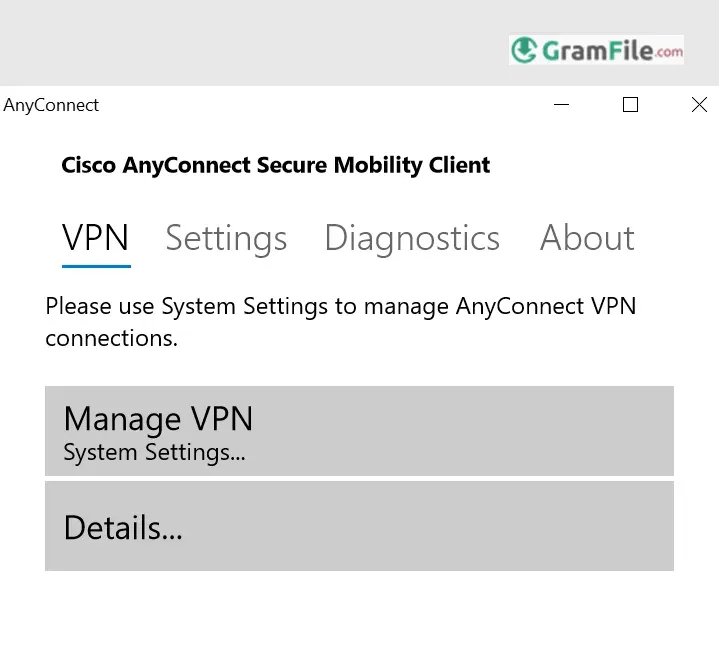
For over a decade, Cisco AnyConnect has been the backbone of secure remote access for businesses and professionals.
What started in 2010 as a straightforward VPN client has evolved into a comprehensive security platform – now rebranded as Cisco Secure Client – while maintaining the simplicity and reliability users know.
Built to replace older VPN solutions, AnyConnect quickly became the gold standard with its seamless SSL/IPsec encryption, cross-platform support, and always-on protection.
Today, it’s more than just a VPN, it’s a full security suite, offering features like zero-trust access, endpoint monitoring, and automatic threat defense, all wrapped in a clean, intuitive Windows interface.
Whether you’re working from home, a coffee shop, or an airport, AnyConnect ensures your connection stays private and secure without slowing you down.
If you’ve ever needed to work from a coffee shop, airport, or home while keeping your data as secure as it’d be in the office, you’ve probably heard of Cisco AnyConnect.
But what exactly is it, and why do businesses worldwide trust it? Let’s break it down, without the jargon.
What Is AnyConnect VPN?
Think of AnyConnect as a digital bodyguard for your internet connection.
It creates an encrypted tunnel between your device and your company’s network, shielding everything you do from prying eyes, whether you’re sending emails, accessing files, or using internal apps.
Originally launched in 2010, it’s evolved from a basic VPN into Cisco Secure Client, a full security suite with extras like malware protection and zero-trust controls.
Key perks
- Military-grade encryption: Secures data before you even log into Windows.
- Seamless auto-reconnect: Drops your Wi-Fi? It reconnects instantly, no fuss.
- IT-friendly: Admins can enforce rules (like blocking devices without antivirus).
- Lightweight: Runs quietly in the background without slowing your PC.
Key Features
- Connects you to your work network securely.
- Works from almost anywhere with internet.
- Protects your device with advanced security.
- Uses strong encryption for your data.
- Can automatically reconnect if your connection drops.
- Checks your computer’s security before allowing access.
- Supports different security methods like multi-factor authentication.
- Can secure web Browse even when not on VPN.
- Provides visibility into network activity for administrators.
- Offers flexible options for how your internet traffic is routed.
- Easy to install and updates automatically.
- Designed for a consistent experience on Windows.
- Integrates with other Cisco security products.
Why do businesses and IT teams rely on it?
- Military-grade encryption – Secures data before you even log in, with automatic failover if the connection drops.
- Enterprise-ready controls – Admins can enforce security policies, restrict unsafe devices, and manage access with ease.
- User-friendly experience – Rated highly for reliability, though some report occasional connection quirks.
From Fortune 500 companies to remote workers, AnyConnect balances powerful security with effortless usability.
(Note: While now part of the broader Cisco Secure Client suite, the AnyConnect VPN remains the core feature, trusted by millions daily.)
How to Download & Install
Step 1: Get the Software
- Option A (For Work Devices): Check your company’s IT portal (e.g., Microsoft Company Portal) or ask IT for a direct download link.
- Option B (Direct from Cisco):
- Visit Cisco’s download page (you’ll need a Cisco account).
- Search for AnyConnect Secure Mobility Client and pick the Windows Pre-Deployment Package 18.
Note: Licenses are required (typically provided by employers).
Step 2: Install in 3 Minutes
- Run the installer (
Setup.exe) → Click Yes if Windows asks for permission. - Customize modules (or stick with defaults):
- Core & VPN (essential).
- Start Before Login (connect to VPN before entering your Windows password).
- Umbrella Roaming (blocks malicious sites even when VPN is off).
- Accept the license → Click Install → Done!.
Step 3: Connect
- Open AnyConnect from your Start menu.
- Enter your company’s VPN address (e.g.,
vpn.yourcompany.com). - Log in with your work credentials, you’re now secure.
Pros & Cons
What we liked
- Secure work access.
- Connects from far away.
- Adds security protection.
What we didn't like
- Can be tricky to set up.
- Needs a company license.
Best AnyConnect Alternatives
-
 Proton VPN
A secure and user-friendly app that shields your online activities with military-grade encryption.
-
 Psiphon
Lets you browse freely and securely, breaking through restrictions with ease.
-
 NordVPN
Keeps your online activity private, secure, and unrestricted with easy-to-use protection.
-
 Windscribe VPN
A secure and versatile VPN that lets you browse privately and access blocked content.
Found a problem with this download? Report an outdated version, broken link, suspicious installer or incorrect information.
 Zoom Workplace
 Nitro PDF Pro
 Sumatra PDF
 IrfanView
 K-Lite Codec Pack
 WinRAR