

Download Details
- Version
- 2.25.8 (latest)
- File size
- 37.71 MB
- License
- Free
- Security scan
- VirusTotal: 69 of 69 engines say OK (0 flagged)
- SHA-256 checksum
4326759d453e321cca38aa16aadbddbafa9e18215c29936f7d3ce8d6ae84debc- Developer
- Windscribe
- Supported OS
- Windows 11, Windows 10
- Installers
- 64-bit (x64), ARM (Arm64), Offline
- Downloads
- 8674
- Rating
- 4.5 out of 5 · 54 reviews
- File name(s)
- Windscribe_2.25.8_amd64.exe, Windscribe_2.25.8_arm64.exe
 Reviewed by Eman Sakr
Tested on Windows 11 and 10 · · How we review
Screenshots

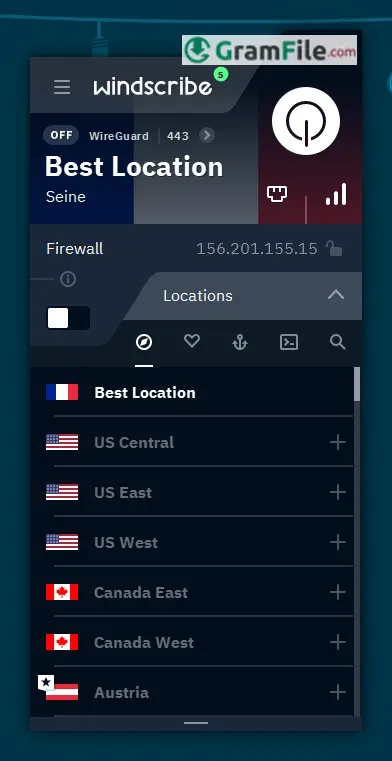
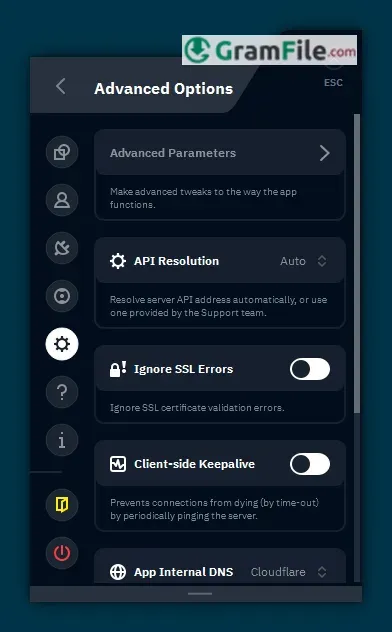
Windscribe suits anyone who wants a free VPN on a Windows PC without entering a credit card. Confirm your email and you get 10 GB of data every month.
It runs on Windows 10 and 11, and an ARM64 installer exists for Snapdragon laptops. One account covers an unlimited number of devices.
The standout is the Firewall, Windscribe’s name for a kill switch, and it works on the free plan too. If you stream a lot, the data cap will run out fast.
What is Windscribe VPN?
Windscribe is a freemium VPN made by Windscribe Limited. It routes your traffic through an encrypted tunnel to a server in another country, which hides your IP address from the sites you visit.
The free tier is paid for by Pro subscribers rather than advertisers, according to the developer. The desktop apps are open source, so their code can be inspected.
Firewall mode: Windscribe’s name for a kill switch
Firewall mode blocks internet traffic that falls outside the VPN tunnel. If the connection drops, your real IP does not leak onto the open network.
Reviewers note that the name is confusing, since most VPNs call this feature a kill switch. It is available on the free plan on Windows.
Tip: set Firewall to automatic if you use public Wi-Fi often. Switch it off when you need local devices such as a printer to stay reachable.
R.O.B.E.R.T., the domain blocker built into the app
R.O.B.E.R.T. blocks ad, tracker and malicious domains at the DNS level. You choose which categories to block from the app’s settings.
It works on free accounts as well. It will not replace a dedicated antivirus, but it removes a lot of ad and tracker requests before they load.
10 GB, 2 GB and what happens at the limit
A new free account gets 2 GB a month. Confirming your email raises that to 10 GB, and the developer says you can earn more data permanently.
When the cap is reached, the service stops working until the monthly reset. That is the only real limit on the free plan, apart from the shorter server list.
Tip: if you only need the VPN for sensitive tasks such as banking on a cafe network, 10 GB goes a long way. Disconnect during large downloads.
Free, Build-A-Plan and Pro compared
| Plan | Price | Data | Locations |
|---|---|---|---|
| Free | $0 | 10 GB a month (2 GB without email) | 10 countries |
| Build-A-Plan | $1 per location per month, $3 minimum | 10 GB per location, unlimited as a $1 add-on | The ones you pick |
| Pro | $9 a month or $69 a year | Unlimited | 69+ countries |
Build-A-Plan suits anyone who needs only one or two countries. Static IPs and port forwarding are limited to paid plans.
Switching protocols when a connection stalls
The Windows app supports WireGuard, OpenVPN and IKEv2. WireGuard is usually the fastest of the three.
If one server will not connect, change the server first. If that fails, change the protocol, which fixes most stalled connections.
Split tunneling on Windows and unlimited devices
Split tunneling lets chosen apps bypass the VPN or use it exclusively. It is useful when a banking app or a game blocks VPN traffic.
One account can be signed in on any number of devices at once, which is rare among free VPNs. Reviewers note that speeds vary from server to server.
Is Windscribe VPN safe to install?
The installer on this page was checked with VirusTotal and came back clean. The developer is Windscribe Limited, and the app’s code is open source.
Windscribe states a no-logs policy and says it does not sell user data on any plan. Always download from the button at the top of this page to avoid fake installers.
Who should pass on the free tier
Skip it if you stream video daily or move a lot of data every month, because the free cap will not last. People who need a specific country outside the ten free ones should look at a paid plan.
A static IP or port forwarding also needs Pro. For a free option with a different approach, Proton VPN is the common alternative.
How to Download & Install
Press the download button at the top of this page to grab the EXE installer. Most PCs need the 64-bit build, which takes a couple of minutes to set up.
Prefer a ready-made video? There is none for this app yet, so follow the steps below.
Step 1: Use the download button above and let the installer finish saving to your Downloads folder.
Step 2: Double-click the installer to open the setup window, then click Install.

Step 3: Wait while the installer copies the files and sets up the network components. This usually takes under a minute.

Step 4: When setup finishes, launch Windscribe from the final screen or from the Start menu.

Step 5: Log in with your account, or create a free one from the login screen. You need an account to connect.
Add and confirm an email address after signing up. Without it the free plan stays at 2 GB a month instead of 10 GB.
Which installer to choose
There are two: the main 64-bit installer and an ARM64 installer. Open Settings, then System, then About, and read the System type line.
An ARM-based processor needs the ARM64 build. Intel and AMD PCs take the main 64-bit one.
System requirements
- Windows 10 or Windows 11, 64-bit (or ARM64)
- Older Windows versions are not supported by the current app
- A Windscribe account (the free plan works)
License and account
Windscribe is free to use, with a monthly data cap. Paid plans remove the cap and open up more server locations.
How to update
Windscribe recommends running the most recent build. When a newer release is out, grab the fresh installer with the button above and run it on top of your existing install.
Fixes for common install and connection problems
- Won’t connect: restart the app and your PC, then pick another server location or switch protocol in the connection settings.
- Blocked by security software: antivirus or a third-party firewall can stop the tunnel. Allow Windscribe in that software, or test with it paused for a minute.
- Data runs out early: check that your email is confirmed, because unverified free accounts get only 2 GB a month.
Pros & Cons
What we liked
- Free plan with 10 GB monthly data
- Unlimited simultaneous devices
- Firewall kill switch on free plan
- Built-in ad and tracker blocking
- Open source desktop apps
What we didn't like
- Free data cap runs out quickly
- Free servers limited to 10 countries
- Speeds vary between servers
Best Windscribe VPN Alternatives
-
 Proton VPN
Free VPN with unlimited data, a no-logs policy and a Swiss base.
-
 Psiphon
Circumvention VPN that tunnels past blocked sites using automatic protocol switching.
-
 NordVPN
VPN client with NordLynx speed, kill switch and per-app split tunneling.
-
 AnyConnect
Cisco VPN client that tunnels remote workers into company networks securely.
Conclusion
4.5out of 5 · 54 user ratings
Windscribe is a solid choice if you want a free VPN for Windows that has the same security features as the paid tier. The Firewall kill switch and the built-in domain blocker are what set it apart.
The limit to know about is data. Ten gigabytes a month disappears quickly with streaming or large downloads, and then the free plan stops until the reset.
It fits light browsing, public Wi-Fi and occasional geo-blocked sites. For heavier use, Build-A-Plan or Pro is the next step, and Proton VPN is the free option to compare.
FAQ
How much free data does Windscribe give each month?
You get 10 GB a month once your email is confirmed. Without an email the free plan is limited to 2 GB.
Do I need an account to use Windscribe on a PC?
Yes, you need an account to connect. A free account is enough, and you can create one from the login screen after installing.
What happens when my free data runs out?
The VPN stops working until the monthly reset. You can wait for the cap to renew or move to a paid plan for unlimited data.
Does Windscribe work on Windows laptops with ARM chips?
Yes, there is a dedicated ARM64 installer for Windows 10 and 11. Check System type under Settings, System, About to see which one you need.
Does Windscribe keep logs of what I do online?
Windscribe states that it follows a no-logs policy and does not sell user data on any plan. You can read its privacy policy on the developer’s website for the details.
Why won’t Windscribe connect on my computer?
Try another server first, then switch protocol. If it still fails, allow the app in your antivirus or firewall and restart your PC.
Found a problem with this download? Report an outdated version, broken link, suspicious installer or incorrect information.
Changelog - What's new in version 2.25.8
Added- Optional detailed app and helper debug tracing on Windows to help pinpoint launch and connection delays.
Improved
- App hardening from the OpenAI Daybreak Blue and Anthropic Defense Access audit.
- Security of WireGuard config handling on Windows.
- Security of the Windows installer and uninstaller.
- Security of in-app update staging on Windows.
- Security of the OpenVPN DNS scripts on macOS and Linux.
- Security of in-app update staging and installation on Linux.
- Security by running the OpenVPN daemon unelevated on Windows.
- Security of the OpenVPN daemon on macOS and Linux.
- Security by redacting VPN server credentials in debug logs.
- Split tunneling app selection duplicate detection on Windows and macOS.
- Hosts file handling for IKEv2 connections, so the app now retries when another program has the file locked on Windows.
- App only allows one running instance per machine. If another signed-in user is already running it, the app now explains why.
- Implementation of post-connect tunnel validation and connected IP state.
- Window installer to use libarchive rather than bundled 7z executable for extraction.
- App removes servers from the locations list with the force_disconnect flag set.
- Windows installer to return specific Windows error codes when a failure occurs.
- Split tunneling compatibility with other WFP redirectors to address potential system crashes on Windows.
- macOS Service-account creation and validation, including handling user ID conflicts and reporting creation failures.
- Custom Connected DNS to support scheme-prefixed DoT endpoints, including an explicit default port.
- Custom Connected DNS handling to avoid starting ctrld for a plain-IP upstream when Split DNS has no domains configured.
- windscribe-cli help to use a conventional layout with an aligned command list and per-command help, and made command output consistent.
- windscribe-cli help and documentation to explain how to turn on AmneziaWG with Protocol Tweaks. The app now logs a warning when the configured AmneziaWG preset is not available and it falls back to another preset.
- windscribe-cli locations commands to list locations in the terminal instead of opening the locations list in the app.
- windscribe-cli commands to report the app's actual result instead of only confirming the request was sent.
- windscribe-cli error messages for connection and update failures, so they describe the actual problem instead of showing a numeric error code.
Fixed
- Local privilege escalation vulnerability involving custom OpenVPN config parsing on Linux.
- OpenVPN-based protocols failing to connect on PCs where Windows cannot rename network adapters with netsh.
- OpenVPN connections failing on some Windows 11 insider builds because the app could not detect the management port.
- Potential app crash when connecting with a custom OpenVPN config on macOS.
- Custom Connected DNS failing after connection or location changes while the app showed Connected on Linux.
- Anti-censorship check not detecting a Chinese system language.
- App rewriting its whole settings file about once a minute while connected, even when nothing changed.
- Windows installer displaying error dialogs when -silent is specified on the command-line.
- ctrld being restarted before its previous instance had exited on macOS.
- ctrld daemon may fail to launch when Connected DNS preference is Control D on Windows.
- Windows tapctl.exe utility to always match OpenVPN version.
- Auto-Connect not triggering when a Hyper-V virtual adapter is the active network interface on Windows.
- AmneziaWG connections never completing when the config contains large I1-I5 packets on Windows.
- IKEv2 connections repeatedly showing a false "Read-Only File" hosts file prompt on Windows.
- Split tunneled traffic being blocked by the firewall on a secondary network interface on macOS.
- Split tunneled IPs going out through the primary interface instead of their original interface on Linux.
- A potential split tunneling extension crash caused by unsynchronized connection-table updates on macOS.
- Proxy Gateway retaining silent, unauthenticated connections without connection limits or a handshake timeout. Reported by Souparna Majumder.
- Network name and per-network settings remaining stale after waking on a different network through the same adapter on Windows.
- Installer starting the previous uninstaller before the helper service has finished stopping on Windows.
- Potential IKEv2 reconnect loop when asynchronous RAS disconnect notification fails to register with Windows.
- Menu bar icon not opening the app while another application is full screen on macOS.
- CLI-only Linux app ignoring the Launch on Startup preference when disabled.
- MTU detection and hotspot adapter detection failing with non-English system locales on Linux.
- systemd-resolved detection for additional resolv.conf symlink targets and stub-resolver configurations.
- Intentional ctrld shutdowns being logged as crashes.
- CLI from the GUI package fails on a headless environment with a no-display error.
- Split Tunneling Apps list accepting duplicate entries for manually added apps. Existing duplicates are now removed on load.
- MAC Spoofing turning off and its interface resetting to "No Interface" after suspend/resume or a NetworkManager restart on Linux.
- windscribe-cli login waiting forever when the login was abandoned, for example by closing the CAPTCHA, or when an email address was entered as the username.
- windscribe-cli help --help and version --help not showing help, and version accepting unexpected arguments.
- windscribe-cli logs send command reporting success before the upload finished, which hid upload failures.
- windscribe-cli log output appears in stdout on macOS and Linux.
- Declining the permission prompt during an in-app update showing an "Auto-Update Failed" error. The update window now returns to its prompt so the update can be started again.
- A missing space between the two sentences of the Decoy Traffic description in Preferences > Connection.
- Excluded apps' traffic, including IPv6 on dual-stack networks, going through the tunnel in Exclusive split tunneling mode on Windows.
- App not stopping an unresponsive WireGuard process after a disconnect timeout on macOS and Linux.
Updated
- The embedded API certificate bundle so it no longer trusts the compromised eMudhra intermediate certificates.
- Qt to 6.12.0.
- AmneziaWG to 3.1.20260814 (Windows) and 3.1.20260828 (macOS/Linux).
- ctrld to 1.5.9.
- cURL to 8.23.0.
- OpenSSL to 4.0.3.
- OpenVPN to 2.7.7.
- OpenVPN DCO driver to 2.8.7 on Windows.
- Third-party components from vcpkg to the latest versions for stability and security.
- Minimum macOS version to 14.4.
 Internet Download Manager
 Sumatra PDF
 IrfanView
 WinRAR
 PotPlayer
 Google Chrome