

Download Details
- Version
- 11.3 (latest)
- File size
- 8.62 MB
- License
- Free Trial
- Security scan
- VirusTotal: 58 of 58 engines say OK (0 flagged)
- SHA-256 checksum
634caa2206d34baa7908ebef98110e3be1de3b3eb9b323463003a51bc04388b5- Developer
- FastStone Corporation
- Supported OS
- Windows 11, Windows 10
- Installers
- 64-bit (x64), 32-bit (x86), Portable, Offline
- Downloads
- 8130
- Rating
- 4.8 out of 5 · 53 reviews
- File name(s)
- FSCaptureSetup113.exe
Screenshots
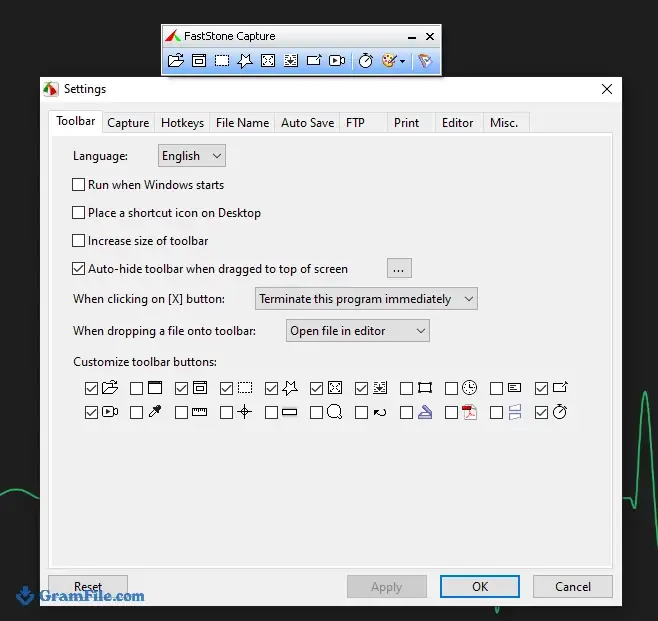
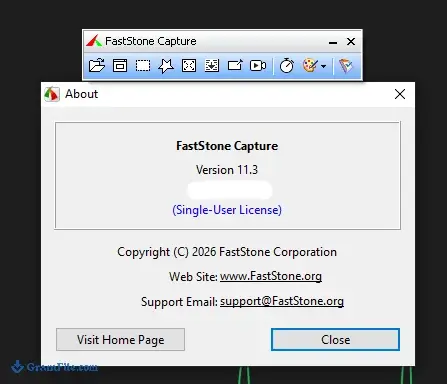
FastStone Capture is a small screenshot and screen recording tool for Windows. It sits in a floating panel and grabs windows, regions, menus or a full scrolling web page.
It suits anyone who takes screenshots daily for documentation, support replies or tutorials. The built-in editor covers arrows, text and quick fixes without opening another app.
The catch is the license. You get a 30-day trial, then it is a paid tool.
If you want a lean capture utility and do not mind paying once, it is worth installing.
What is FastStone Capture?
FastStone Capture is a screenshot and screen recording utility from FastStone Corporation. It is built for Windows 11 and Windows 10 and stays small enough to run in the background all day.
It started as a free tool, but today it is a paid program with a 30-day trial.
A floating panel that stays out of your way
The Capture Panel is a small bar you can drag anywhere or shrink into the system tray. Every capture mode sits one click away.
You can also set the app to start with Windows. For daily screenshots, that is the main reason people keep it installed.
Capture modes: from a single menu to a scrolling web page
You can capture a window, an object, a menu, the full screen, or a rectangular, freehand or fixed-size region. Multi-level menus and multiple windows also work.
Scrolling capture grabs a long web page or document as a single image. It is the feature most people install the app for.
Multi-monitor setups are supported, so you are not stuck with one screen.
Tip: use the fixed-size region when you need screenshots with identical dimensions for a help article or a slide deck.
Editing and saving: draw, annotate, export
After a capture, the built-in editor lets you draw on the image, add text and make quick adjustments. For most support replies and how-to guides, you never need to open a separate image editor.
Images save as BMP, GIF, JPEG, PCX, PNG, TGA, TIFF or PDF. You can also send a capture by email straight from the app.
If you prefer a different editor, you can set an external one such as MS Paint on Windows 11.
Recording the screen: handy for short tutorials
The recorder captures screen activity, speech from your microphone, mouse movements and clicks into a compressed video file. That covers quick walkthroughs and bug reports well.
It is not a video editor. If you need cuts, transitions or advanced effects, you will need another program.
Tip: record with the microphone on when you explain a bug, so the support team hears what you see.
Trial, paid license and the old free versions
Many old listings still call FastStone Capture freeware. That refers to a build from many years ago, which handles the shadowed window edges of modern Windows poorly.
Skip those old builds and use the current release instead.
| Option | Time limit | Cost |
|---|---|---|
| Trial | 30 days | Free |
| Licensed | None | One-time payment |
Is FastStone Capture safe to install?
FastStone Capture is a long-running commercial utility from a known developer. Use the download button on this page, where listings are reviewed manually and installers carry no bundleware.
Avoid random mirrors that repackage old builds.
Skip it if you need a free or cross-platform tool
FastStone Capture runs on Windows only, so Mac users need another option. If you want a tool that stays free after 30 days, look at ShareX or Greenshot.
The same goes for heavy video editing: a dedicated editor does that job better.
How to Download & Install
Click the download button at the top of this page and you get the FastStone Capture installer as an EXE file. A portable edition is also available if you prefer not to install anything.
Step 1: Pick the main installer (usually 64-bit) for a current Windows 11 or Windows 10 PC. Choose the 32-bit installer only if your system is 32-bit.
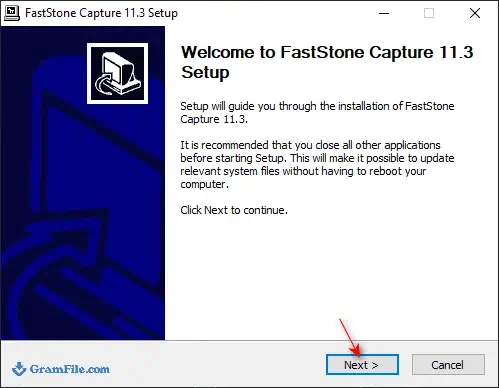
Step 2: Double-click the downloaded file and confirm the Windows permission prompt if it appears.
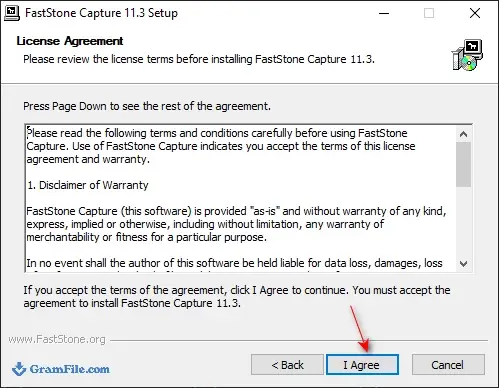
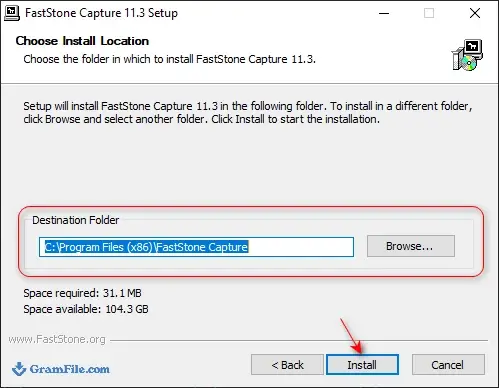
Step 3: Follow the setup wizard, accept the license agreement and choose an install folder.
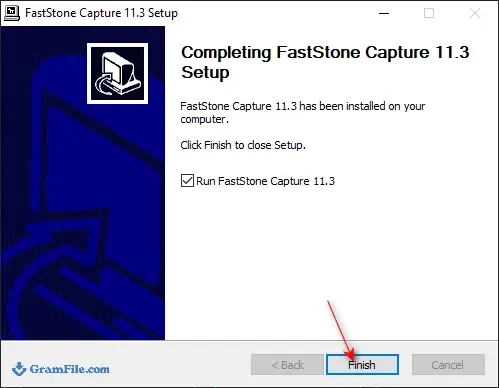
Step 4: Launch FastStone Capture from the Start menu. The floating Capture Panel appears, ready for your first screenshot.
Step 5: Optional: set the app to run when Windows starts, so the panel is always one click away.
Installer or portable edition
The installer adds the app to your Start menu and lets it launch with Windows. The portable edition runs from any folder, which helps on a work PC where you cannot install software.
Both come with the same 30-day trial.
System requirements
- Windows 11 or Windows 10
- 64-bit installer for most modern PCs
- 32-bit installer for older 32-bit systems
License and activation after the trial
FastStone Capture runs as a free trial for 30 days. After that you need a paid license to keep using it.
Buy the license from the developer, FastStone Corporation, and enter your key inside the app.
How to update FastStone Capture
Check the download button on this page for the newest build. For the installed edition, run the new installer over your current copy.
Portable users should replace the old folder with the new one.
Fixing common install problems
- Windows shows a warning when you run the installer: make sure you got the file from the download button on this page, then choose to run it anyway.
- Window edges look odd in screenshots: you may be running a very old build made for older Windows. Install the current release instead.
- The app will not start after a 32-bit install on a 64-bit PC: uninstall it and use the main (64-bit) installer.
Pros & Cons
What we liked
- Light and quick to start
- Scrolling capture for long pages
- Built-in editor and annotation tools
- Portable edition available
- Screen recorder included
What we didn't like
- Free only for a 30-day trial
- Windows only
- Video recording is basic
Best FastStone Capture Alternatives


Conclusion
4.8out of 5 · 53 user ratings
Screenshot tools look alike until you check the price and the extras. A quick comparison shows where FastStone Capture fits.
Look at cost after the trial, scrolling capture and how much editing you need.
| App | Best For | Price | Platform | Standout Feature |
|---|---|---|---|---|
| FastStone Capture | Daily screenshots and short recordings | 30-day trial, then paid | Windows | Floating Capture Panel with scrolling capture |
| ShareX | Power users who want automation | Free | Windows | Custom workflows after each capture |
| Greenshot | Quick annotated screenshots | Free | Windows | Fast, simple annotation tools |
| Snagit | Professional documentation and training | Paid | Windows, macOS | Templates and advanced video tools |
Final verdict
FastStone Capture is a good fit if you take many screenshots and want one small tool for capture, editing and quick recordings. Run the 30-day trial first and see whether the paid license pays off for your routine.
If your needs are occasional, a free tool like ShareX or Greenshot will do.
FAQ
Is FastStone Capture really free, or only a trial?
It is a free trial that lasts 30 days. After that you need a paid license.
Can I still get the old freeware build of FastStone Capture?
Old free builds still circulate, but they are many years old. They handle modern Windows window edges poorly, so the current release is the better choice.
Can FastStone Capture screenshot a whole scrolling web page?
Yes. Its scrolling capture mode grabs a long window or web page as one image.
Which file formats can FastStone Capture save screenshots in?
It saves BMP, GIF, JPEG, PCX, PNG, TGA, TIFF and PDF. You can also email a capture straight from the app.
Does FastStone Capture record video with microphone sound?
Yes. It records screen activity, microphone speech and mouse movements into compressed video files.
Is there a Mac version of FastStone Capture?
No. FastStone Capture is made for Windows only.
What can I use instead of FastStone Capture once the trial ends?
ShareX and Greenshot are free Windows options. Snagit is a paid pick if you need more advanced documentation tools.
Found a problem with this download? Report an outdated version, broken link, suspicious installer or incorrect information.
Changelog - What's new in version 11.3
- Added MP3 as an output format in Screen Recorder for audio-only recording- Added support for copying and pasting tiny images, down to 1 × 1 pixel, in the Editor and Draw tools
- Fixed selection alignment issues when zoomed in within the Draw tool
- Other improvements and bug fixes
 Zoom Workplace
 Nitro PDF Pro
 Sumatra PDF
 IrfanView
 K-Lite Codec Pack
 WinRAR