

Download Details
- File size
- 18.3 MB
- License
- Free
- Developer
- Bitdefender
- Supported OS
- Windows 11, Windows 10
- Installers
- 64-bit (x64), 32-bit (x86)
- Downloads
- 3784
- Rating
- 4.2 out of 5 · 28 reviews
 Reviewed by Ahmed Madbouli
Tested on Windows 11 and 10 · · How we review
Screenshots
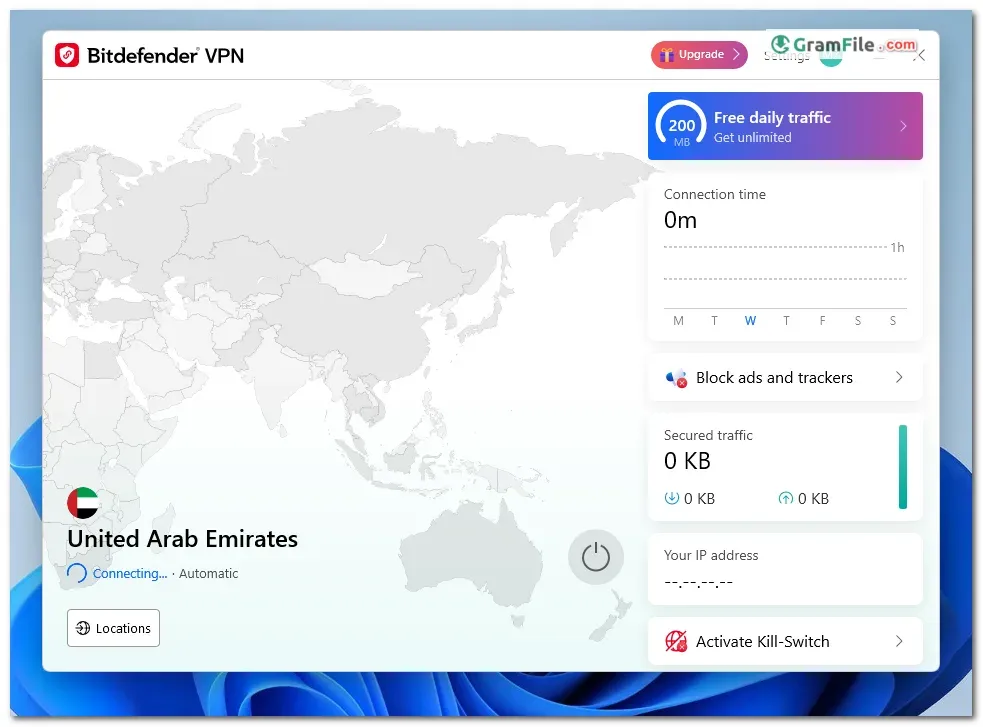

Bitdefender VPN encrypts your internet traffic on Windows and routes it through a remote server, so your real IP address stays hidden.
It suits people who already use Bitdefender security and want protection on public Wi-Fi. The free tier is capped, so heavy users need the paid plan.
It is worth installing for light browsing, banking and email on the go. For streaming, torrenting or choosing exact server locations, the paid tier is the version to judge.
What is Bitdefender VPN?
Bitdefender VPN is a virtual private network from the security company Bitdefender. It encrypts your connection and masks your IP address and location.
That helps on public Wi-Fi at airports, cafes and hotels. It also helps when a site is blocked in your region.
Bitdefender Premium VPN: what it offers
The paid Premium VPN removes the daily cap and lets you pick a server. Bitdefender advertises thousands of servers across more than 50 countries.
Tip: If you only need a VPN for occasional banking or email, try the free tier first and upgrade only when you hit the limit.
Encryption and privacy
The service uses 256-bit AES encryption, the same standard used for banking traffic. Bitdefender also states a no-logs policy and includes protection against IP and DNS leaks.
Tip: After connecting, run an IP and DNS leak test in your browser to confirm the tunnel works on your network.
Server network and streaming
On paid plans you can choose a country, which is what you need to reach regional content. On the free tier the app chooses for you, so you cannot target a location.
Streaming services often block VPN traffic. Treat access to any specific service as something to test, not a promise.
Interface and daily use
The window is simple: sign in, press connect, done. There are few settings to get lost in.
Tip: Turn on the option that starts the VPN when Windows starts if you want protection without thinking about it.
Where it annoys
The free tier has a small daily traffic allowance for each device. That is enough for a few emails, but a single video can use it up.
The server list is smaller than the biggest VPN brands, and advanced options are limited.
Free vs Pro
| Feature | Free | Premium VPN |
|---|---|---|
| Daily traffic | Small daily cap per device | Unlimited |
| Server choice | No, automatic | Yes |
| Encryption | 256-bit AES | 256-bit AES |
| Best for | Quick tasks on public Wi-Fi | Daily use and streaming |
Is Bitdefender VPN safe to install?
Bitdefender is an established security vendor, and the installer on this page comes from the developer. GramFile reviews each app by hand and lists no bundleware.
Always download from the button at the top of this page, not from random mirrors.
Who should skip it
Skip it if you need unlimited free data, because the free tier ends quickly. Heavy streamers and people who want fine control over protocols and server locations should also look elsewhere.
If you only want a free VPN with a larger allowance, see the comparison in the conclusion below.
How to Download & Install
Click the download button at the top of this page to get the EXE installer for Bitdefender VPN. Then follow the steps below.
Step 1: Open the downloaded EXE file and allow Windows to run it if the User Account Control prompt appears.
Step 2: Follow the setup wizard and accept the license terms.
Step 3: Wait for the installation to finish, then launch Bitdefender VPN.
Step 4: Sign in with your Bitdefender Central account. If you do not have one, create it on the sign-in screen.
Step 5: Click the connect button. The app picks a server for you on the free tier.
Installer types
One main installer is available, built for 64-bit Windows. There is no separate portable version.
System requirements
- Windows 11 or Windows 10
- 64-bit (x64) or 32-bit (x86) processor
- A Bitdefender Central account
- An internet connection
License and activation
The app is free to install, but the free tier has a daily traffic limit. To remove it, sign in with an account that has the Premium VPN plan or a Bitdefender suite that includes unlimited VPN.
Activation needs no key. Your Bitdefender Central account decides which plan the app uses.
How to update
Open the app settings and check for updates. If your copy cannot update itself, download the latest installer from this page and run it over the existing installation.
Common install and connection problems
- Installer will not start: Right-click the EXE, choose Run as administrator, and restart Windows if setup stalls.
- “Upgrade now” pop-up when connecting: You have likely used the daily free traffic. Wait for the next day, or upgrade to the paid plan.
- Connection fails or hangs: Close any other VPN client first, since two VPN adapters can conflict. Then reconnect or reinstall the app.
Pros & Cons
What we liked
- Simple one-click connection
- Strong 256-bit AES encryption
- Works with Bitdefender Central account
- Large server network on paid plans
- Free tier for light use
What we didn't like
- Small daily cap on free tier
- No server choice when free
- Fewer advanced settings than rivals
Best Bitdefender VPN Alternatives
-
 Proton VPN
Free VPN with unlimited data, a no-logs policy and a Swiss base.
-
 Psiphon
Lets you browse freely and securely, breaking through restrictions with ease.
-
 NordVPN
Keeps your online activity private, secure, and unrestricted with easy-to-use protection.
-
 Windscribe VPN
A secure and versatile VPN that lets you browse privately and access blocked content.
Conclusion
4.2out of 5 · 28 user ratings
The free tier looks generous until you check its daily cap. A fair comparison shows what you get for the same job elsewhere.
Look at the data allowance, server choice and price before you commit to any VPN.
| App | Best For | Price | Platform | Standout Feature |
|---|---|---|---|---|
| Bitdefender VPN | Bitdefender users on public Wi-Fi | Free tier (small daily cap), paid plans | Windows, macOS, Android, iOS | One-click connect inside the Bitdefender ecosystem |
| Proton VPN | Free VPN with no data cap | Free tier, paid plans | Windows, macOS, Linux, Android, iOS | Free plan with unlimited data |
| NordVPN | Streaming and large server choice | Paid plans | Windows, macOS, Linux, Android, iOS | Very large global server network |
| Windscribe | Flexible free plan | Free tier, paid plans | Windows, macOS, Linux, Android, iOS | Monthly free data allowance with several locations |
Final verdict
Bitdefender VPN is a tidy, easy VPN for short sessions on public Wi-Fi, especially if you already use Bitdefender.
If you want unlimited data for free or deeper control over servers, Proton VPN or Windscribe fit better. For heavy streaming, the paid Premium VPN or NordVPN is the safer bet.
FAQ
Is Bitdefender VPN free?
Partly. There is a free tier, but it has a small daily traffic limit per device.
Premium VPN removes that limit and adds server selection.
Why does Bitdefender VPN show an “Upgrade now” pop-up?
The pop-up usually means you have used your daily free traffic. Wait for the allowance to reset the next day, or upgrade to the paid plan.
Can I choose a server location with the free Bitdefender VPN?
No. The free tier connects you to a server chosen by the app.
Choosing a country needs the paid Premium VPN.
How do I log in to Bitdefender VPN?
Sign in with your Bitdefender Central account. No separate VPN credentials are needed.
Is Bitdefender VPN good for streaming?
It can work, but streaming services often block VPN servers, so results vary by service. The free tier is too small for video anyway.
Is Bitdefender VPN safe?
Yes, it comes from an established security company and uses 256-bit AES encryption with leak protection. Install it only from the download button on this page.
Which Windows versions does Bitdefender VPN support?
It supports Windows 11 and Windows 10, on both 64-bit and 32-bit processors.
Found a problem with this download? Report an outdated version, broken link, suspicious installer or incorrect information.
 Zoom Workplace
 Nitro PDF Pro
 Sumatra PDF
 IrfanView
 K-Lite Codec Pack
 WinRAR